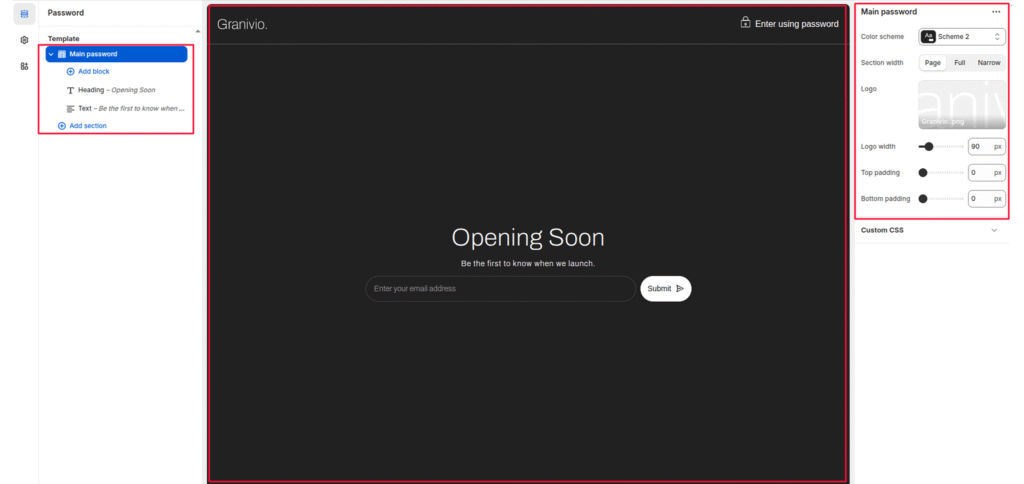
The Main Password section controls the layout and design of your Shopify password page, also known as the “coming soon” or “store under construction” page.
This section is displayed when your Shopify store is password-protected, allowing you to share a preview or collect emails before launch.
It’s designed for simplicity, featuring your logo, a heading, a subtext, and an optional countdown timer — all centered for visual balance.
Section Purpose #
- Introduce your brand while your store is in development or private mode.
- Display a launch announcement message and logo.
- Optionally include a countdown timer for upcoming launch dates.
- Encourage visitors to subscribe to updates before launch.
Section Settings #
Color scheme #
Applies your chosen theme color scheme to section backgrounds and text.
Section width #
Choose how wide the section spans on the page:
- Page: Constrained to standard content width.
- Full: Spans the full page width.
- Narrow: Creates a smaller centered layout (best for minimal password pages).
Logo #
Upload your brand logo to be displayed at the top of the password page.
Logo width #
Adjusts the displayed logo width in pixels.
Top padding #
Adds vertical space above the section content.
Bottom padding #
Adds vertical space below the section content.