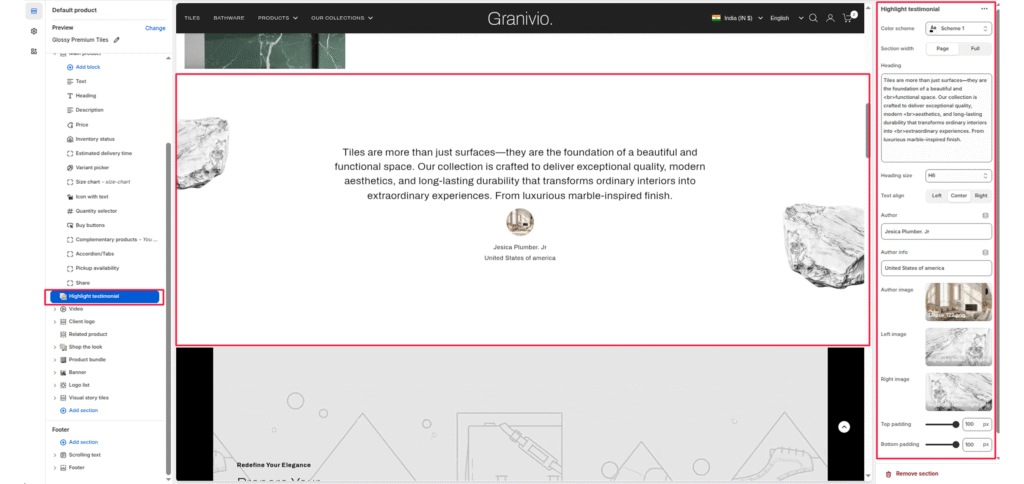
The Highlight testimonial section is designed to showcase premium customer feedback or impactful brand statements. It features a clean, centered typography layout accented by decorative floating images and detailed author attribution.
Color scheme #
Select your preferred color palette for the background and text.
Section Width #
- Page: Constrains the content to the theme’s maximum site width.
- Full: Stretches the section to the edges of the browser window.
Heading #
Add the main promotional title. This typically appears next to the label.
Heading size #
Adjust the scale of the heading from H1 to H6 to establish visual hierarchy.
Text Align #
Set the alignment of the text and button to left, center, or right.
Author #
Enter the name of the person being quoted (e.g., “Jessica Plumber, Jr.”).
Author info #
Add secondary details like location or job title (e.g., “United States of America”).
Author image #
Upload a small profile picture or avatar that appears above the author’s name.
Left image #
Upload a decorative graphic (such as the “rock” element) to float on the left side of the text.
Right image #
Upload a decorative graphic to float on the right side of the text to create a balanced, symmetrical look.
Top/Bottom Padding #
Adjust the vertical spacing (in pixels) to give the section room to breathe.