Table of Contents
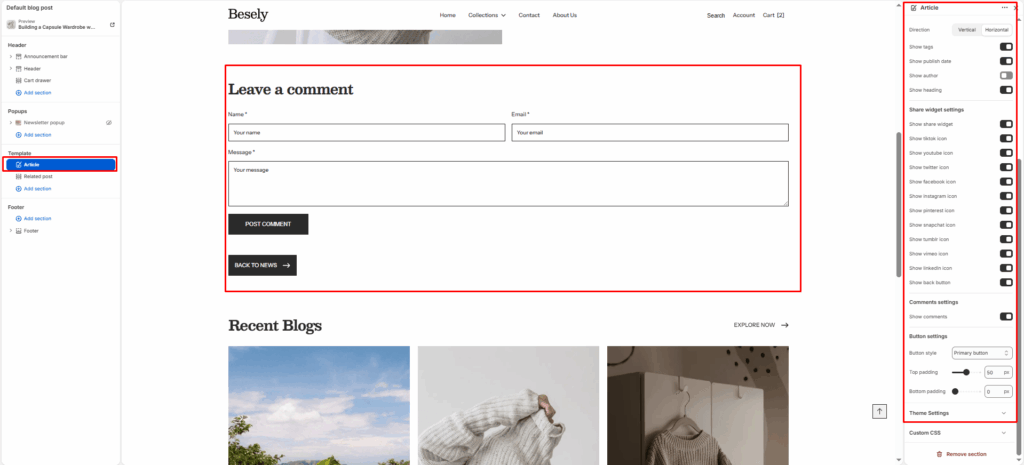
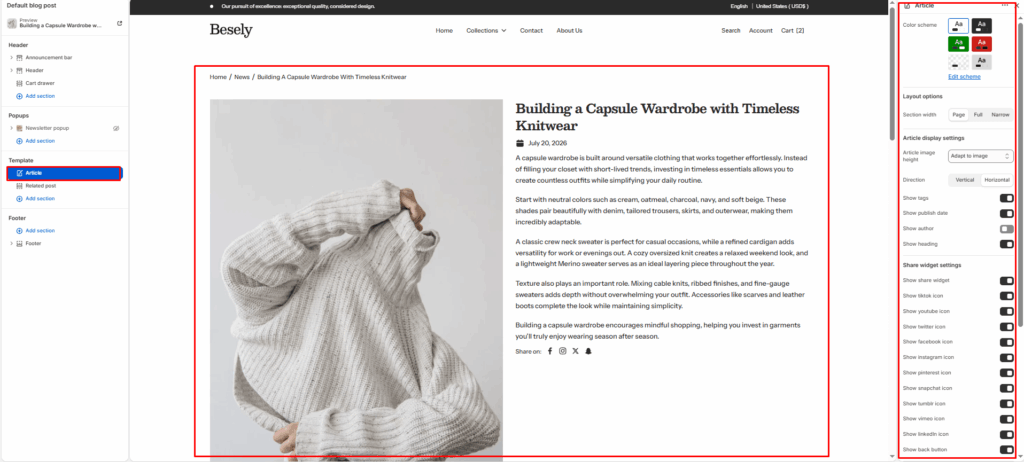
Renders a single blog post’s content, featured image, author, date, tags, and social sharing options.
Section settings #
- Color scheme: Choose which color scheme (defined in Theme settings → Colors) this element uses.
- Article header color scheme: Choose which color scheme (defined in Theme settings → Colors) this element uses.
Layout options #
- Section width: Choose from: “Page”, “Full”, “Narrow”.
Article display settings #
- Article image height: Choose from: “Adapt to image”, “300px”, “400px”, “500px”, “600px”.
- Direction: Choose from: “Vertical”, “Horizontal”.
- Show tags: Displays tags when this is switched on.
- Show publish date: Displays publish date when this is switched on.
- Show author: Displays author when this is switched on.
- Show heading: Displays heading when this is switched on.
Share widget settings #
- Show share widget: Displays share widget when this is switched on.
- Show tiktok icon: Displays tiktok icon when this is switched on.
- Show youtube icon: Displays youtube icon when this is switched on.
- Show twitter icon: Displays twitter icon when this is switched on.
- Show facebook icon: Displays facebook icon when this is switched on.
- Show instagram icon: Displays instagram icon when this is switched on.
- Show pinterest icon: Displays pinterest icon when this is switched on.
- Show snapchat icon: Displays snapchat icon when this is switched on.
- Show tumblr icon: Displays tumblr icon when this is switched on.
- Show vimeo icon: Displays vimeo icon when this is switched on.
- Show linkedIn icon: Displays linkedin icon when this is switched on.
- Show back button: Displays back button when this is switched on.
Comments settings #
- Show comments: Displays comments when this is switched on.
Button settings #
- Button style: Choose from: “Primary button”, “Secondary button”, “Outline”, “Link”.
- Top padding: Fine-tune this value with the slider (from 0 to 100px).
- Bottom padding: Fine-tune this value with the slider (from 0 to 100px).