

Featured Product
On this page
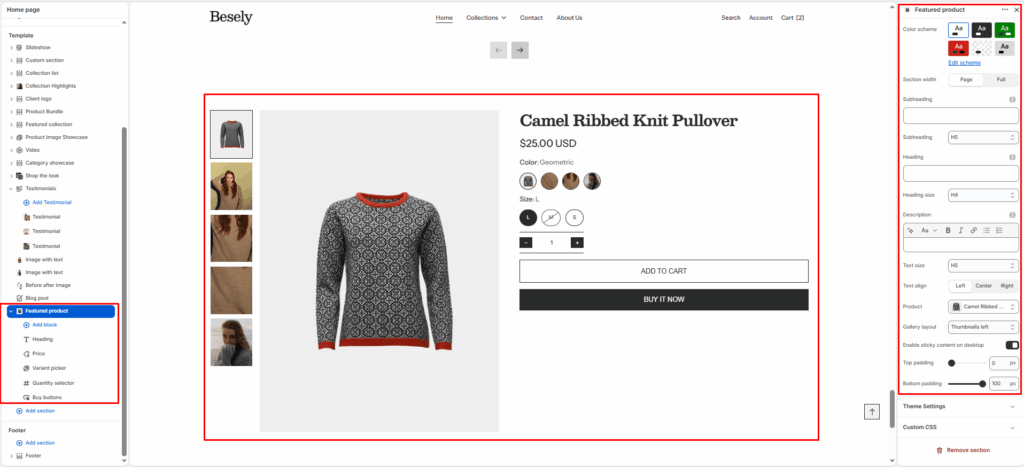
Showcases a single hand-picked product with full purchase options (variants, price, add-to-cart) inside a custom layout.
Section settings
- Color scheme: Choose which color scheme (defined in Theme settings → Colors) this element uses.
- Section width: Choose from: “Page”, “Full”.
- Subheading: Enter the text you want to display.
- Subheading: Choose from: “H1”, “H2”, “H3”, “H4”, “H5”, “H6”.
- Heading: Enter the text you want to display.
- Heading size: Choose from: “H1”, “H2”, “H3”, “H4”, “H5”, “H6”.
- Description: Add formatted text — supports bold, italic, links, and lists.
- Text size: Choose from: “H1”, “H2”, “H3”, “H4”, “H5”, “H6”.
- Text align: Choose from: “Left”, “Center”, “Right”.
- Product: Select the product to feature.
- Gallery layout: Choose from: “Grid”, “Thumbnails bottom”, “Thumbnails left”, “Slideshow”.
- Enable sticky content on desktop: Switch this on to activate sticky content on desktop.
- Top padding: Fine-tune this value with the slider (from 0 to 100px).
- Bottom padding: Fine-tune this value with the slider (from 0 to 100px).
@app block
Text block
- Text: Configure this option to control the setting’s behavior.
Heading block
Price block
Quantity selector block
Description block
Variant picker block
SKU block
Product rating block
To display a rating, add a product rating app. [Learn more](https://help.shopify.com/manual/online-store/themes/theme-structure/page-types#product-rating-block)
Pickup availability block
Inventory status block
- Low inventory threshold: Choose 0 to always show in stock if available.
- Show inventory count: Displays inventory count when this is switched on.
Buy buttons block
- Show dynamic checkout buttons: Using the payment methods available on your store, customers see their preferred option, like PayPal or Apple Pay. [Learn more](https://help.shopify.com/manual/using-themes/change-the-layout/dynamic-checkout)
- Show recipient information form for gift cards: Allows buyers to send gift cards on a scheduled date along with a personal message. [Learn more](https://help.shopify.com/manual/online-store/themes/customizing-themes/add-gift-card-recipient-fields)
Custom liquid block
- Custom liquid: Insert custom Liquid code for advanced customization.
Was this article helpful?
Thanks for the feedback.
Still need help?
Can't find what you're looking for? Send us a message and we'll help you out.