Table of Contents
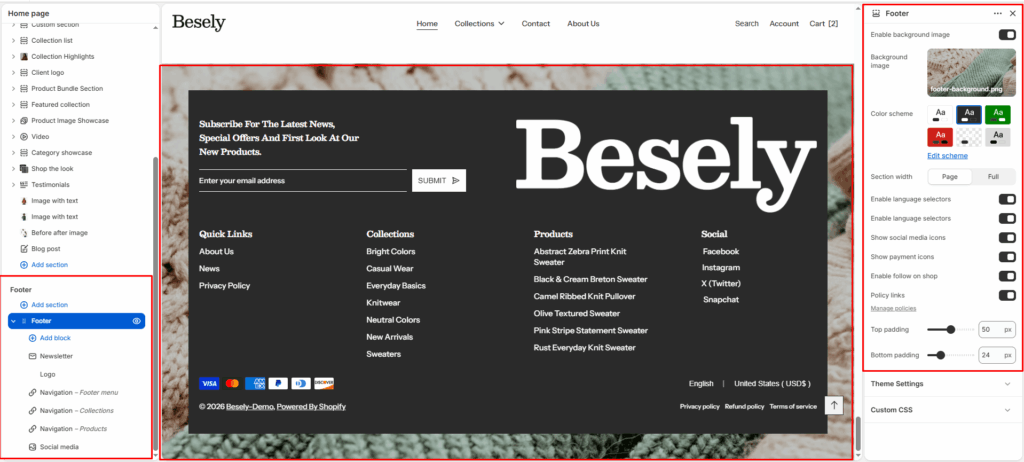
The site-wide footer shown at the bottom of every page, containing menus, newsletter sign-up, social links, and payment icons.
Section settings #
- Enable background image: Switch this on to activate background image.
- Background image: Upload or select an image to display.
- Color scheme: Choose which color scheme (defined in Theme settings → Colors) this element uses.
- Section width: Choose from: “Page”, “Full”.
- Enable language selectors: Switch this on to activate language selectors.
- Enable language selectors: Switch this on to activate language selectors.
- Show social media icons: Displays social media icons when this is switched on.
- Show payment icons: Displays payment icons when this is switched on.
- Enable follow on shop: Switch this on to activate follow on shop.
- Policy links: [Manage policies](/admin/settings/legal)
- Top padding: Fine-tune this value with the slider (from 0 to 100px).
- Bottom padding: Fine-tune this value with the slider (from 0 to 100px).
Navigation block #
- Navigation: Choose the navigation menu to display (menus are managed under Online Store → Navigation in Shopify admin).
- Show navigation heading: Displays navigation heading when this is switched on.
- Navigation heading: Configure this option to control the setting’s behavior.
Newsletter block #
- Newsletter heading: Enter a longer block of plain text.
- Newsletter text: Add formatted text — supports bold, italic, links, and lists.
- Social media heading: Configure this option to control the setting’s behavior.
- Show social media icons: Displays social media icons when this is switched on.
Social media block #
- Social media heading: Configure this option to control the setting’s behavior.
- Show social media icons: Displays social media icons when this is switched on.
Text block #
- Heading: Configure this option to control the setting’s behavior.
- Logo: Upload or select an image to display.
- Text: Add formatted text — supports bold, italic, links, and lists.
- Text size: Choose from: “H1”, “H2”, “H3”, “H4”, “H5”, “H6”.
- Show social media icons: Displays social media icons when this is switched on.
Image block #
- Image: Upload or select an image to display.
Logo block #
- Logo: Upload or select an image to display.
- Link: Link this element to a page, product, collection, blog, or external URL.