Table of Contents
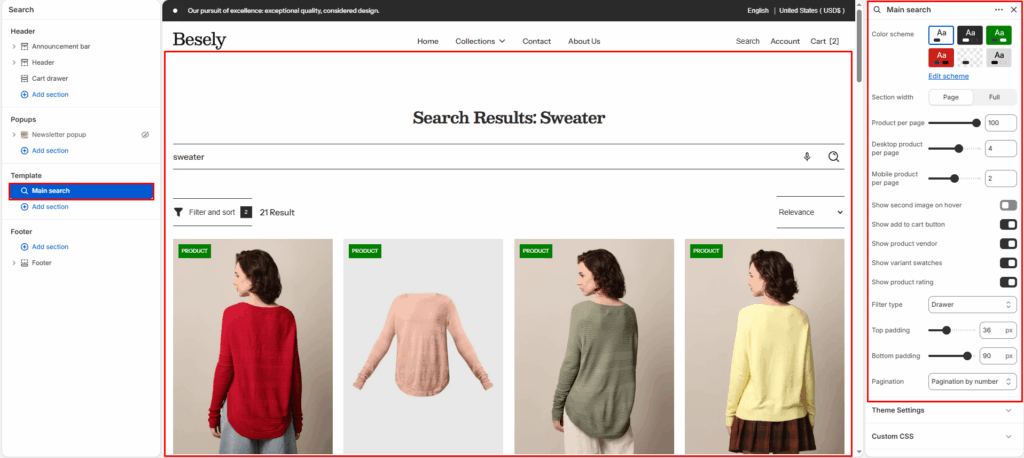
Controls the search results page layout, including product and content results.
Section settings #
- Color scheme: Choose which color scheme (defined in Theme settings → Colors) this element uses.
- Section width: Choose from: “Page”, “Full”.
- Product per page: Fine-tune this value with the slider (from 1 to 100).
- Desktop product per page: Fine-tune this value with the slider (from 1 to 6).
- Mobile product per page: Fine-tune this value with the slider (from 1 to 3).
- Show second image on hover: Displays second image on hover when this is switched on.
- Show add to cart button: Displays add to cart button when this is switched on.
- Show product vendor: Displays product vendor when this is switched on.
- Show variant swatches: Displays variant swatches when this is switched on.
- Show product rating: Displays product rating when this is switched on.
- Filter type: Choose from: “Vertical”, “Horizontal”, “Drawer”.
- Top padding: Fine-tune this value with the slider (from 0 to 100px).
- Bottom padding: Fine-tune this value with the slider (from 0 to 100px).
- Pagination: Choose from: “Infinite”, “Load more button”, “Pagination by number”.