Table of Contents
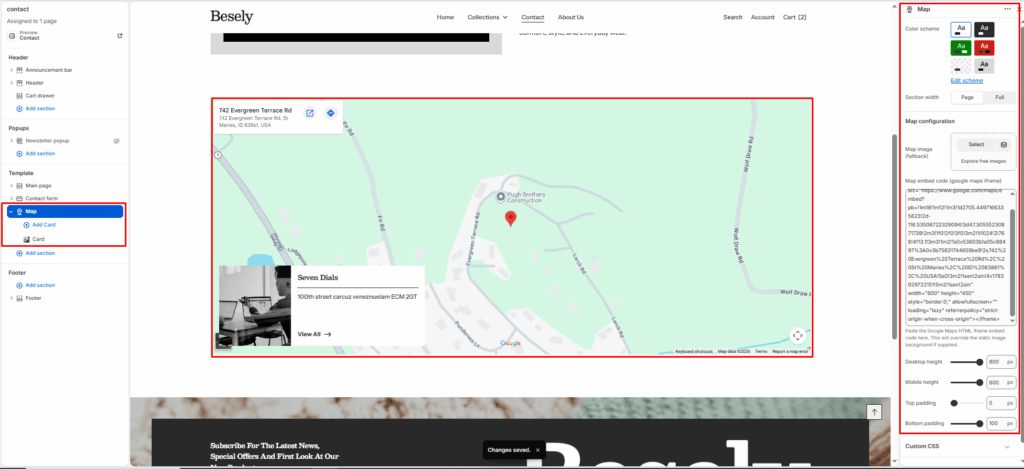
Embeds an interactive map (e.g. store location) alongside optional text and contact details.
Section settings #
- Color scheme: Choose which color scheme (defined in Theme settings → Colors) this element uses.
- Section width: Choose from: “Page”, “Full”.
Map configuration #
- Map image (fallback): Upload or select an image to display.
- Map embed code (google maps iframe): Paste the Google Maps HTML iframe embed code here. This will override the static image background if supplied.
- Desktop height: Fine-tune this value with the slider (from 300 to 800px).
- Mobile height: Fine-tune this value with the slider (from 250 to 600px).
- Top padding: Fine-tune this value with the slider (from 0 to 100px).
- Bottom padding: Fine-tune this value with the slider (from 0 to 100px).
Card block #
- Card Color Scheme: Choose which color scheme (defined in Theme settings → Colors) this element uses.
- Desktop content position: Choose from: “Top left”, “Top right”, “Bottom left”, “Bottom right”, “Middle center”.
- Image: Upload or select an image to display.
- Heading: Enter the text you want to display.
- Text: Add formatted text — supports bold, italic, links, and lists.
- Button label: Enter the text you want to display.
- Button link: Link this element to a page, product, collection, blog, or external URL.