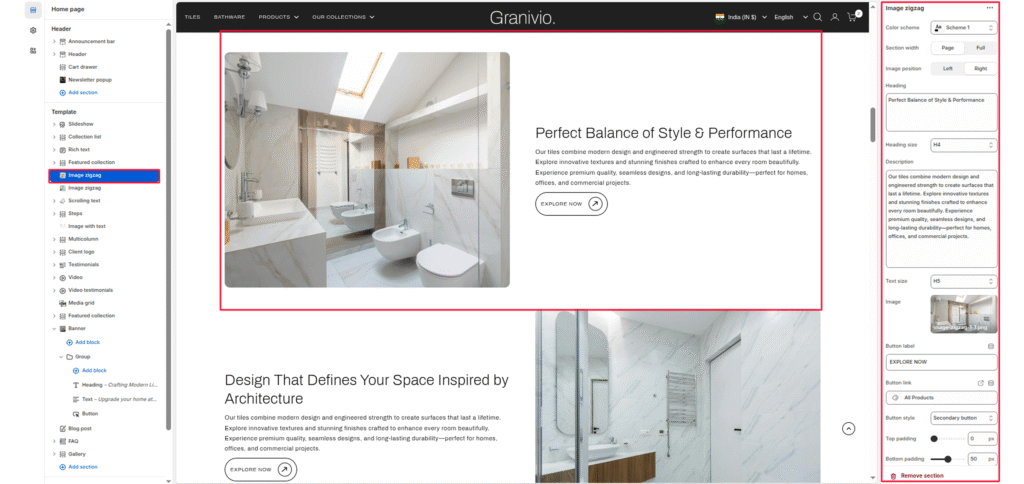
The Image Zigzag section is designed to showcase dual-column content with alternating text and images. It allows merchants to tell a story visually — pairing product imagery with descriptive text, headlines, and call-to-action buttons.
Color scheme #
Choose the theme color palette for this section.
Section width #
Choose how wide the section spans on the page:
- Page: Keeps the content aligned with the main page container.
- Full: Stretches the section across the full browser width.
Image #
Upload an image of the section. This image is typically used to represent product quality or key visual content.
Heading #
Add a heading to highlight the message related to the image.
Heading size #
Select the size of the heading (e.g., H1, H2, H3, H4, H5, H6).
Description #
Add descriptive text to explain more about the left-side image or content. Keep it concise and engaging.
Text size #
Control the size of the left-side body text (e.g., H1, H2, H3, H4, H5, H6).
Button label #
Enter the call-to-action text for the right-side button.
Button link #
Choose the link destination for the button (e.g., All Products collection or a custom URL).
Top padding #
Adjust the spacing above the section in pixels.
Bottom padding #
Adjust the spacing below the section in pixels.