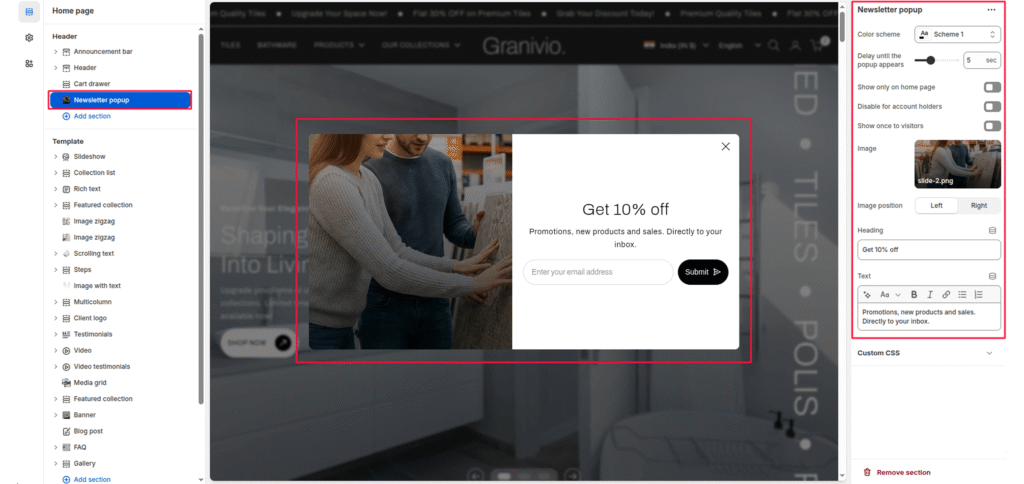
The Newsletter Popup section allows you to capture customer emails and grow your subscriber list with a stylish, customizable pop-up. It can display promotional messages such as discounts or announcements and appear automatically after a set delay when a visitor lands on your store.
Color scheme #
Select the color scheme to match your theme’s design. The pop-up adapts to your chosen scheme automatically.
Delay until the pop-up appears #
Set the delay (in seconds) after which the pop-up appears when the page loads. Default: 5 seconds.
Show only on the home page #
Enable this to show the pop-up only on the home page and hide it on other pages.
Disable for account holders #
If enabled, logged-in customers will not see the pop-up. Useful for avoiding showing the pop-up to returning customers.
Show it once to visitors #
Prevents the pop-up from appearing repeatedly for the same visitor by saving their preference in the browser.
Image #
Upload an image to display on one side of the pop-up. This can be used for product photography, lifestyle images, or brand visuals.
Image position #
Choose whether the image appears on the left or right side of the pop-up.
Heading #
Add a main heading for your pop-up (e.g., “Get 10% Off”). This is displayed prominently to attract attention.
Text #
Add supporting text below the heading (e.g., “Promotions, new products, and sales”). Directly to your inbox.” Basic formatting like bold, italic, and links is supported.