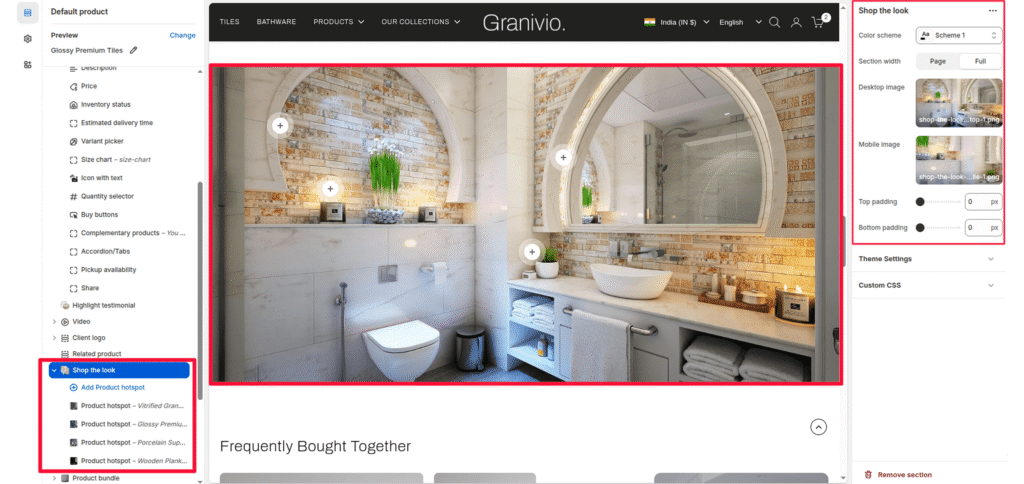
The Shop the look section is an interactive feature that displays a large lifestyle image with clickable “hotspots”. When a customer clicks a hotspot, they can view product details and add items to their cart without leaving the page.
Color scheme #
Choose a predefined color palette to match the section with your store’s theme style.
Section Width #
- Page: Constrains the content to the theme’s maximum site width.
- Full: Stretches the section to the edges of the browser window.
Desktop image #
Upload a high-resolution horizontal image optimized for large screens.
Mobile image #
Upload a vertically oriented image specifically for mobile users to ensure the best composition.
Top/Bottom Padding #
Adjust the vertical spacing (in pixels) to give the section room to breathe.
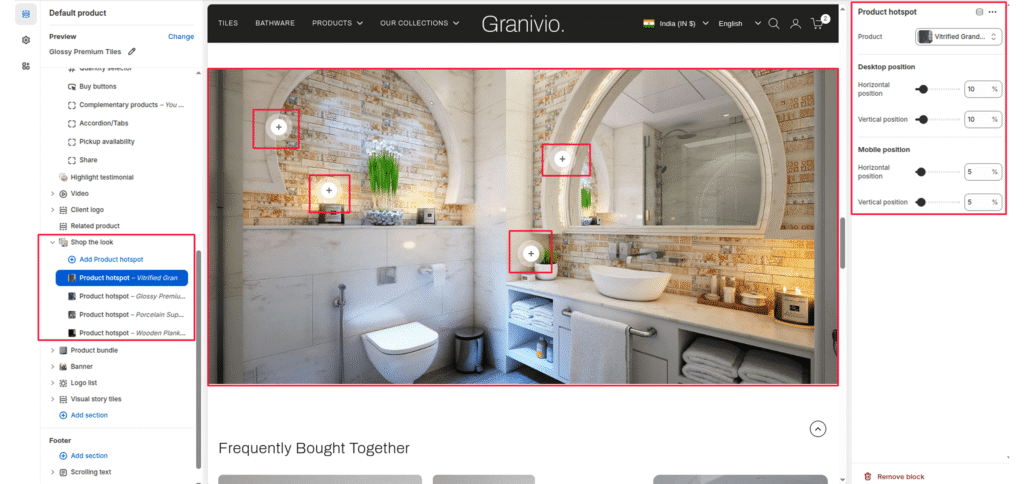
Product Hotspots #
You can add multiple product hotspots to your image. Each hotspot appears as a “+” icon that the user can interact with.
Product #
Select the specific product from your catalog that should be linked to this hotspot.
Desktop position:
- Horizontal position: Move the slider (0% to 100%) to place the hotspot from left to right on desktop screens.
- Vertical position: Move the slider (0% to 100%) to place the hotspot from top to bottom on desktop screens.
Mobile position:
- Horizontal position: Adjust where the hotspot appears on the mobile version of the image.
- Vertical position: Adjust the vertical height of the hotspot for mobile devices.