

Client Logo
On this page
- Client Logo
- Section settings
- Color scheme
- Section width
- Subheading
- Subheading size
- Heading
- Heading size
- Text
- Text size
- Text alignment
- Section rotate
- Speed
- Reverse direction
- Logo max height
- Top padding / Bottom padding
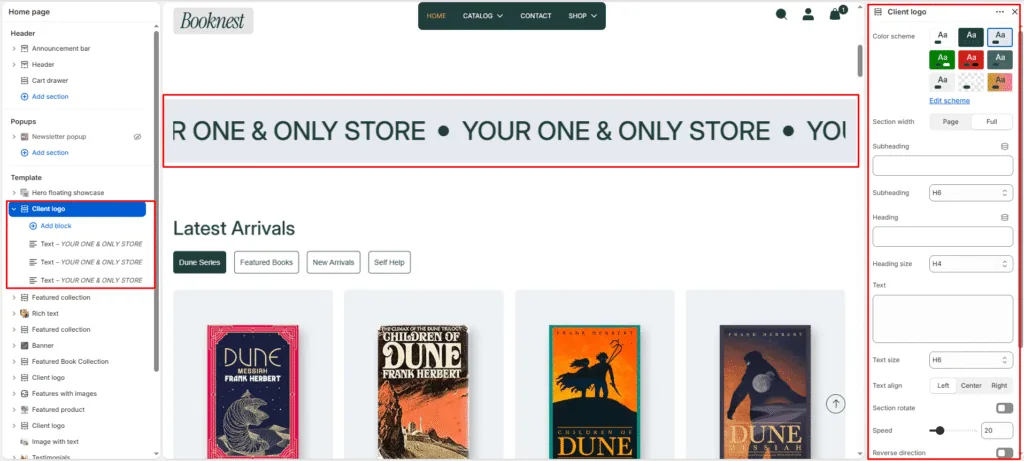
- Design 1 — Text (Scrolling text marquee)
- Text
- Text size
- Design 2 — Logo (Image logo marquee)
- Image
- Link
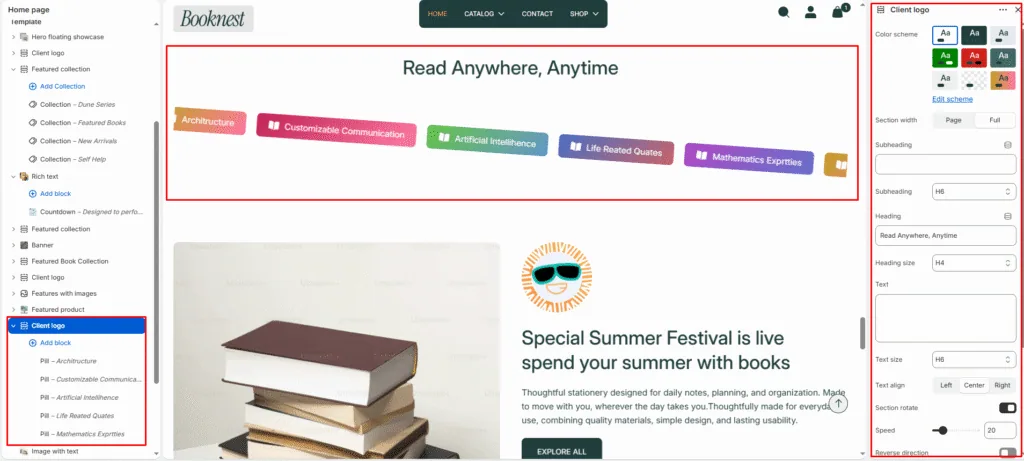
- Design 3 — Pill (Gradient category tags)
- Text
- Link
- Icon image
- Gradient start
- Gradient end
- Text color
Client Logo
The Client Logo section displays a continuous scrolling marquee of brand elements — perfect for showcasing publisher logos, media mentions, promotional text, or book category tags. It builds instant credibility and adds dynamic movement to your homepage or landing pages.
This section supports 3 block designs. You can use one design per section, or mix blocks together in the same marquee.
Section settings
Color scheme
Select a predefined color palette so the marquee blends seamlessly with your store’s theme.
Section width
Choose Page width or Full width to control how wide the section spans across the screen.
Subheading
Optional small label above the main heading.
Subheading size
Choose the visual size for the subheading (H1–H6 style).
Heading
Add a main title for the section.
Heading size
Select how large the heading appears (H1–H6 style).
Text
Optional description below the heading.
Text size
Control the visual size of the description text.
Text alignment
Align the header content to Left, Center, or Right.
Section rotate
Tilt the entire marquee on a slight angle for a more dynamic, editorial look. Best used with Pill blocks for category/genre showcases.
Speed
Control how fast the marquee scrolls (5–100). Lower values scroll faster; higher values scroll slower.
Reverse direction
Flip the scroll direction so items move right-to-left instead of left-to-right.
Logo max height
Set the maximum display height for logo images (20px–120px). Applies to Logo block images only.
Top padding / Bottom padding
Adjust vertical spacing above and below the section (0–100px).
Design 1 — Text (Scrolling text marquee)
A bold, text-only marquee ideal for repeating promotional messages or brand statements.
Text
Enter the scrolling text (e.g., YOUR ONE & ONLY STORE, Free shipping on all orders).
Text size
Choose the visual size for this text item (H1–H6 style).
Design 2 — Logo (Image logo marquee)
A classic logo strip for publisher, media, or partner brand logos.
Image
Upload a logo image (PNG with transparent background recommended).
Link
Optional URL — link each logo to the partner’s website, a collection, or a campaign page.
Design 3 — Pill (Gradient category tags)
Colourful gradient pill badges with optional icons — great for showcasing book genres or reading categories.
Text
Label text inside the pill.
Link
Optional URL — link each pill to a collection or filtered page.
Icon image
Upload a small icon displayed inside the pill (e.g., a book or category icon).
Gradient start
Starting colour of the pill background gradient.
Gradient end
Ending colour of the pill background gradient.
Text color
Colour of the text inside the pill.
Was this article helpful?
Thanks for the feedback.
Still need help?
Can't find what you're looking for? Send us a message and we'll help you out.