

Main Page
On this page
Main Page
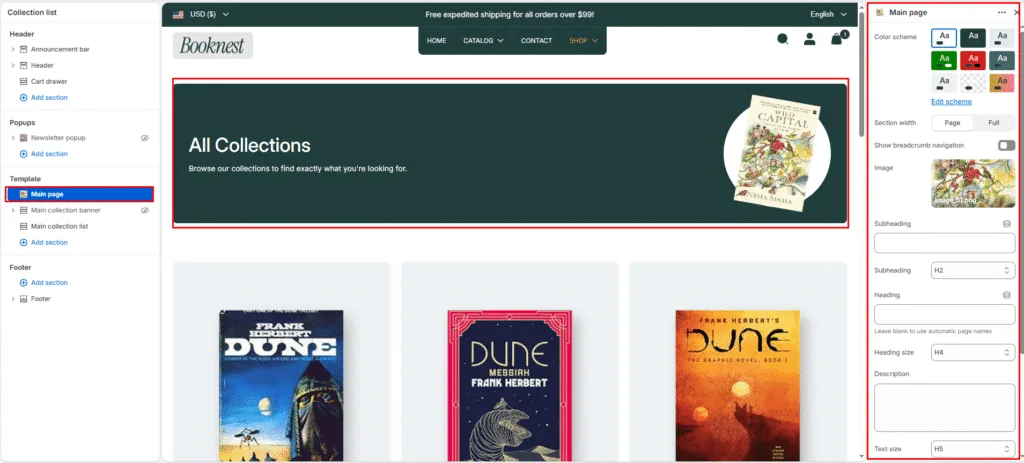
The Main page section is a page header or hero strip for templates such as the homepage, collections, blogs, articles, standard pages, cart, and search. It can show breadcrumbs (when breadcrumbs are enabled in theme settings), a prominent title, optional description, an optional background image, and—on supported templates—a numeric badge that reflects list length or cart quantity.
Color scheme
Applies your chosen theme color preset to the banner area so it matches the rest of the storefront.
Section width
Controls how wide the article content area spans on the page.
Full — content stretches edge to edge across the full browser width.
Page — content is constrained within the standard page container width.
Image
Adds an optional background or decorative image behind the text block. When an image is present, the layout uses an overlay treatment so the title and description remain readable.
Subheading #
Enter a small introductory text displayed above the heading.
Subheading size
Choose the size of the subheading text (H1 to H6).
Heading
Sets a custom title for the banner. If you leave this empty, the theme fills the title automatically from the current template—for example the collection name, blog name, article title, or page title.
Heading size
Selects the visual scale of the title using theme-defined options from h1 through h6.
Description
Sets custom supporting text below the title. If you leave this empty, the theme may pull default body content for the current resource, such as a short description or introductory text, depending on the template.
Text size
Selects the scale of the description using theme-defined options from h1 through h6.
Text align
Aligns the heading and description block to the left, center, or right.
Top padding
Adds space above the section from 0px to 100px. On smaller screens the theme uses slightly reduced padding for balance.
Bottom padding
Adds space below the section from 0px to 100px, with the same responsive adjustment on small screens.
Was this article helpful?
Thanks for the feedback.
Still need help?
Can't find what you're looking for? Send us a message and we'll help you out.