

Rich Text
On this page
- Rich Text
- Color scheme
- Section width
- Subheading
- Subheading size
- Heading
- Heading size
- Text
- Text size
- Button label
- Button link
- Button style
- Text alignment
- Top padding
- Bottom padding
- Left image
- Right image
- Blocks (Option → Description)
- Countdown block (limit: 1)
- Heading
- Heading size
- Text
- Text size
- Button label
- Button link
- Button style
- Image
- Image link
- Expiration date
- Countdown text size
- Color scheme
- Image block
- Image
Rich Text
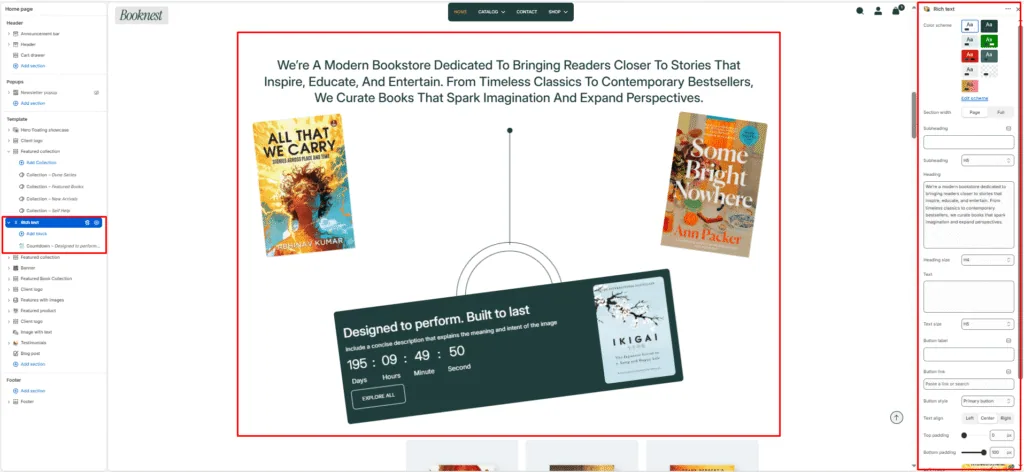
The Rich Text section is a content-focused layout for headings, descriptions, and a call-to-action button. It also supports a two-image collage (left + right) and optional Countdown and Image blocks for promotional campaigns.
Color scheme
Select a predefined color palette so the section blends seamlessly with your store’s theme.
Section width
Choose Page width or Full width to control the horizontal span of the section.
Subheading
Add a small label above the main heading.
Subheading size
Choose the visual size of the subheading (H1–H6 style).
Heading
Add the main title for the section.
Heading size
Control how large the heading appears (H1–H6 style).
Text
Add supporting content below the heading (short paragraph or multi-line message).
Text size
Control the visual size of the text.
Button label
Add button text (e.g., Explore all, Shop now). If left blank, the button is hidden.
Button link
Choose where the button should go (collection, product, page, or any URL).
Button style
Choose Primary or Secondary button style.
Text alignment
Align content to Left, Center, or Right.
Top padding
Add spacing above the section (0–100px).
Bottom padding
Add spacing below the section (0–100px).
Left image
Upload the left collage image shown beneath the text content.
Right image
Upload the right collage image shown beneath the text content.
Blocks (Option → Description)
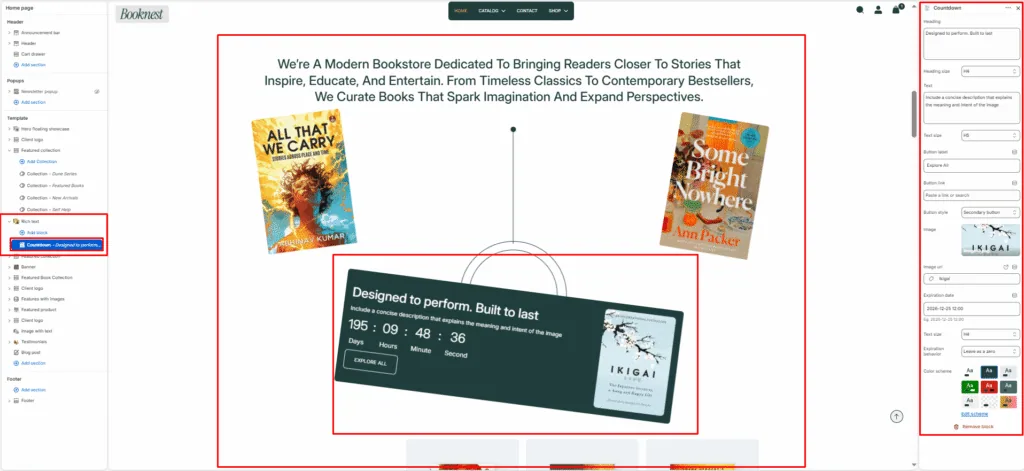
Countdown block (limit: 1)
Heading
Countdown title (e.g., Sale ends soon).
Heading size
Control the countdown heading size.
Text
Short supporting message for the countdown.
Text size
Control the countdown text size.
Button label
Optional button text shown under the timer.
Button link
Button destination URL.
Button style
Choose Primary or Secondary button style for the countdown button.
Image
Optional image shown beside the countdown content.
Image link
Optional link for the countdown image.
Expiration date
Set the countdown end date/time (format example: 2026-12-25 12:00).
Countdown text size
Controls the size of the timer numbers/labels (H1–H6 style).
Expiration behavior
- Hide: hides the timer when it expires
- Leave: keeps the timer visible (stops at 00)
Color scheme
Choose a separate color scheme for the countdown panel.
Image block
Image
Add extra images displayed in the Rich Text image area (useful for collage-style layouts or additional visuals).
Was this article helpful?
Thanks for the feedback.
Still need help?
Can't find what you're looking for? Send us a message and we'll help you out.