

Blog Post
On this page
- Blog Post
- Color scheme
- Section width
- Subheading
- Subheading size
- Heading
- Heading size
- Text
- Text size
- Button label
- Button link
- Button style
- Text alignment
- Blog
- Desktop layout
- Enable mobile slider
- Show navigation
- Show pagination
- Posts limit
- Desktop posts per row
- Mobile posts per row
- Show view all button
- View all button label
- Button style
- Top padding
- Bottom padding
- Post options
- Show featured image
- Show tag
- Show title
- Show author
- Show excerpt
- Show description
Blog Post
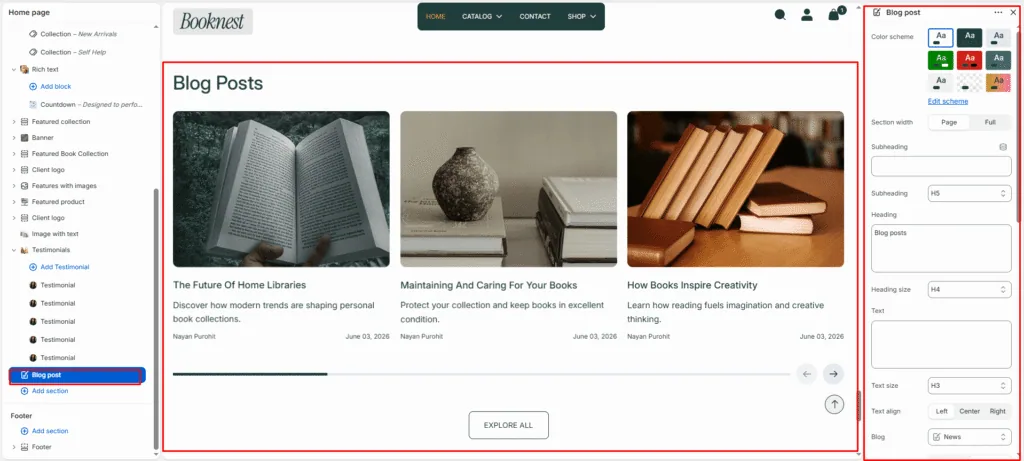
The Blog Post section showcases recent articles or stories from your Shopify blog. It’s ideal for highlighting educational content, product tips, lifestyle insights, or brand news — helping you engage customers and improve SEO visibility.
Color scheme
Select a predefined color palette to ensure the blog section blends seamlessly with your store’s theme.
Section width
Choose how wide the section spans on the page.
Full: Stretches the section edge-to-edge across the browser window.
Page: Aligns section content with the page container.
Subheading
Enter a small introductory text displayed above the heading.
Subheading size
Choose the size of the subheading text (H1 to H6).
Heading
Enter the main heading for the section.
Heading size
Select the size of the heading text (H1 to H6).
Text
Add descriptive rich text content for storytelling or brand messaging.
Text size
Choose the size of the text content (H1 to H6).
Button label
Enter the call-to-action button text.
Button link
Select the destination page or URL for the button.
Button style
Choose between available button styles. The styles depend on your theme’s design system.
- Primary button
- Secondary button
Text alignment
Select the alignment of section content.
- Right
- Left
- Center
Blog
Select which blog from your Shopify admin to display articles from.
Desktop layout
Select between Grid or Slider layout for desktop view.
Enable mobile slider
Enable or disable the slider for mobile devices to optimize small-screen navigation.
Show navigation
Enable left and right arrows for manual slide navigation.
Show pagination
Enable pagination dots at the bottom of the slider for quick slide position feedback.
Posts limit
Set how many articles to show (between 2 and 20).
Desktop posts per row
Choose how many posts appear per row on desktop (2–6 columns).
Mobile posts per row
Choose how many posts appear per row on mobile (1–3 columns).
Show view all button
Toggle ON to display a “View All” or “See All” button linking to the full blog page.
View all button label
Customize the button text (e.g., SEE ALL).
Button style
Choose between available button styles. The styles depend on your theme’s design system.
- Primary button
- Secondary button
Top padding
Adds vertical space above the section content (value in pixels).
Bottom padding
Adds vertical space below the section content (value in pixels).
Post options
Show featured image
Display the main image from each post.
Show tag
Show blog tags above the title if available.
Show title
Display the blog post’s title.
Show author
Include the author’s name for credibility.
Show excerpt
Display a short preview of the post content.
Show description
Show the full or partial post description if needed.
Was this article helpful?
Thanks for the feedback.
Still need help?
Can't find what you're looking for? Send us a message and we'll help you out.