

Shop The Look
On this page
- Shop The Look
- Section settings
- Color scheme
- Layout
- Section width
- Subheading
- Subheading size
- Heading
- Heading size
- Description
- Text size
- Text alignment
- Image
- Show second image on hover
- Show product vendor
- Show product rating
- Show variant swatches
- Show add to cart button
- Top padding
- Bottom padding
- Block settings
- Product hotspot block
- Product
- Desktop position
- Mobile position
Shop The Look
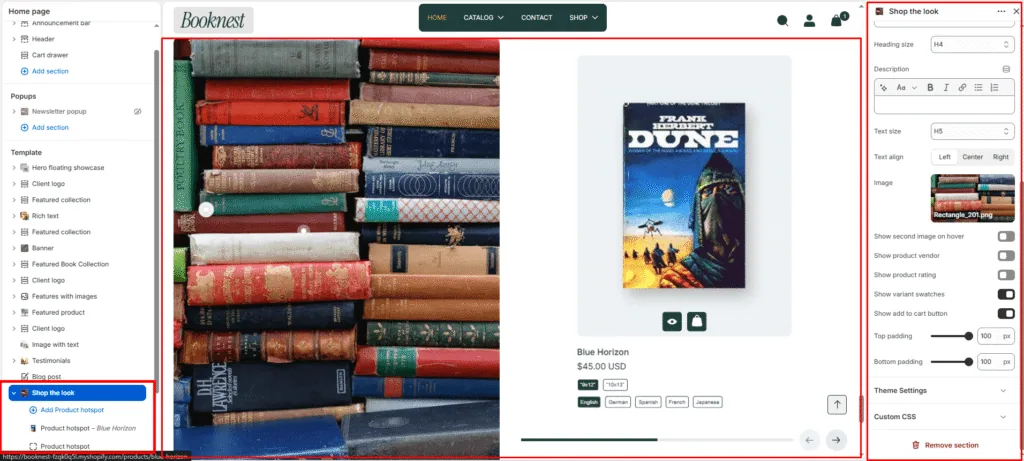
The Shop The Look section helps you create an interactive product discovery experience by combining a lifestyle image with clickable product hotspots. Customers can click the markers to preview linked products, view product details, and quickly move toward purchase. This section is ideal for showcasing complete looks, routines, or curated product combinations.
Section settings
Color scheme
Choose the color palette for this section from the available theme schemes.
Layout
Select the layout style for how the image and product preview area are arranged (for example split-by-side style).
Section width
- Page: Constrains the content to the theme’s maximum site width.
- Full: Stretches the section to the edges of the browser window.
Subheading
Enter a short introductory text shown above the heading.
Subheading size
Set the subheading typography size based on available heading scale options.
Heading
Enter the main title for the section, such as “Shop The Look”.
Heading size
Choose the heading text size.
Description
Add supporting text to explain the featured look or product story.
Text size
Control the size of description text.
Text alignment
Set content alignment to Left, Center, or Right.
Image
Select the main lifestyle image where hotspot markers will appear.
Show second image on hover
Enable this option to show an alternate product image when customers hover product cards.
Show product vendor
Enable or disable display of the product brand/vendor name.
Show product rating
Enable or disable product rating display in the preview area.
Show variant swatches
Enable this setting to show variant options (such as size or color) in product previews.
Show add to cart button
Enable a direct add-to-cart action from the product preview card.
Top padding
Adjust the vertical space above the section in pixels.
Bottom padding
Adjust the vertical space below the section in pixels.
Block settings
Product hotspot block
Each Product hotspot block adds one clickable marker on the main image and links it to a selected product.
Product
Choose the product that opens when the hotspot is clicked.
Desktop position
Set the hotspot position on desktop using horizontal and vertical percentage controls.
Mobile position
Set the hotspot position on mobile using horizontal and vertical percentage controls.
Was this article helpful?
Thanks for the feedback.
Still need help?
Can't find what you're looking for? Send us a message and we'll help you out.