

Our Story
On this page
Our Story
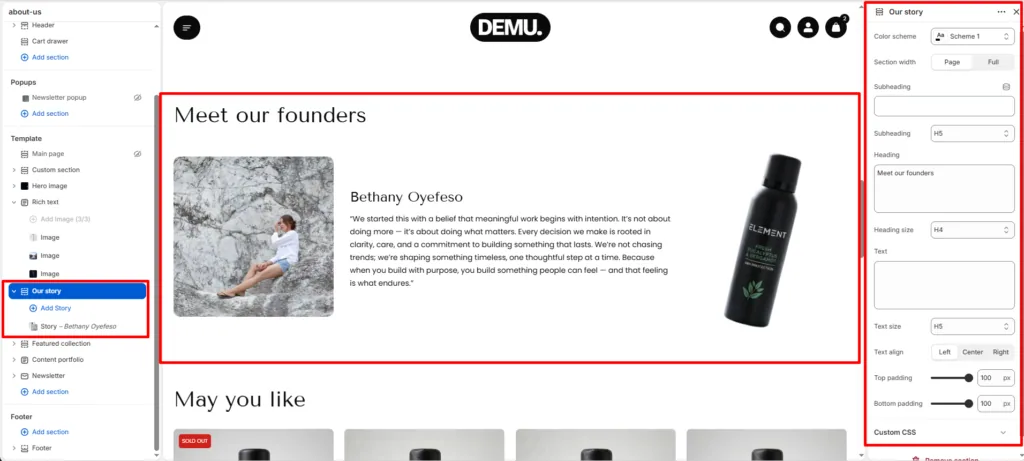
The Our story section is designed to present founder or brand storytelling content in a clean editorial layout. It combines section-level intro content with repeatable story blocks, where each block can include an image, heading, rich text, and an optional product visual. This section is ideal for About pages and brand-led landing pages.
Section settings
Color scheme
Choose the color palette for this section from the available theme schemes.
Section width
Control how wide the section appears on the page.
Use Page to keep content aligned to the theme container, or Full to stretch the section across the browser width.
- Page: Contained within the page width.
- Narrow: Uses a tighter, centered layout for a more compact design.
Subheading
Enter a short introductory text shown above the main section heading.
Subheading size
Set the typography size for the subheading (for example H1 to H6 based on your theme controls).
Heading
Enter the main title for this section, such as “Meet our founders”.
Heading size
Choose the heading size for the main title.
Text
Add supporting text under the heading to introduce the story content.
Text size
Set the font size for the section-level text content.
Text alignment
Align section content to Left, Center, or Right.
Top padding
Set vertical spacing above the section in pixels.
Bottom padding
Set vertical spacing below the section in pixels.
Block settings
Story block
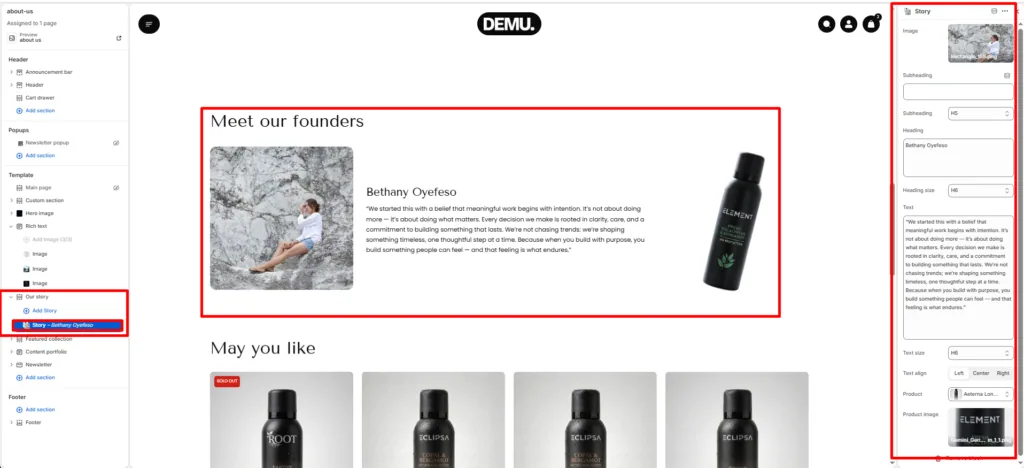
Each Story block adds one story entry inside the section. You can add multiple story blocks to feature multiple founders, team members, or brand chapters.
Image
Select the main image for the story block (for example founder portrait or lifestyle image).
Subheading
Add optional short text shown above the story title in the block.
Subheading size
Control the typography size of the block subheading.
Heading
Add the story block title, such as a founder name.
Heading size
Set the title size for the story block heading.
Text
Enter the detailed story description for this block.
Text size
Set the font size for the story text.
Text alignment
Align block content to Left, Center, or Right.
Product
Choose a product reference to display in the story block.
Product image
Select which product image is shown for the selected product (for example featured, card, or another available product media option).
Was this article helpful?
Thanks for the feedback.
Still need help?
Can't find what you're looking for? Send us a message and we'll help you out.