

Rich Text
On this page
Rich Text
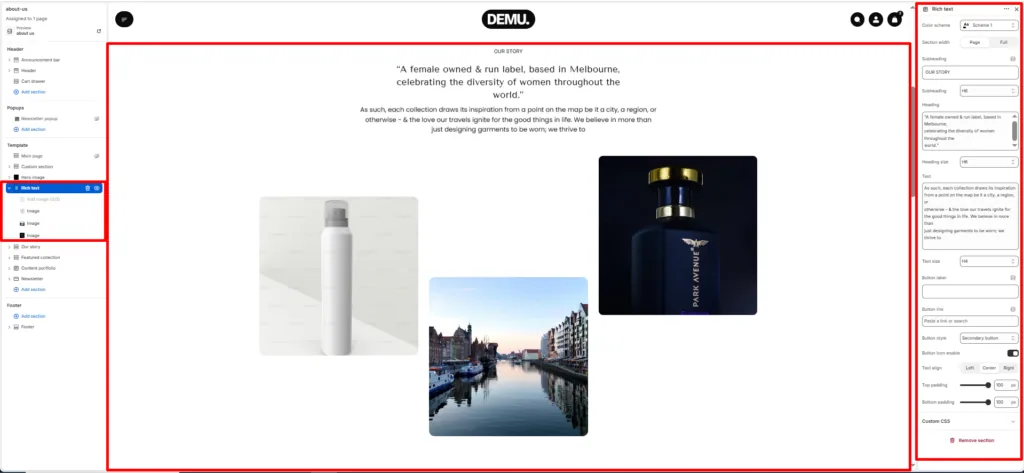
The Rich text section is used to display formatted brand content such as introductions, stories, campaign messaging, or editorial text. It supports heading and paragraph content, optional button, and decorative image blocks to build a visually engaging text-focused layout.
Section settings
Color scheme
Choose the desired color palette for this section from the available theme schemes.
Section width
Choose how wide the section spans on the page.
- Page: Aligns section content with the page container.
- Full: Stretches the section edge-to-edge across the browser window.
Subheading
Enter a small introductory text displayed above the heading.
Subheading size
Choose the size of the subheading text (H1 to H6).
Heading
Enter the main heading for the section.
Heading size
Select the size of the heading text (H1 to H6).
Text
Add descriptive rich text content for storytelling or brand messaging.
Text size
Choose the size of the text content (H1 to H6).
Button label
Enter the call-to-action button text.
Button link
Select the destination page or URL for the button.
Button style
Choose between available button styles. The styles depend on your theme’s design system.
- Secondary button
- Primary button
Button icon enable
Choose the icon style shown with the button (if enabled in your theme style).
Text alignment
Select the alignment of section content.
- Right
- Left
- Center
Top padding
Adds vertical space above the section content (value in pixels).
Bottom padding
Adds vertical space below the section content (value in pixels).
Blocks settings
Image block
Adds an image element within the rich text layout to support visual storytelling.
You can add multiple image blocks and position them based on your section design.
Was this article helpful?
Thanks for the feedback.
Still need help?
Can't find what you're looking for? Send us a message and we'll help you out.