

Testimonials
On this page
- Testimonials
- Section settings
- Color scheme
- Section width
- Subheading
- Subheading size
- Heading
- Heading size
- Text
- Text size
- Text alignment
- Desktop view
- Desktop columns
- Mobile slides per view
- Enable mobile slideshow
- Show navigation arrows
- Show pagination dots
- Autoplay slideshow
- Top padding
- Bottom padding
- Block settings (Testimonial card)
- Card color scheme
- Author image
- Author
- Author info
- Testimonial heading
- Text
- Icons
Testimonials
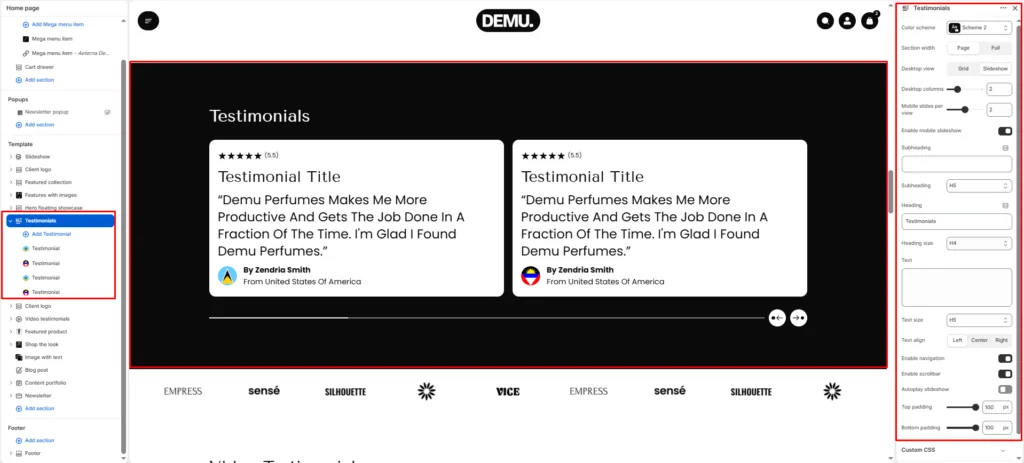
The Testimonials section is a powerful social proof area that helps you build trust by displaying customer reviews, profile details, ratings, and related products. It supports both grid and slideshow presentation, so you can choose between a clean static layout or an interactive carousel experience across desktop and mobile.
Section settings
Color scheme
Choose the desired color palette for this section from the available theme schemes.
Section width
Choose how wide the section spans on the page.
Page keeps content aligned with the main theme container.
Full stretches the section edge-to-edge across the browser window.
Subheading
Enter a short introductory text displayed above the heading.
Subheading size
Choose the size of the subheading text (H1 to H6).
Heading
Enter the main heading for the section.
Heading size
Select the size of the heading text (H1 to H6).
Text
Add supporting descriptive content for the testimonial area.
Text size
Choose the size of the text content (H1 to H6).
Text alignment
Set content alignment to Left, Center, or Right.
Desktop view
Choose how testimonials are displayed on desktop.
Grid shows static cards.
Slideshow shows an interactive horizontal carousel.
Desktop columns
When using slideshow mode, control how many testimonial cards are visible at once. Decimal values such as 2.5 allow the next card to partially appear, encouraging interaction.
Mobile slides per view
Set how many testimonial cards are visible simultaneously on mobile screens.
Enable mobile slideshow
Turn this on to show testimonials as a swipeable carousel on mobile instead of a static grid.
Show navigation arrows
Enable left and right arrows for manual slide navigation.
Show pagination dots
Enable pagination dots at the bottom of the slider for quick slide position feedback.
Autoplay slideshow
Enable automatic slide movement without user interaction.
Top padding
Adjust vertical spacing above the section in pixels.
Bottom padding
Adjust vertical spacing below the section in pixels.
Block settings (Testimonial card)
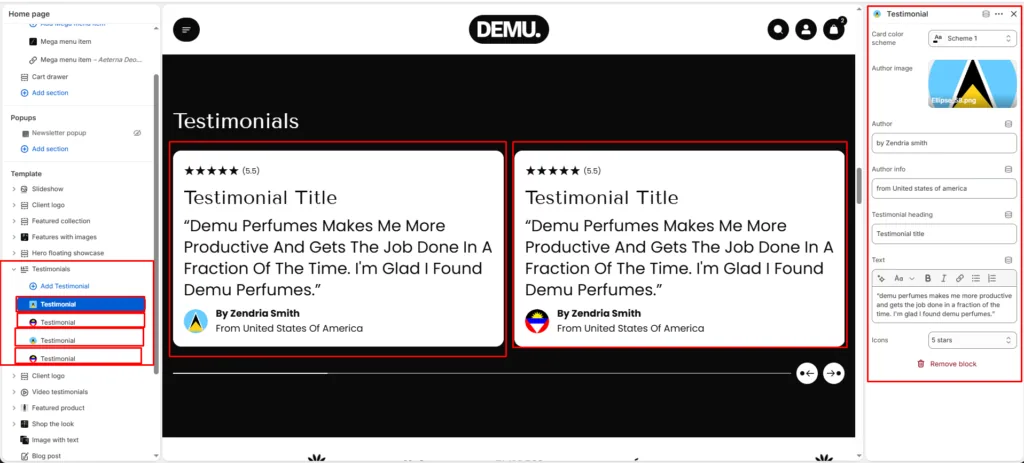
To add or edit individual customer reviews, open the Testimonials section in the theme editor sidebar and select a Testimonial block.
Card color scheme
Choose a dedicated color scheme for this individual testimonial card to create contrast with the section background.
Author image
Upload a profile image or avatar of the customer.
Author
Enter the customer name.
Author info
Enter secondary details such as location, role, or short identity text.
Testimonial heading
Add a short headline for the review card.
Text
Use the rich text editor to add the full customer quote. You can apply formatting such as bold and italic text.
Icons
Choose a rating style (for example star count) from the dropdown.
Was this article helpful?
Thanks for the feedback.
Still need help?
Can't find what you're looking for? Send us a message and we'll help you out.