

Video Testimonials
On this page
- Video Testimonials
- Section Settings
- Subheading
- Subheading size
- Heading
- Heading size
- Description
- Text size
- Text alignment
- Desktop view
- Desktop columns
- Enable mobile slider
- Mobile slides per view
- Slider settings
- Enable desktop slider
- Autoplay slider
- Slider speed (ms)
- Show navigation arrows
- Show pagination dots
- Source
- Top padding / Bottom padding
- Video Block
- Block settings
- Video title
- YouTube or Vimeo video URL
- Product
- Author
- Author info
- Image
Video Testimonials
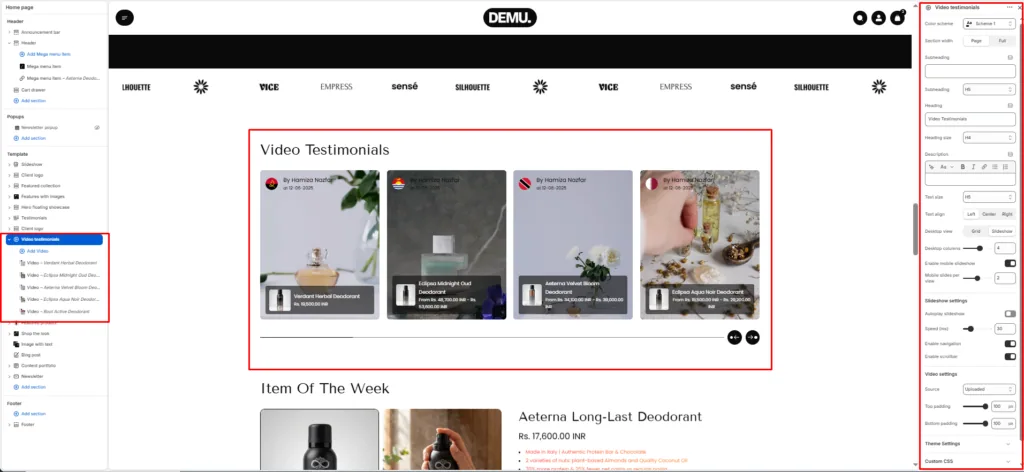
The Video Testimonials section allows you to showcase customer reviews or success stories through embedded YouTube or Vimeo videos. You can display these videos in a slider or grid layout, with full customization for autoplay, navigation, and responsiveness. This section is perfect for building trust and highlighting real customer experiences.
Section Settings
Color scheme
Choose from your theme’s available color schemes to match the section design.
Section width
Choose how wide the section spans on the page:
- Full: Stretches the section edge-to-edge across the browser window.
- Page: Aligns section content with the page container.
Subheading
Enter a small introductory text displayed above the heading.
Subheading size
Choose the size of the subheading text H1 To H6.
Heading
Add a main title for the section (e.g., Customer Success Stories).
Heading size
Select the heading size (e.g., H1, H2, H3, H4, H5, or H6).
Description
Add a short description or supporting text below the heading.
Text size
Choose the font size for the section’s text content.
Text alignment
Align text to the left, center, or right.
Desktop view
Choose between the Grid or Slider layout for desktop display.
Desktop columns
Define how many video blocks appear per row on desktop (e.g., 4).
Enable mobile slider
Toggle ON to make the videos scroll horizontally on mobile.
Mobile slides per view
Set how many videos are visible per slide on mobile (e.g., 2).
Slider settings
Enable desktop slider
Enable this option to activate the slider layout on the desktop view.
Autoplay slider
Turn ON to automatically slide through the videos.
Slider speed (ms)
Adjust the transition delay between slides in milliseconds (e.g., 30).
Show navigation arrows
Enable or disable navigation arrows for manual slide control.
Show pagination dots
Toggle ON to display pagination dots beneath the slider.
Source
Choose External URL to embed YouTube or Vimeo videos.
Top padding / Bottom padding
Adjust spacing above and below the section for layout balance.
Video Block
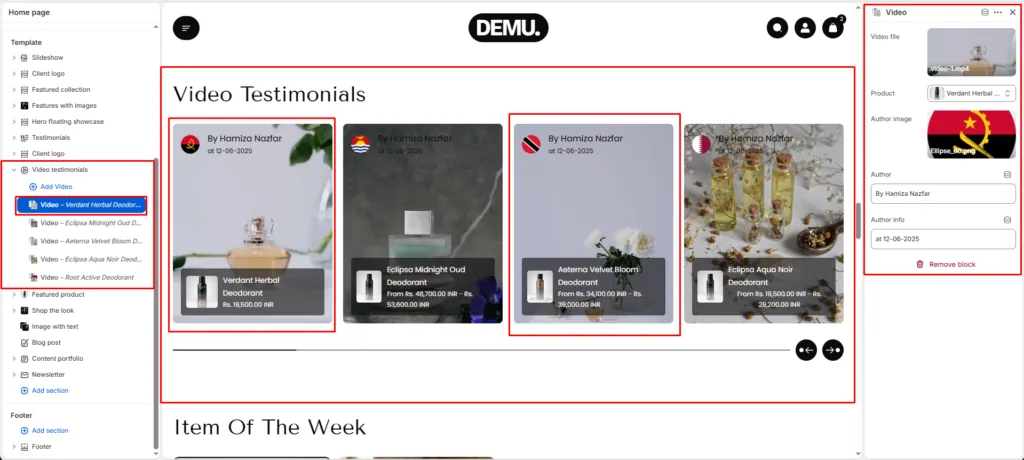
Each video block represents one embedded video within the slider or grid.
Block settings
Video title
Enter the name or title of the video.
YouTube or Vimeo video URL
Paste the direct video link from YouTube or Vimeo. You can add multiple video blocks to showcase a carousel of testimonials.
Product
Select a specific item from your store catalog to associate with this review.
Author
Enter the customer’s name.
Author info
Enter secondary information about the customer.
Image
Upload a secondary image to display within the card. This is perfect for displaying User Generated Content a picture of the product they bought.
Was this article helpful?
Thanks for the feedback.
Still need help?
Can't find what you're looking for? Send us a message and we'll help you out.