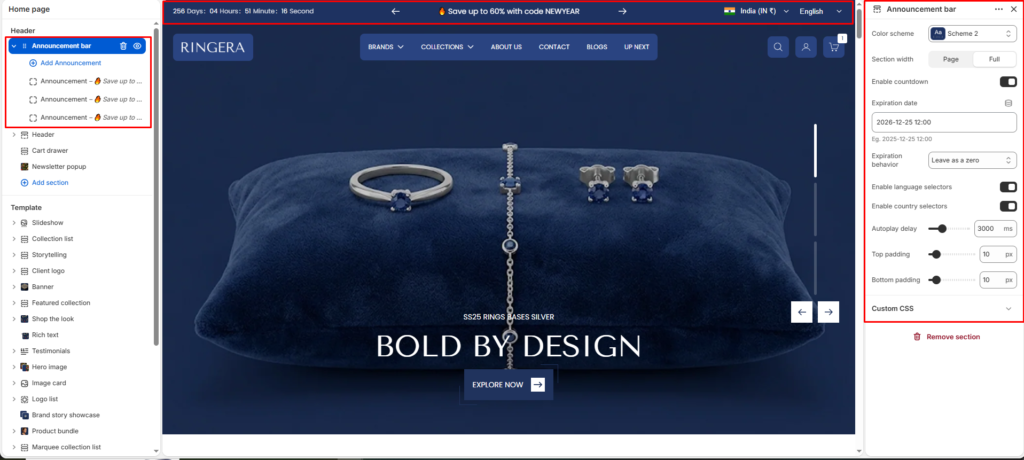
The Announcement Bar lets you display one or more messages at the top of your storefront.
Use it for promotions, shipping updates, store notices, seasonal campaigns, or quick links.
If multiple announcement blocks are added, they can rotate automatically like a slider.
Settings #
Color Scheme #
Select the color scheme used by the announcement bar (text/background styling).
Section Width #
Choose the layout width for the bar (for example, full-width or page/container width).
Enable Countdown #
Displays a countdown timer inside the announcement bar.
Expiration Date #
Sets the date/time when the countdown ends.
Expiration Behavior #
Defines what happens after expiry (for example, hide the timer or keep showing static content).
Enable Language Selectors #
Shows a language switcher in the announcement area (if multiple languages are published).
Enable Country Selectors #
Shows a country/region selector in the announcement area (if markets are configured).
Autoplay Delay #
Controls how quickly announcement slides rotate. Lower value = faster rotation.
Top Padding #
Adds spacing above the announcement content.
Bottom Padding #
Adds spacing below the announcement content.
Custom CSS #
Add optional custom styling for advanced visual adjustments.