

Multicolumn
On this page
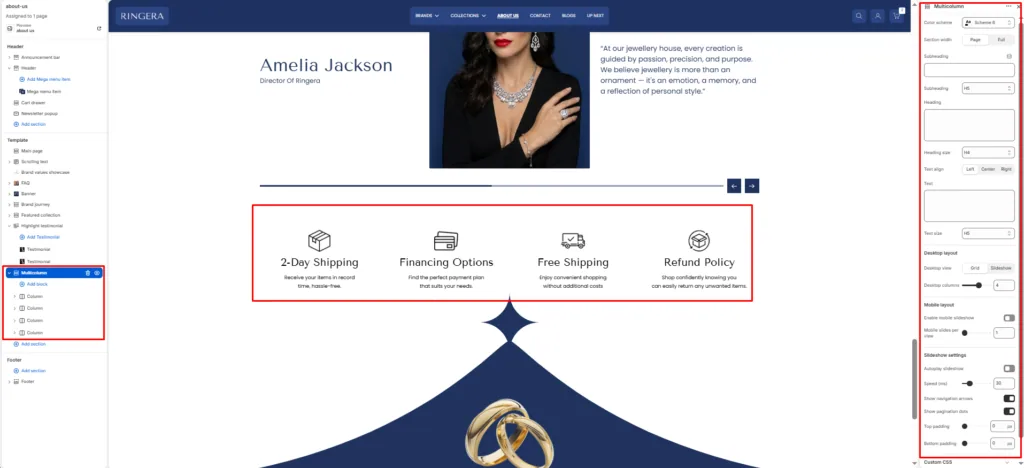
The Multicolumn section is designed to display a series of content blocks (columns) side-by-side.
It’s ideal for showcasing features, values, benefits, or services — for example, highlighting brand qualities, product advantages, or key information in a visually organized layout.
Each column supports an image, title, text, and optional link, giving merchants flexible control over how content is presented.
Section Settings
Color scheme
Applies one of your theme color presets to the section background and typography.
Section width
Chooses whether the section stays within page width or spans full width edge to edge.
Subheading
Optional line above the main title, for example a category label.
Subheading size
Sets the subheading scale using theme-defined options from h1 through h6.
Heading
The main section title, such as “Our partners”.
Heading size
Sets the heading scale using theme-defined options from h1 through h6.
Text
Optional supporting copy under the heading.
Text size
Sets the supporting text scale using theme-defined options from h1 through h6.
Text align
Aligns the heading area to the left, center, or right.
Columns per row (desktop)
Define how many columns appear side-by-side on desktop screens.
Common options: 2-4 columns per row.
Stack columns on mobile
Enable this option to stack columns vertically on smaller devices for better readability and spacing.
Top padding / Bottom padding
Control vertical spacing above and below the section. Useful for maintaining consistent layout flow.
Blocks (Columns)
Each Column block represents one content card inside the multicolumn layout.
Multiple columns can be added to form rows of equal-height, balanced items.
Block Column
Each column block contains the following options:
Image
Upload an image to represent the column visually.
Ideal for product shots, icons, or feature illustrations.
Heading
The title or label for the column content.
Text
Add a short description or supporting information beneath the heading.
Link (optional)
Add a button or make the image clickable by linking to another page, product, or collection.
Was this article helpful?
Thanks for the feedback.
Still need help?
Can't find what you're looking for? Send us a message and we'll help you out.