

FAQ
On this page
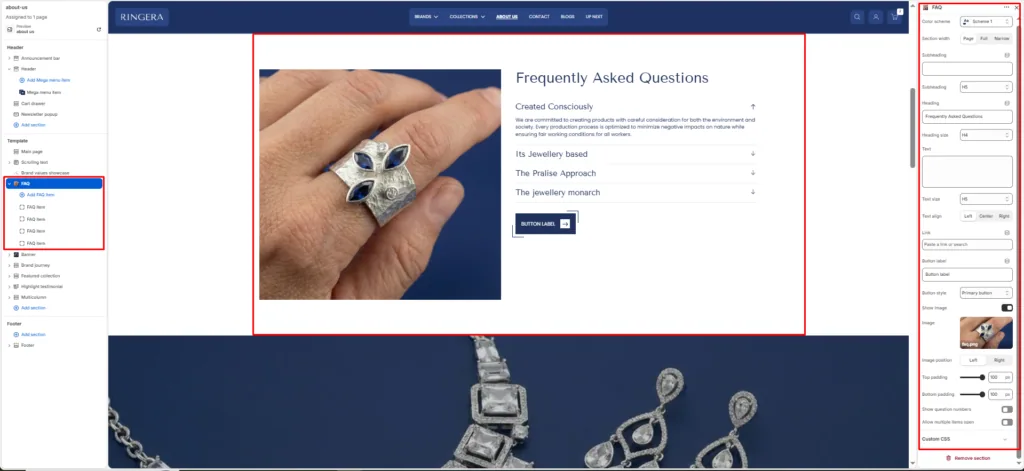
The FAQ Section allows you to display a list of frequently asked questions in an accordion layout. Each FAQ item can expand or collapse to show the answer, helping users find key information quickly. This section is great for support, product details, or brand information.
Section Settings
Color scheme
Select a predefined color style to match your theme’s design.
Section width
Choose how wide the section appears on the page. Options: Page, Full, or Narrow.
Top padding
Adds space above the section content (in pixels).
Bottom padding
Adds space below the section content (in pixels).
Subheading
Enter a small introductory text displayed above the heading.
Subheading size
Choose the size of the subheading text H1 To H6.
Heading
Enter the main heading for the section.
Heading size
Select the size of the heading text H1 To H6.
Text
Add descriptive content to tell your brand story.
Text size
Choose the size of the text content H1 To H6.
Text align
Aligns section text to Left, Center, or Right.
Show question numbers
Toggle ON to display numbered questions (e.g., 01, 02, 03…).
Allow multiple items to be open
When enabled, users can open more than one question at the same time.
Show Image
Enable or disable the floating image.
Image
Upload the specific image you want to feature as a floating element within the section.
Blocks Settings
FAQ Item
Each block represents a single question and answer.
Question
The question text is displayed in the accordion title.
Example: “What’s your return policy?”
Answer
The text is shown when the accordion expands.
Example: “Step into a world where fashion meets function, and every piece tells a story.”
You can add multiple FAQ Item blocks to create a full list of FAQs.
Was this article helpful?
Thanks for the feedback.
Still need help?
Can't find what you're looking for? Send us a message and we'll help you out.