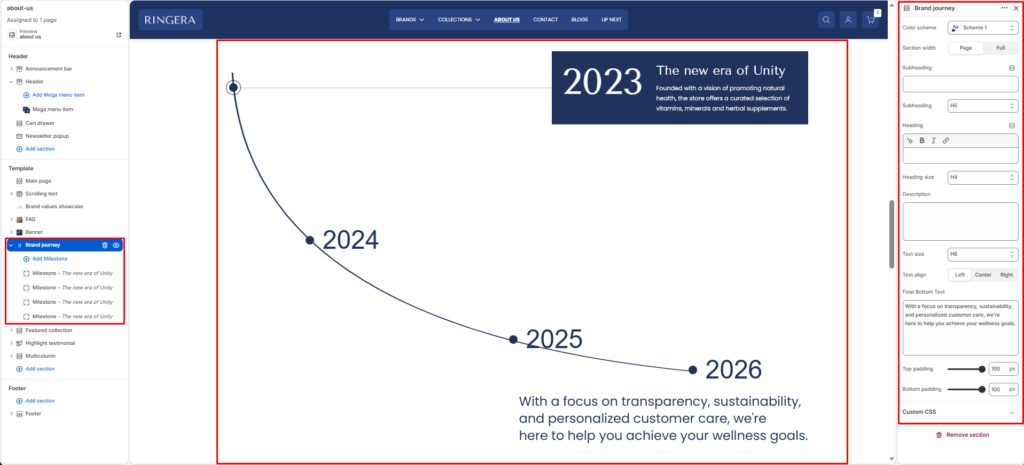
Showcase your brand’s growth and key milestones through a visual timeline.
Color scheme #
Choose the desired color palette for this section from the available theme schemes.
Section width #
Choose how wide the section spans on the page:
- Page: Aligns section content with the page container.
- Full: Stretches the section edge-to-edge across the browser window.
Subheading #
Enter a small introductory text displayed above the main heading.
Subheading size #
Select the size of the subheading text H1 To H6.
Heading #
Enter the main heading for the section.
Heading size #
Choose the size of the heading text H1 To H6.
Description #
Add supporting text below the heading.
Text size #
Select the size of the description text H1 To H6.
Text alignment #
Choose the alignment of the content.
- Left
- Center
- Right
Final bottom text #
Enter a concluding message displayed at the bottom of the section.
Top padding #
Adjust the space above the section.
Bottom padding #
Adjust the space below the section.
Milestone Block #
Add milestone #
Add timeline points to represent key events in your brand journey.
Year / Label #
Enter the year or label for the milestone.
Title #
Add a short title for the milestone.
Description #
Provide details about the milestone.