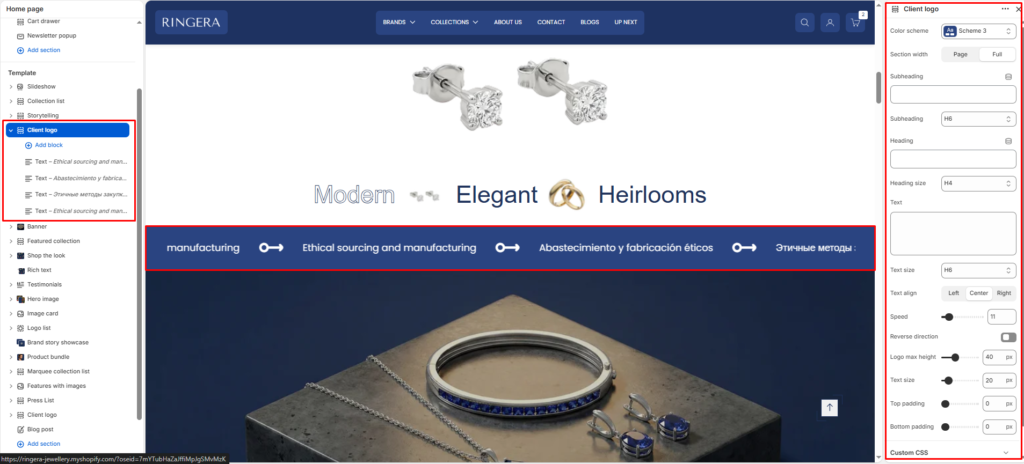
Client Logo #
The Client Logo section allows you to display a horizontally scrolling carousel of brand logos or promotional messages. Ideal for showcasing partner brands, featured collaborators, or promotional texts, this section enhances brand credibility and visual interest.
Color scheme #
Choose the desired color palette for this section from the available theme schemes.
Section width #
Choose how wide the section spans on the page:
- Page: Aligns section content with the page container.
- Full: Stretches the section edge-to-edge across the browser window.
Subheading #
Enter a small introductory text displayed above the heading.
Subheading size #
Choose the size of the subheading text H1 To H6.
Heading #
Enter the main heading for the section.
Heading size #
Select the size of the heading text H1 To H6.
Text #
Add descriptive content to tell your brand story.
Text size #
Choose the size of the text content H1 To H6.
Text alignment #
Select the alignment of the content.
- Right
- Left
- Center
Scrolling speed #
Controls the speed of the scrolling marquee (1 = slowest, 100 = fastest). Default: 10.
Pause hover #
When enabled, the scrolling pauses when a user hovers over the slider.
Slider Direction #
Sets the scroll direction of the marquee. Options: Left, Right.