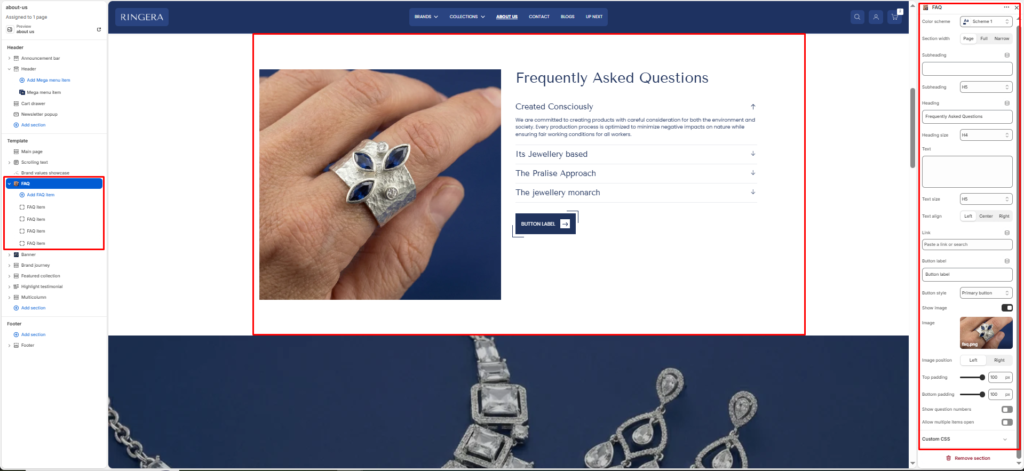
The FAQ Section allows you to display a list of frequently asked questions in an accordion layout. Each FAQ item can expand or collapse to show the answer, helping users find key information quickly. This section is great for support, product details, or brand information.
Section Settings #
Color scheme #
Select a predefined color style to match your theme’s design.
Section width #
Choose how wide the section appears on the page. Options: Page, Full, or Narrow.
Top padding #
Adds space above the section content (in pixels).
Bottom padding #
Adds space below the section content (in pixels).
Subheading #
Enter a small introductory text displayed above the heading.
Subheading size #
Choose the size of the subheading text H1 To H6.
Heading #
Enter the main heading for the section.
Heading size #
Select the size of the heading text H1 To H6.
Text #
Add descriptive content to tell your brand story.
Text size #
Choose the size of the text content H1 To H6.
Text align #
Aligns section text to Left, Center, or Right.
Show question numbers #
Toggle ON to display numbered questions (e.g., 01, 02, 03…).
Allow multiple items to be open #
When enabled, users can open more than one question at the same time.
Show Image #
Enable or disable the floating image.
Image #
Upload the specific image you want to feature as a floating element within the section.
Blocks Settings #
FAQ Item #
Each block represents a single question and answer.
Question #
The question text is displayed in the accordion title.
Example: “What’s your return policy?”
Answer #
The text is shown when the accordion expands.
Example: “Step into a world where fashion meets function, and every piece tells a story.”
You can add multiple FAQ Item blocks to create a full list of FAQs.