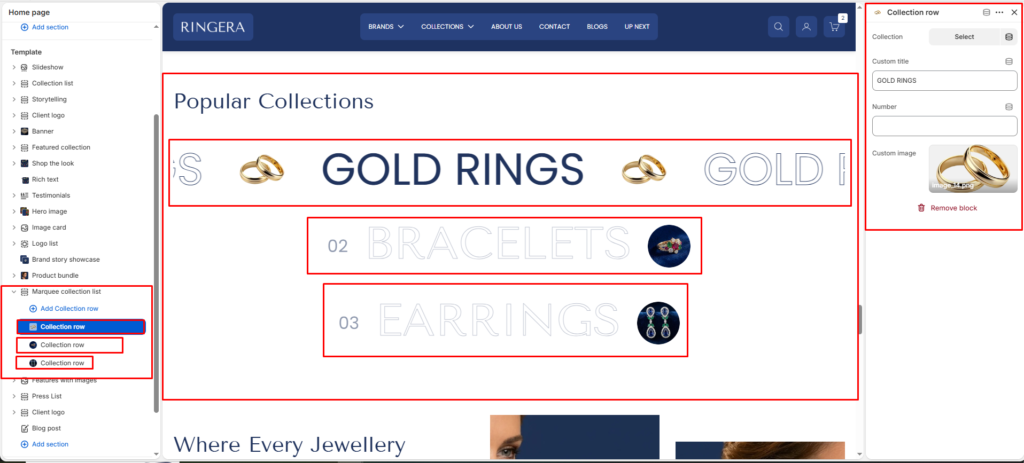
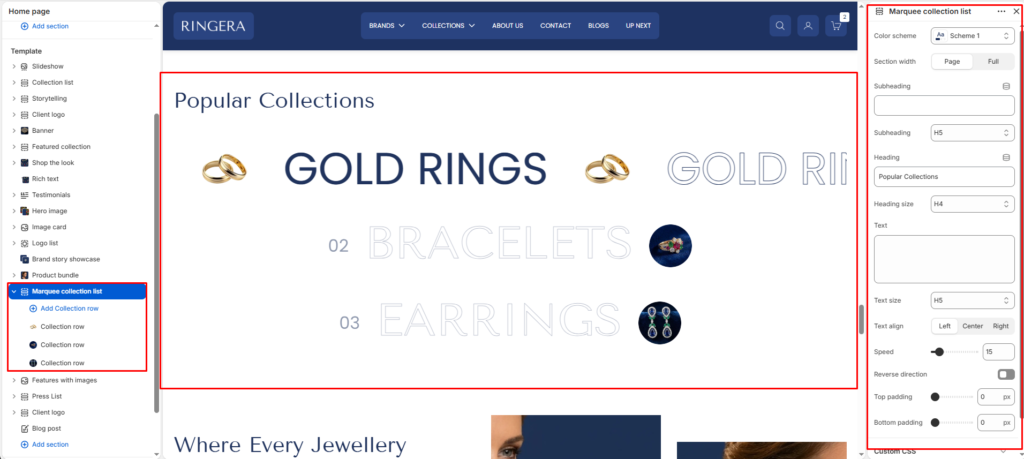
The Marquee Collection List section displays your store’s collections as continuously scrolling horizontal ticker rows — each row animates infinitely across the page, alternating large collection name typography with a small circular product image. A section heading and optional subheading sit above the marquee rows. Each row is a separate Collection Row block, giving you full control over which collection is featured, its display title, numbering, and image per row.
Color scheme #
Sets the overall color scheme for the section — controls the background color and typography color across the section heading and all marquee rows.
Section width #
Controls how wide the section spans across the browser window.
- Page — content is contained within the standard page max-width container.
- Full — the marquee rows and heading stretch edge to edge across the full browser width.
Subheading #
Enter a small introductory text displayed above the heading.
Subheading size #
Choose the size of the subheading text H1 To H6.
Heading #
Enter the main heading for the section.
Heading size #
Select the size of the heading text H1 To H6.
Text #
Add descriptive content to tell your brand story.
Text size #
Choose the size of the text content H1 To H6.
Text alignment #
Select the alignment of the content.
- Right
- Left
- Center
Speed #
Controls the scroll speed of all marquee rows simultaneously. A lower value produces a slower, more leisurely scroll; a higher value creates a fast, energetic ticker effect. Defaults to 15. Adjust to match the overall pacing and mood of your page.
Reverse direction #
When enabled, all marquee rows scroll from right to left instead of the default left-to-right direction. Useful for creating a visual contrast when combining this section with other marquee sections scrolling in the opposite direction.
Top padding #
Controls the vertical spacing above the section content.
Bottom padding #
Controls the vertical spacing below the section content.
Collection Row #
Each Collection Row block renders one full-width horizontally scrolling ticker that repeats the collection name in large typography alternating with a circular product image. The row scrolls infinitely at the speed defined by the section-level Speed setting. Each block has the following settings:
Collection #
Select the Shopify collection to link this row to. When a customer clicks anywhere on the marquee row, they are taken to the selected collection’s page. The collection picker searches all active collections in your store.
Custom title #
Overrides the collection’s default name with a custom label displayed in the scrolling ticker instead of the Shopify collection title). If left blank, the row uses the linked collection’s name automatically. Use this to control capitalization or shorten long collection names for the marquee display.
Number #
An optional index number displayed to the left of the collection name in the marquee row. This adds a numbered sequence style to the list, reinforcing the ranked or ordered feel of the collection showcase. Leave blank to hide the number from the row.
Custom image #
Upload a custom circular image displayed as the repeating visual accent between each instance of the collection name in the ticker row. This is typically a small product photo or brand icon cropped to a circle. If left blank, the row may fall back to a collection image or display text only, depending on theme defaults.