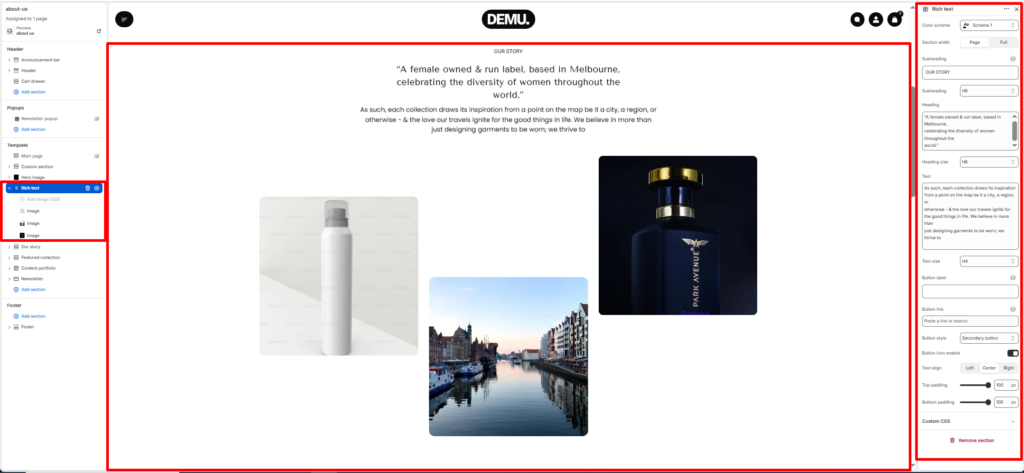
Rich Text #
The Rich text section is used to display formatted brand content such as introductions, stories, campaign messaging, or editorial text. It supports heading and paragraph content, optional button, and decorative image blocks to build a visually engaging text-focused layout.
Section settings #
Color scheme #
Choose the desired color palette for this section from the available theme schemes.
Section width #
Choose how wide the section spans on the page.
- Page: Aligns section content with the page container.
- Full: Stretches the section edge-to-edge across the browser window.
Subheading #
Enter a small introductory text displayed above the heading.
Subheading size #
Choose the size of the subheading text (H1 to H6).
Heading #
Enter the main heading for the section.
Heading size #
Select the size of the heading text (H1 to H6).
Text #
Add descriptive rich text content for storytelling or brand messaging.
Text size #
Choose the size of the text content (H1 to H6).
Button label #
Enter the call-to-action button text.
Button link #
Select the destination page or URL for the button.
Button style #
Choose between available button styles. The styles depend on your theme’s design system.
- Secondary button
- Primary button
Button icon enable #
Choose the icon style shown with the button (if enabled in your theme style).
Text alignment #
Select the alignment of section content.
- Right
- Left
- Center
Top padding #
Adds vertical space above the section content (value in pixels).
Bottom padding #
Adds vertical space below the section content (value in pixels).
Blocks settings #
Image block #
Adds an image element within the rich text layout to support visual storytelling.
You can add multiple image blocks and position them based on your section design.