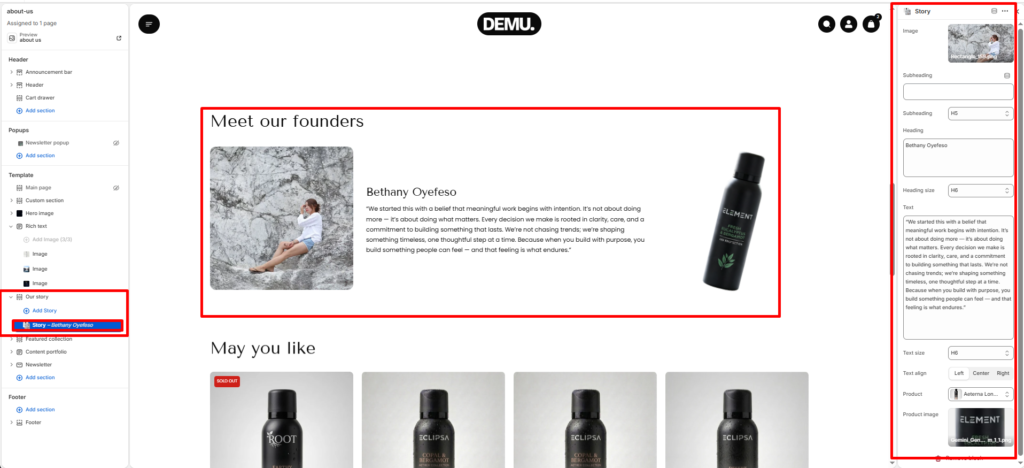
Our Story #
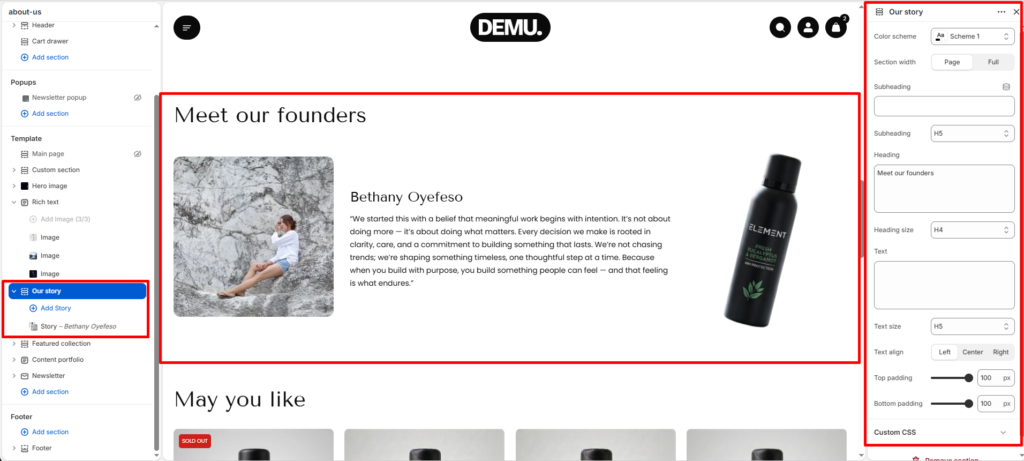
The Our story section is designed to present founder or brand storytelling content in a clean editorial layout. It combines section-level intro content with repeatable story blocks, where each block can include an image, heading, rich text, and an optional product visual. This section is ideal for About pages and brand-led landing pages.
Section settings #
Color scheme #
Choose the color palette for this section from the available theme schemes.
Section width #
Control how wide the section appears on the page.
Use Page to keep content aligned to the theme container, or Full to stretch the section across the browser width.
- Page: Contained within the page width.
- Narrow: Uses a tighter, centered layout for a more compact design.
Subheading #
Enter a short introductory text shown above the main section heading.
Subheading size #
Set the typography size for the subheading (for example H1 to H6 based on your theme controls).
Heading #
Enter the main title for this section, such as “Meet our founders”.
Heading size #
Choose the heading size for the main title.
Text #
Add supporting text under the heading to introduce the story content.
Text size #
Set the font size for the section-level text content.
Text alignment #
Align section content to Left, Center, or Right.
Top padding #
Set vertical spacing above the section in pixels.
Bottom padding #
Set vertical spacing below the section in pixels.
Block settings #
Story block #
Each Story block adds one story entry inside the section. You can add multiple story blocks to feature multiple founders, team members, or brand chapters.
Image #
Select the main image for the story block (for example founder portrait or lifestyle image).
Subheading #
Add optional short text shown above the story title in the block.
Subheading size #
Control the typography size of the block subheading.
Heading #
Add the story block title, such as a founder name.
Heading size #
Set the title size for the story block heading.
Text #
Enter the detailed story description for this block.
Text size #
Set the font size for the story text.
Text alignment #
Align block content to Left, Center, or Right.
Product #
Choose a product reference to display in the story block.
Product image #
Select which product image is shown for the selected product (for example featured, card, or another available product media option).