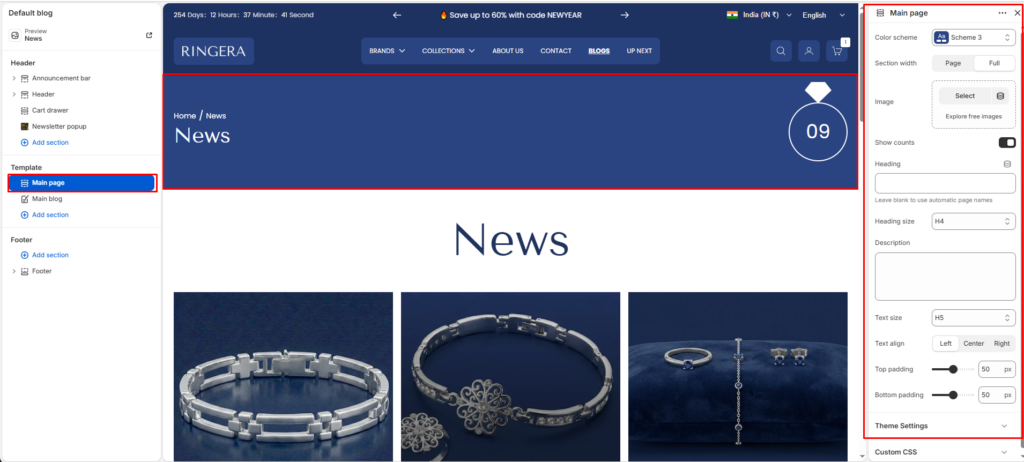
The Main page section is a page header or hero strip for templates such as the homepage, collections, blogs, articles, standard pages, cart, and search. It can show breadcrumbs (when breadcrumbs are enabled in theme settings), a prominent title, optional description, an optional background image, and—on supported templates—a numeric badge that reflects list length or cart quantity.
Color scheme #
Applies your chosen theme color preset to the banner area so it matches the rest of the storefront.
Section width #
Sets whether the inner content follows page width or uses full width across the viewport.
Image #
Adds an optional background or decorative image behind the text block. When an image is present, the layout uses an overlay treatment so the title and description remain readable.
Show counts #
Turns on an optional count display in the banner. On the cart template it shows the number of line items. On collection and blog style layouts it attempts to show how many product or post cards are listed on the page, and hides the badge when there is nothing to count.
Heading #
Sets a custom title for the banner. If you leave this empty, the theme fills the title automatically from the current template—for example the collection name, blog name, article title, or page title.
Heading size #
Selects the visual scale of the title using theme-defined options from h1 through h6.
Description #
Sets custom supporting text below the title. If you leave this empty, the theme may pull default body content for the current resource, such as a short description or introductory text, depending on the template.
Text size #
Selects the scale of the description using theme-defined options from h1 through h6.
Text align #
Aligns the heading and description block to the left, center, or right.
Top padding #
Adds space above the section from 0px to 100px. On smaller screens the theme uses slightly reduced padding for balance.
Bottom padding #
Adds space below the section from 0px to 100px, with the same responsive adjustment on small screens.