Table of Contents
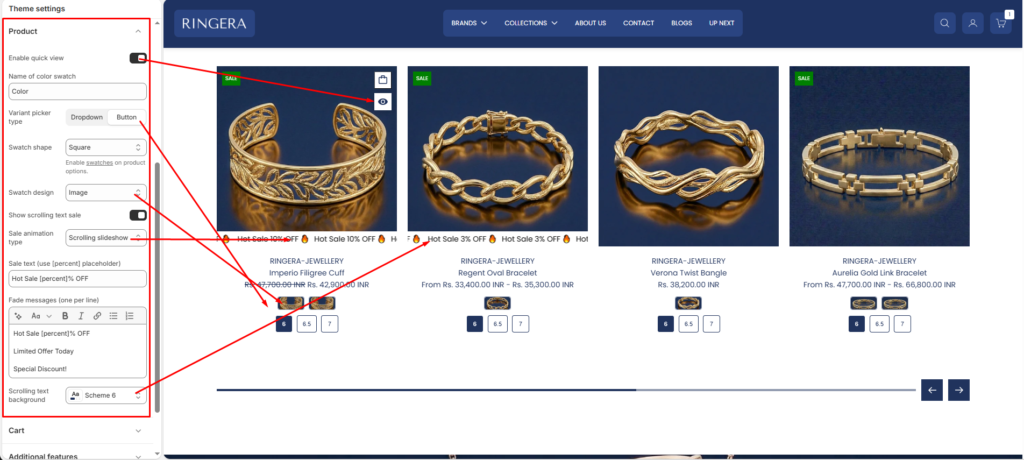
Enable Quick View #
- Enable this option to allow customers to preview product details without leaving the collection page.
- Helps users view product information and add items to cart faster
- Displays a quick view modal on product cards
Name of Color Swatch #
Define the product option name used for color swatches.
- The system will match this name with product variant options
- Common values include:
Color,Colour,Material, etc.
Note: Ensure the option name exactly matches the variant option in your product settings.
Variant Picker Type #
Choose how product variants are displayed on product cards and product pages.
- Dropdown – Displays variants in a select dropdown
- Button – Displays variants as clickable buttons
Swatch Shape #
Select the shape of the swatches displayed for variant options.
- Square
- Circle
- Default
Swatch Design #
Choose how swatches are visually represented.
- Color – Displays solid color swatches
- Image – Displays swatches using images (useful for patterns or textures)
- Default – Displays text-based swatches
Show Scrolling Text Sale #
Enable this option to display animated promotional text (e.g., sale messages) on product cards.
- Helps highlight discounts and offers
- Attracts user attention with motion
Sale Animation Type #
Select the animation style for sale text.
- Example: Scrolling Slideshow
- Can display multiple promotional messages in rotation
Sale Text (Use [percent] Placeholder) #
Define the sale message format.
- Use
[percent]to dynamically display the discount percentage
Example:Hot Sale [percent]% OFF
Fade Messages (One per line) #
Add multiple promotional messages that will rotate in the animation.
- Enter each message on a new line
Scrolling Text Background #
Select the color scheme for the scrolling sale text background.
- Matches your theme’s color schemes
- Ensures proper contrast and readability
Best Practice Tips #
- Use consistent naming for swatches (e.g., always “Color”)
- Prefer image swatches for premium products like jewellery
- Keep sale messages short and impactful
- Ensure sufficient color contrast for accessibility compliance