Table of Contents
Related Post Section #
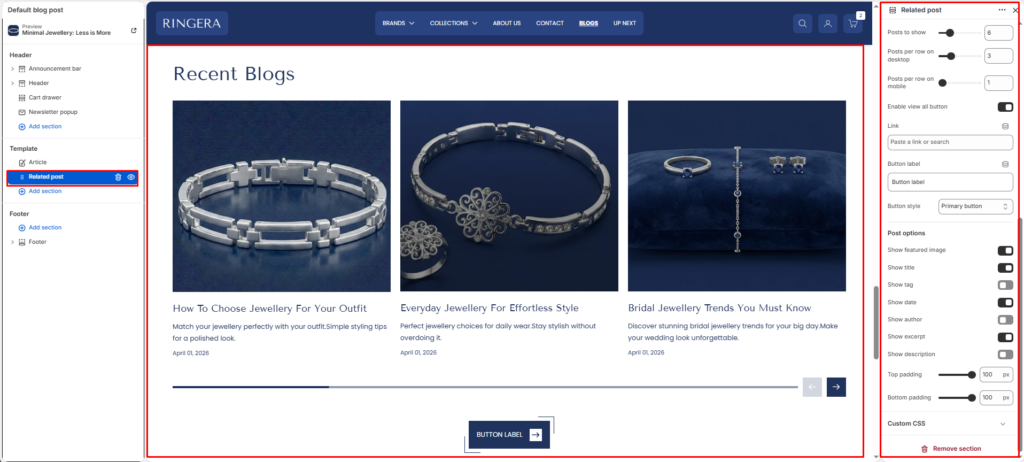
The Related Post section is used on the Article (Blog Post) template to display recently published or related blog articles. This section helps users discover more content and improves engagement and time spent on the site.
Section Settings #
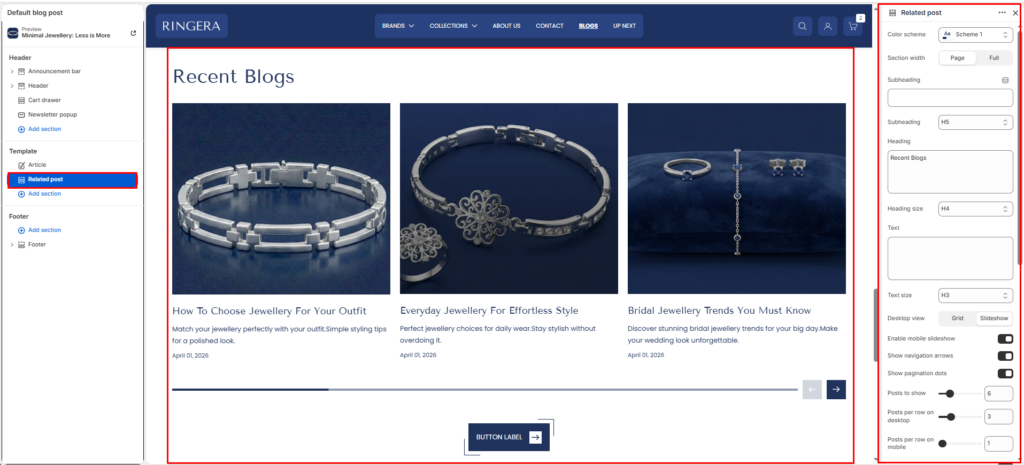
Color Scheme #
- Select a predefined color scheme
- Controls background, text, and button colors
Section Width #
- Page—constrained to the site container
- Full—Stretches across the full browser width
Heading Settings #
- Heading: Custom text for the section title
- Heading size: Choose heading level (H1–H6)
Description #
- Optional supporting text below the heading
- Useful for context or SEO-friendly copy
Text Size #
- Controls the size of description text
Mobile Settings #
- Enable mobile slideshow—turns posts into a slider on mobile devices
Slider Controls #
(Visible when slideshow is enabled)
- Show navigation arrows
- Show pagination dots
Posts to Show #
- Controls the total number of blog posts displayed
Posts per Row (Desktop) #
- Adjust number of cards per row on desktop (e.g. 2, 3, or 4)
Posts per Row (Mobile) #
- Adjust number of cards per row on mobile (typically 1)
View All Button #
- Enable View all button → Shows a CTA button linking to the blog listing page
- Button text and style follow global theme settings
Post Options #
Show featured image #
Display the main image from each post.
Show tag #
Show blog tags above the title if available.
Show title #
Display the blog post’s title.
Show author #
Include the author’s name for credibility.
Show excerpt #
Display a short preview of the post content.
Show description #
Show the full or partial post description if needed.