

Currency codes
On this page
Sneax is engineered to support international sneaker drops and global footwear retail. Sneakerheads and shoe collectors frequently shop cross-border, making transparent, localized currency pricing essential for building customer trust and reducing cart abandonment.
Through the Currency format settings, you can control whether three-letter ISO currency codes (such as USD, EUR, GBP, CAD, or AUD) display alongside product prices across your entire store.
How to Access Currency Format Settings
- From your Shopify Admin, navigate to Online Store > Themes.
- Click Customize on the Sneax theme.
- Click the Theme settings (⚙️ gear icon) in the left sidebar.
- Select the Currency format tab.
- Check or uncheck Show currency codes.
- Click Save.
Available Settings & Configuration
| Setting Name | Type | Options / State | Default | Description |
|---|---|---|---|---|
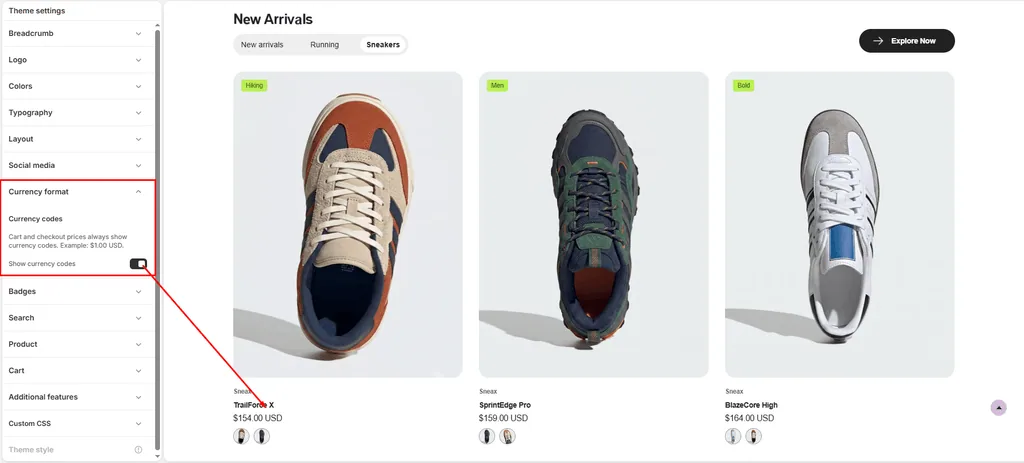
| Show currency codes | Checkbox | Enabled (Checked) / Disabled (Unchecked) | Enabled (true) | Displays the standard 3-letter ISO currency code (e.g., $180.00 USD) next to product and cart prices throughout the storefront. |
Detailed Setting Breakdown
Show Currency Codes (currency_code_enabled)
- When Enabled (
Checked):- Sneax applies Shopify’s
money_with_currencyformatting filter storewide. - Displayed on: Product cards, collection grid tiles, single product pages, quick-view popups, search suggestions, price ranges (
From $120.00 USD - $180.00 USD), and the slide-out cart drawer. - Eliminates ambiguity for international shoppers who use the same currency symbol (e.g., distinguishing between US Dollar
$, Canadian DollarCAD $, and Australian DollarAUD $).
- Sneax applies Shopify’s
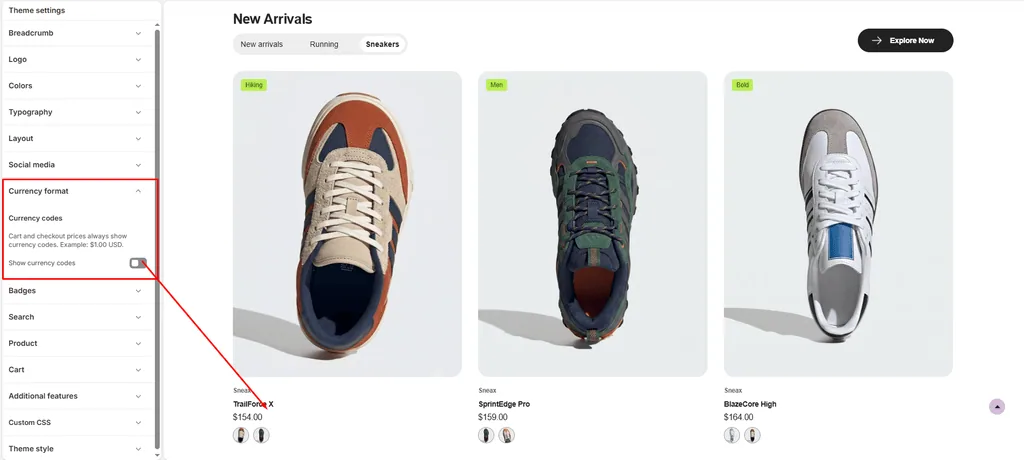
- When Disabled (
Unchecked):- Sneax reverts to the standard
moneyfilter format (e.g.,$180.00). - Best suited for domestic stores selling exclusively within a single country or region.
- Sneax reverts to the standard
(Note: Cart totals and Shopify checkout pages always enforce currency codes by default to guarantee full legal compliance and pricing clarity).
Pro Tips for Sneax Footwear Stores
- Crucial for Hype Releases & Global Drops: If you promote limited-edition sneaker raffles or international drops, always keep Show currency codes enabled. Foreign buyers will immediately know what currency they are being billed in before reaching checkout.
- Pair with Shopify Markets: Sneax pairs automatically with Shopify Markets and multi-currency geolocators, allowing international visitors to browse and pay in their local currency with accurate automated conversions.
Was this article helpful?
Thanks for the feedback.
Still need help?
Can't find what you're looking for? Send us a message and we'll help you out.