

Newsletter Popup
On this page
Building a dedicated subscriber list is one of the highest-converting strategies in the sneaker and streetwear industry. Direct email marketing drives VIP early-access sneaker drops, shock restock alerts, raffle announcements, and first-time buyer discounts.
Sneax includes a built-in, hardware-accelerated Newsletter Popup powered by GSAP spring animations, smart visitor targeting, and adaptive layout configurations.
How to Access Newsletter Popup Settings
- From your Shopify Admin, navigate to Online Store > Themes.
- Click Customize on the Sneax theme.
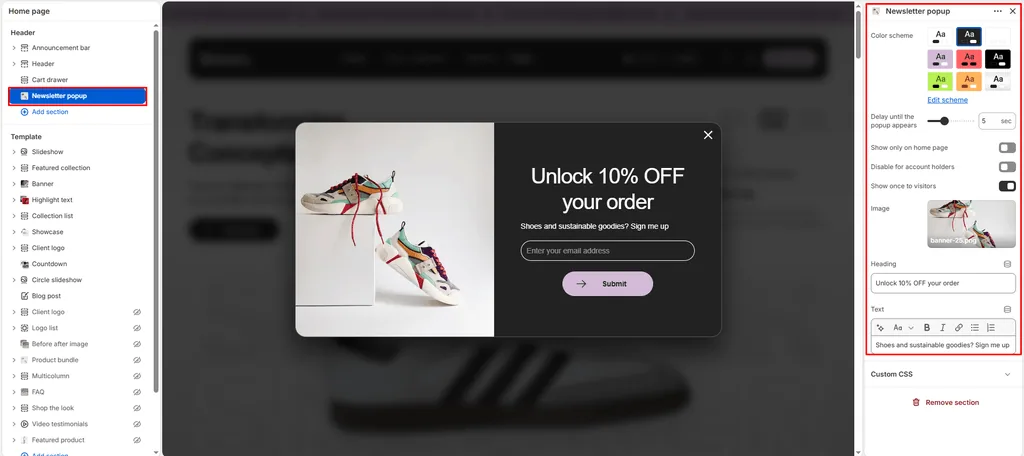
- In the left sidebar under the Header group, click Newsletter popup (or click Add section > Newsletter popup).
- Configure your timing, targeting rules, and promotional content.
- Click Save.
Available Settings & Configuration
| Setting Name | Type | Options / Range | Default | Description |
|---|---|---|---|---|
| Color scheme | Color Scheme Picker | Any configured color scheme | Scheme 1 | Sets the background, typography, button, and input field colors for the modal card. |
| Apparition delay | Slider / Range | 0 – 15 sec (Step: 1s) | 5 sec | Sets how many seconds after page load the popup springs into view. |
| Show only on index | Checkbox | Enabled / Disabled | Enabled (true) | Restricts the popup exclusively to your homepage, keeping product pages distraction-free. |
| Show only for visitors | Checkbox | Enabled / Disabled | Enabled (true) | Prevents the popup from showing to existing, logged-in account customers. |
| Show only once | Checkbox | Enabled / Disabled | Enabled (true) | Uses browser localStorage to prevent annoying repeat impressions for the same shopper. |
| Image | Image Picker | Image upload | None | Optional promotional photo (e.g., shoe drop photography, lifestyle shot, or brand emblem). |
| Heading | Text | e.g., “Get 10% Off” | Get 10% off | Main bold headline displayed at the top of the form. |
| Content | Rich Text | HTML / Formatted text | Promotions, new products... | Explains the benefits of joining your sneaker subscriber community. |
Detailed Settings & Technical Breakdown
1. Timing & Targeting Logic
- Apparition Delay (
0to15s): Giving shoppers 4 to 7 seconds allows them to appreciate your hero sneaker visuals and brand identity before receiving a subscription prompt, leading to higher conversion rates. - Homepage Restriction (
show_only_on_index): Ensures customers who land directly on a single shoe detail page from social media ads or Google search can immediately check sizing and buy without interruption. - Zero-Spam Memory (
show_only_once): When closed or submitted, Sneax marks the user’s browser storage (localStorage: popup_shown). Returning visitors will not see the modal again during their shopping session.
2. Adaptive Responsive Layout
- With Image: Sneax automatically formats the modal into a sleek 50/50 split layout on desktop (campaign photography on the left, email form on the right) and stacks vertically on mobile screens.
- Without Image: If left blank, Sneax automatically scales the modal down to a compact, centered
500pxcard with balanced50pxpadding.
3. High-Performance GSAP Animation
- Smooth Spring Physics: Powered by GSAP
back.out(1.8)easing, the modal emerges with an organic, subtle scale bounce (0.75to1.0) that feels high-end and polished. - Effortless Dismissal: Shoppers can dismiss the popup by clicking the top X close button, clicking anywhere on the darkened backdrop overlay, or simply hitting the Escape (
Esc) key on their keyboard.
Pro Tips for Sneax Footwear Stores
- Incentivize with Shoe Drops & First-Order Savings: Sneakerheads gladly exchange their email for tangible perks. Strong headlines include:
- “Join the Sneax Club: 10% Off Your First Pair”
- “Unlock VIP Early Access to Limited Sneaker Drops & Restocks”
- “Get Free Sneaker Care Kit on Orders Over $100”
- Use High-Contrast Product Photography: Upload a clean, transparent or high-contrast photo of your flagship sneaker silhouette as the Image to instantly command attention.
Was this article helpful?
Thanks for the feedback.
Still need help?
Can't find what you're looking for? Send us a message and we'll help you out.