

Search
On this page
In the footwear and sneaker industry, search is a high-intent conversion tool. Shoppers frequently look for specific sneaker models, silhouettes (e.g., Retro High, Runner, Low-Top), colorways, or limited collaboration drops.
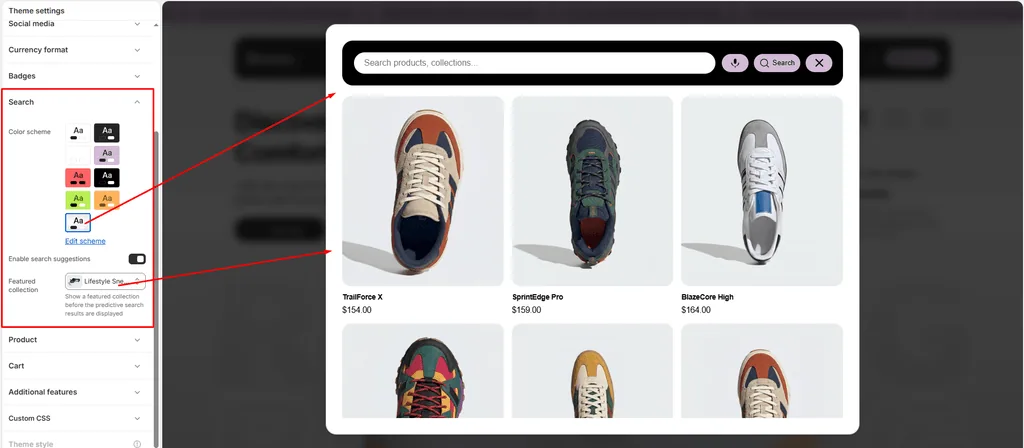
Sneax features an interactive Search Modal & Predictive Search Drawer that includes instant live suggestions, pre-search curated footwear recommendations, and built-in voice search.
How to Access Search Settings
- From your Shopify Admin, navigate to Online Store > Themes.
- Click Customize on the Sneax theme.
- Click the Theme settings (⚙️ gear icon) in the left sidebar.
- Select the Search tab.
- Configure your search settings and click Save.
Available Settings & Configuration
| Setting Name | Type | Options / State | Default | Description |
|---|---|---|---|---|
| Color scheme | Color Scheme Picker | Any configured color scheme | Scheme 1 | Sets the background, text, borders, and input styling for the full search overlay and results panel. |
| Enable search suggestions | Checkbox | Enabled (Checked) / Disabled (Unchecked) | Enabled (true) | Activates dynamic predictive search. As customers type, instant product matching, prices, and thumbnails appear in real time. |
| Featured collection | Collection Picker | Any collection in your store | None (Defaults to All) | Selects a curated collection to showcase as recommended footwear when the search drawer first opens (before the shopper types anything). |
Detailed Settings Breakdown
1. Color Scheme (search_color_scheme)
Allows you to match the search overlay to your store’s aesthetic. You can give the search modal a sleek dark look (e.g., Scheme 2) for an urban streetwear feel or a clean, bright white look (Scheme 1) for high readability.
2. Enable Search Suggestions (show_search_suggestion)
- When Enabled: As soon as a customer types the first few letters of a shoe model (e.g., “Air” or “Retro”), Sneax performs a high-speed background lookup and populates matched sneakers with their photos, titles, and live prices. It also supports search across articles, pages, and collections.
- When Disabled: Renders a standard search submission bar that only takes users to the search results page upon pressing Enter.
3. Featured Collection (collection)
Sneax utilizes the search modal as an active merchandising space:
- When a customer clicks the magnifying glass icon in the header, the search drawer opens.
- Before they even type a single character, Sneax displays up to 12 featured footwear cards under the default suggestions grid.
- Recommended Usage: Assign your “Trending Drops”, “Best Sellers”, or “New Footwear Arrivals” collection here to inspire immediate clicks.
Pro Tips for Sneax Footwear Stores
- Curate a “Trending Sneakers” Search Collection: Don’t leave the pre-search empty. Selecting a curated collection filled with high-demand silhouettes or trending restocks turns an empty search bar into an instant shopping gallery.
- Tag Silhouette Names in Product Titles: To make predictive search ultra-effective, include recognizable keywords in your product titles or tags (e.g., “Sneax Runner V2 – Triple Black – Waterproof”). Shoppers searching for “Black” or “Waterproof” will see the shoe pop up instantly.
Was this article helpful?
Thanks for the feedback.
Still need help?
Can't find what you're looking for? Send us a message and we'll help you out.