

Main Blog
On this page
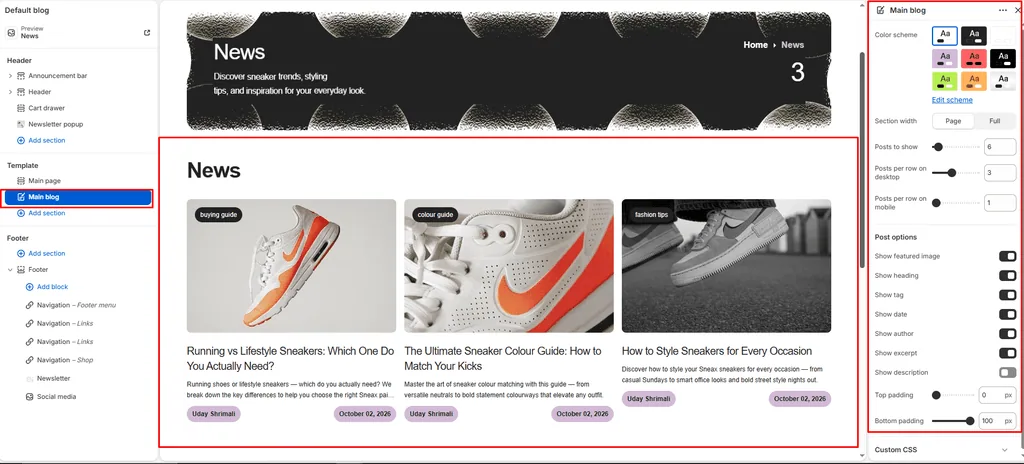
The Main Blog section powers your store’s primary editorial index (the /blogs/[blog-name] page).
For modern footwear and streetwear brands, a dedicated blog journal builds brand authority, engages the sneaker community, and drives organic SEO—showcasing sneaker drop calendars, on-foot styling reviews, athlete interviews, and shoe care guides.
Sneax presents your articles in an adaptive, high-performance CSS grid featuring hardware-accelerated card animations, granular metadata controls, and automatic pagination.
How to Access Main Blog Settings
- From your Shopify Admin, navigate to Online Store > Themes.
- Click Customize on the Sneax theme.
- In the top template selector dropdown, select Blogs > Default blog.
- In the left sidebar, click the Main blog section.
- Configure your grid and post card options.
- Click Save.
Layout & Grid Settings
| Setting Name | Type | Options / Range | Default | Description |
|---|---|---|---|---|
| Color scheme | Color Scheme Picker | Any configured color scheme | Scheme 1 | Sets the background, text, and card color scheme for the blog index page. |
| Section width | Dropdown | Page width, Full width | Page width | Determines whether the blog grid stays within your store’s container or spans edge-to-edge. |
| Posts per page | Slider / Range | 1 – 100 (Step: 1) | 9 | Maximum number of articles displayed before automatic pagination links appear. |
| Desktop posts per row | Slider / Range | 1 – 6 (Step: 1) | 4 | Controls how many article cards appear side-by-side on desktop monitors and laptops. |
| Mobile posts per row | Slider / Range | 1 – 3 (Step: 1) | 2 | Controls columns on mobile devices (automatically collapses to 1 column on screens under 450px). |
| Top padding | Slider / Range | 0px – 100px (Step: 1px) | 100px | Top whitespace spacing (automatically halved on mobile phones). |
| Bottom padding | Slider / Range | 0px – 100px (Step: 1px) | 100px | Bottom whitespace spacing (automatically halved on mobile phones). |
Article Card Content Toggles
Customize exactly which metadata and content elements display on individual blog tiles:
| Setting Name | Type | Default | Description |
|---|---|---|---|
| Show image | Checkbox | Enabled (true) | Displays the article’s featured hero image with responsive loading. |
| Show title | Checkbox | Enabled (true) | Displays the article headline. |
| Show tag | Checkbox | Disabled (false) | Displays the article’s primary tag as a category badge (e.g., Drop Alert, Review, Maintenance). |
| Show date | Checkbox | Enabled (true) | Shows the publication date (essential for timely sneaker drop news). |
| Show author | Checkbox | Enabled (true) | Displays the author/editor byline. |
| Show excerpt | Checkbox | Enabled (true) | Renders the short, custom summary excerpt written in the Shopify article editor. |
| Show description | Checkbox | Disabled (false) | Outputs the full body copy preview if you prefer longer text cards without excerpts. |
Pro Tips for Sneax Footwear Stores
- Use Tags for Sneaker Categorization: Enable Show tag and tag your articles consistently (such as
DROP CALENDAR,SHOE CARE,STYLING TIPS, orCOLLABS). Shoppers can instantly identify the topic while browsing your editorial feed. - Recommended Grid Layout: Setting Desktop posts per row to
3or4with Posts per page set to9or12creates a visually balanced, magazine-style layout for sneaker lookbooks. - High-Impact Photography: Use a consistent aspect ratio (such as 16:9 landscape or 4:5 vertical) for all featured article images to ensure uniform alignment across each row of the grid.
Was this article helpful?
Thanks for the feedback.
Still need help?
Can't find what you're looking for? Send us a message and we'll help you out.