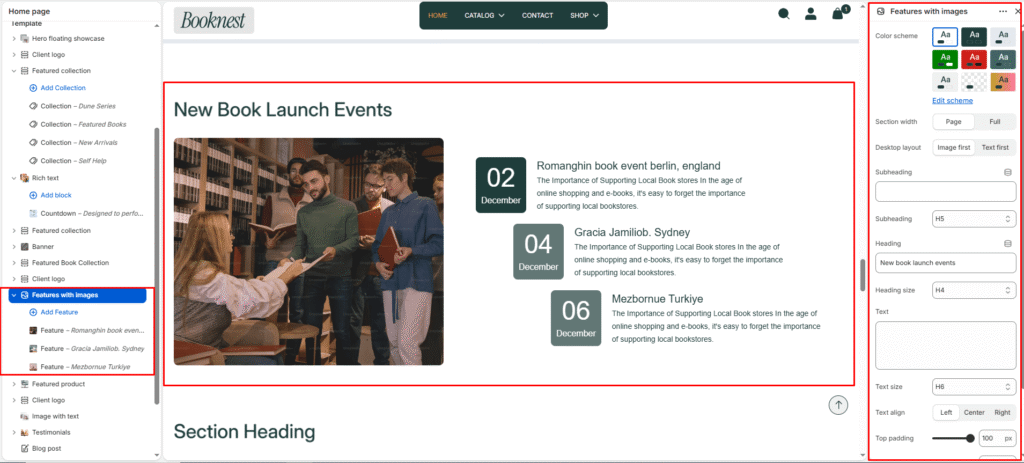
Features with images #
The Features with Images section creates an engaging editorial block that pairs a visual image gallery with a clickable feature list. It is ideal for promoting events, book launches, author spotlights, reading experiences, or key bookstore features with supporting imagery.
Section settings #
Color scheme #
Select a predefined color palette to ensure the blog section blends seamlessly with your store’s theme.
Section width #
Choose how wide the section spans on the page.
Full: Stretches the section edge-to-edge across the browser window.
Page: Aligns section content with the page container.
Subheading #
Enter a small introductory text displayed above the heading.
Subheading size #
Choose the size of the subheading text (H1 to H6).
Heading #
Enter the main heading for the section.
Heading size #
Select the size of the heading text (H1 to H6).
Text #
Add descriptive rich text content for storytelling or brand messaging.
Text size #
Choose the size of the text content (H1 to H6).
Button label #
Enter the call-to-action button text.
Button link #
Select the destination page or URL for the button.
Button style #
Choose between available button styles. The styles depend on your theme’s design system.
- Primary button
- Secondary button
Text alignment #
Select the alignment of section content.
- Right
- Left
- Center
Top padding #
Adds vertical space above the section content (value in pixels).
Bottom padding #
Adds vertical space below the section content (value in pixels).
Block settings #
Each feature block represents one image plus descriptive content. Blocks are rendered as a clickable feature list with a matching image stage.
Image #
The visual media for this feature. Displayed in the image stage area. If no image is provided, a placeholder graphic appears.
Event day #
A short text field intended for a day number or highlight date. Displayed inside the date card for each feature.
Event month #
A short text field intended for a month name or label. Complements the day field in the date card.
Title #
The feature headline. Appears on the feature button and is used as the image alt text when no alt exists.
Description #
Short rich text or paragraph content. Displays below the feature title in the feature list.