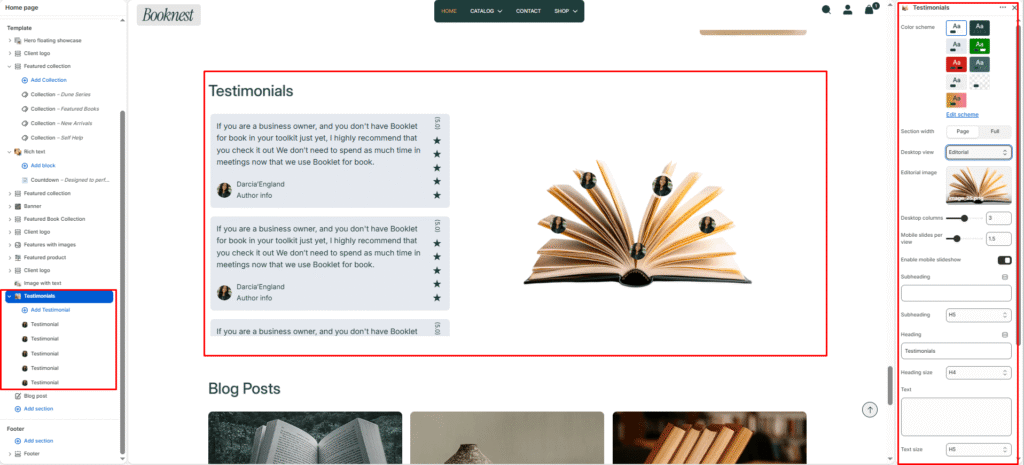
Testimonials #
The Testimonials section displays customer or reader quotes with author details, ratings, and optional editorial layouts. It’s perfect for building trust and social proof on homepages, landing pages, or product-related content.
Section settings #
Color scheme #
Controls the overall section background and accent colors.
Section width #
page-widthkeeps content contained.full-widthstretches the section across the screen.
Desktop view #
grid— shows testimonials in a responsive multi-column layout.slideshow— displays one testimonial at a time with navigation controls.editorial-testimonials— layered editorial cards with a large feature image.
Editorial image #
- Visible only when
desktop viewiseditorial-testimonials. - Use a large background or editorial image for the layout.
Columns desktop #
Number of testimonial columns on desktop. Supports fractional values for finer spacing control.
Columns mobile #
Number of cards or slides shown on mobile. If mobile slideshow for grid is enabled, grid layouts use a slideshow on smaller screens.
Mobile slideshow for grid #
When enabled, grid layouts switch to a mobile slideshow for better mobile usability.
Subheading #
Small label text above the main testimonial heading.
Subheading size #
Controls subtitle size from h1 to h6.
Heading #
Main title for the testimonial section.
Heading size #
Controls the heading font size.
Text #
Optional supporting copy under the heading.
Text size #
Controls the size of the supporting text.
Text align #
left, center, or right alignment for heading and text.
Navigation #
Toggles previous/next arrows.
Pagination #
Toggles slideshow-style pagination or progress bar.
Autoplay slideshow #
When enabled, testimonial slides automatically advance.
Padding top / bottom #
Adjusts section spacing above and below the block.
Block settings #
Each testimonial block includes:
Card colour scheme #
Color scheme for the testimonial card background.
Author image #
Photo or avatar for the review author.
Position x / Position y #
Only visible in editorial view. Sets the position of the testimonial card or author image within the editorial layout.
Author #
Name of the customer, reader, or reviewer.
Author info #
Additional author details like role, location, or affiliation.
Testimonial title #
Short headline for the testimonial.
Testimonial #
Main quoted content, entered as rich text.
Icons #
Use the dropdown menu to select a visual star rating to display at the bottom of the card.