Table of Contents
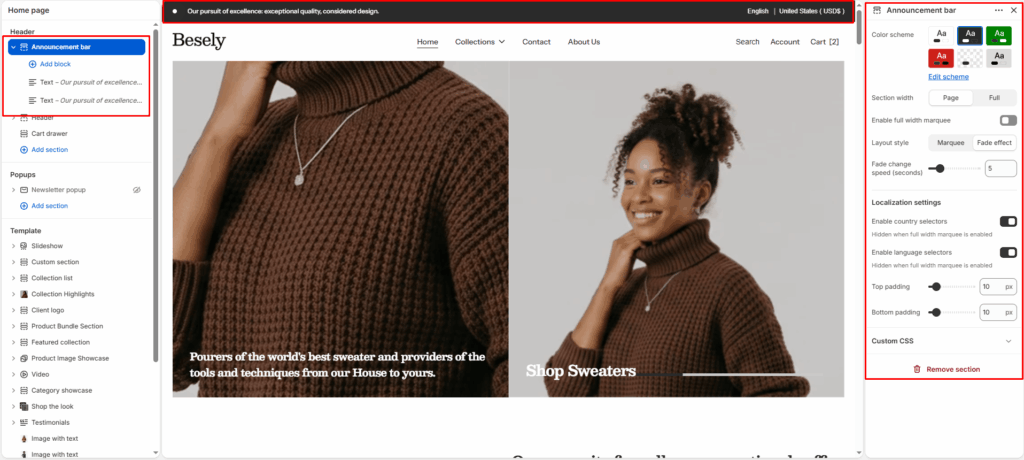
A slim bar pinned above the header used for store-wide messages such as shipping thresholds, promotions, or seasonal notices. Supports multiple rotating messages.
Section settings #
- Color scheme: Choose which color scheme (defined in Theme settings → Colors) this element uses.
- Section width: Choose from: “Page”, “Full”.
- Enable full width marquee: Switch this on to activate full width marquee.
- Layout style: Choose from: “Marquee”, “Fade effect”.
- Fade change speed (seconds): Fine-tune this value with the slider (from 3 to 15).
Localization settings #
- Enable country selectors: Hidden when full width marquee is enabled
- Enable language selectors: Hidden when full width marquee is enabled
- Marquee speed (seconds per loop): Fine-tune this value with the slider (from 5 to 100).
- Reverse direction: Turns the “Reverse direction” option on or off.
- Pause on hover: Turns the “Pause on hover” option on or off.
- Top padding: Fine-tune this value with the slider (from 0 to 100px).
- Bottom padding: Fine-tune this value with the slider (from 0 to 100px).
Text block #
- Text: Configure this option to control the setting’s behavior.
- Link: Link this element to a page, product, collection, blog, or external URL.
Image block #
- Image: Upload or select an image to display.