Table of Contents
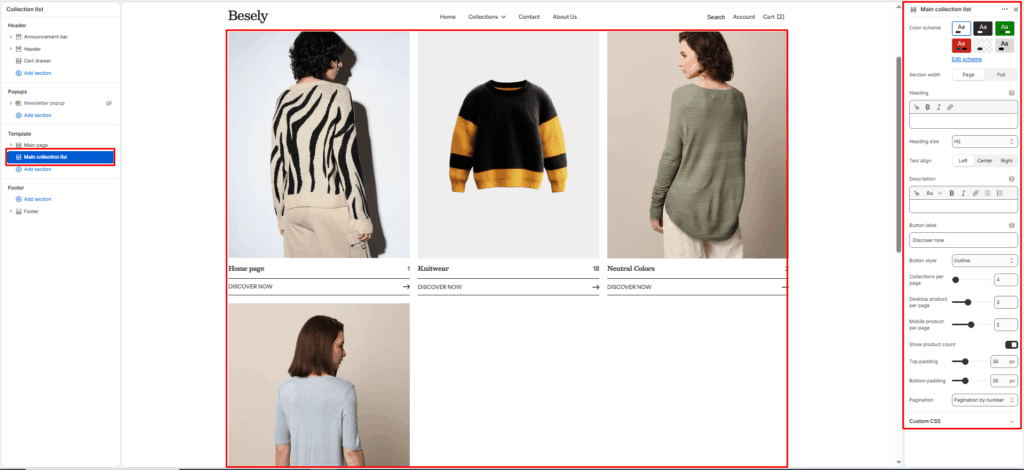
Controls the layout of the page that lists all of your store’s collections.
Section settings #
- Color scheme: Choose which color scheme (defined in Theme settings → Colors) this element uses.
- Section width: Choose from: “Page”, “Full”.
- Heading: Configure this option to control the setting’s behavior.
- Heading size: Choose from: “H1”, “H2”, “H3”, “H4”, “H5”, “H6”.
- Text align: Choose from: “Left”, “Center”, “Right”.
- Description: Add formatted text — supports bold, italic, links, and lists.
- Button label: Enter the text you want to display.
- Button style: Choose from: “Primary button”, “Secondary button”, “Outline”, “Link”.
- Collections per page: Fine-tune this value with the slider (from 1 to 100).
- Desktop product per page: Fine-tune this value with the slider (from 1 to 6).
- Mobile product per page: Fine-tune this value with the slider (from 1 to 3).
- Show product count: Displays product count when this is switched on.
- Top padding: Fine-tune this value with the slider (from 0 to 100px).
- Bottom padding: Fine-tune this value with the slider (from 0 to 100px).
- Pagination: Choose from: “Infinite”, “Load more button”, “Pagination by number”.