

Logo
On this page
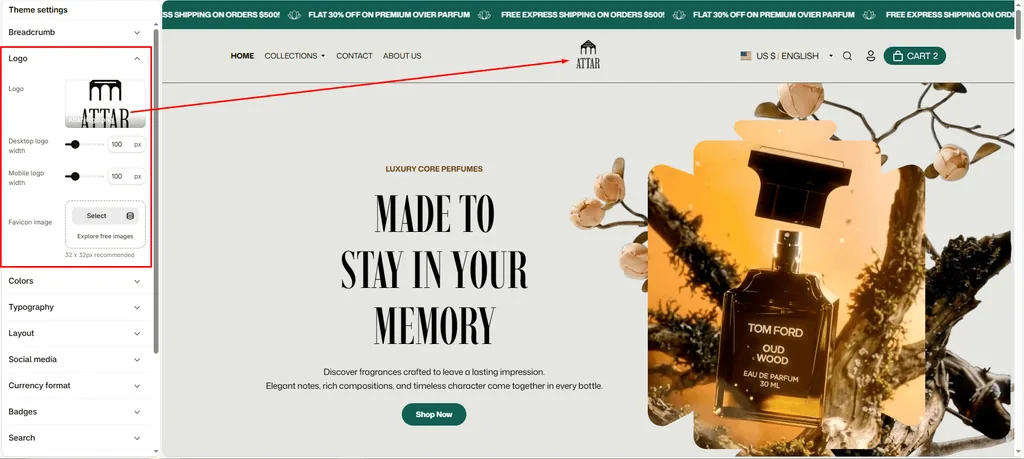
Configure your perfume brand’s visual identity across your entire store. The Logo & Favicon settings allow you to upload your primary brand logo, set independent sizing for desktop and mobile screens, and add your browser tab icon.
How to Access Logo Settings
- From your Shopify Admin, navigate to Online Store > Themes.
- Click Customize on the Attar theme.
- Click the Theme settings (⚙️ gear icon) in the left sidebar.
- Select Logo from the menu.
Settings Breakdown
1. Logo
Upload your brand’s primary logo image.
- SEO & Performance Optimized: On your homepage, Attar wraps your logo inside a semantic heading tag with dynamic alt-text for search engines, and loads it eagerly to ensure fast page load times.
- Text Fallback: If you do not upload an image logo, Attar will automatically display your store name in clean, theme-matched typography.
2. Desktop Logo Width (50px to 300px)
Adjust your logo size for laptops and desktop screens. Attar automatically preserves your logo’s height and aspect ratio so it never stretches or distorts.
3. Mobile Logo Width (50px to 300px)
Size your logo independently for mobile devices. This keeps your mobile header compact and ensures the mobile menu button, search icon, and cart icon fit cleanly on a single line.
4. Favicon Image
Upload the icon that appears in browser tabs, bookmarks, and mobile search results next to your site title.
- Recommended Size:
32 x 32pxor48 x 48px. - Format: Square
.pngwith a transparent background.
Available Settings & Configuration
| Setting Name | Type | Options / Range | Default | Description |
|---|---|---|---|---|
| Logo | Image Picker | Image upload (PNG, SVG, JPG, WebP) | None | Upload your primary brand logo. If left blank, your store name displays as typography text. |
| Desktop logo width | Slider / Range | 50px – 300px (Step: 10px) | 100px | Controls maximum logo display width on desktop and tablet screens (screens above 767px). |
| Mobile logo width | Slider / Range | 50px – 300px (Step: 10px) | 100px | Fine-tunes logo width specifically for smartphones to keep the mobile header clean. |
| Favicon image | Image Picker | Image upload (PNG) | None | Sets the icon displayed in browser tabs and bookmarks next to your store name. |
Pro Tips for Attar Stores
- Use Transparent PNG or SVG: For best results on high-resolution Retina and mobile screens, upload a high-quality PNG (at least 600px wide) with a transparent background or an SVG file. This ensures your logo stays sharp across light and dark header color schemes.
- Balanced Mobile Header: Setting your Mobile logo width between
80pxand110pxusually provides the best balance between clear brand recognition and header space on phones.
Was this article helpful?
Thanks for the feedback.
Still need help?
Can't find what you're looking for? Send us a message and we'll help you out.