

Announcement Bar
On this page
The Announcement Bar sits at the very top of your storefront, serving as the first touchpoint for visiting shoppers.
Attar features a smooth, continuous Infinite Marquee Ticker. This creates an elegant, dynamic presentation ideal for highlighting new fragrance releases, sitewide promotional offers, complimentary sample announcements, and free shipping thresholds.
How to Access Announcement Bar Settings
- From your Shopify Admin, navigate to Online Store > Themes.
- Click Customize on the Attar theme.
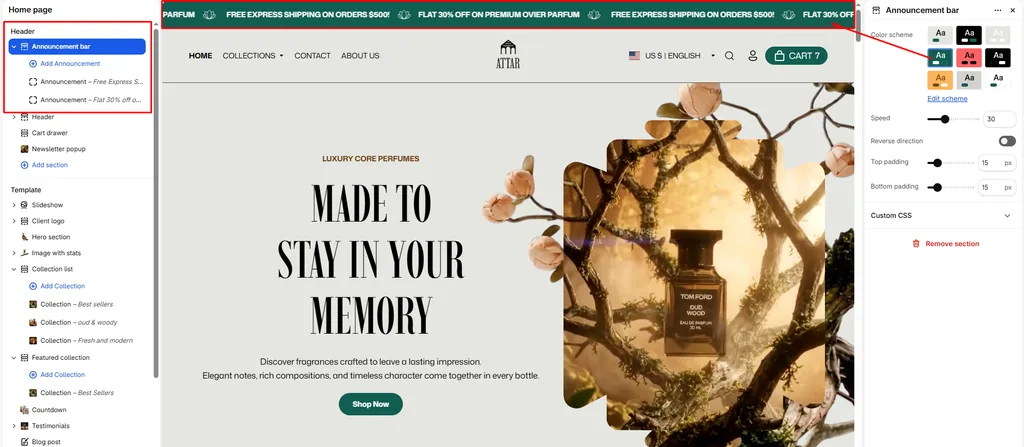
- In the left sidebar under the Header group, click Announcement bar.
- Configure your section settings and manage your announcement blocks.
- Click Save.
Available Section Settings & Configuration
| Setting Name | Type | Options / Range | Default | Description |
|---|---|---|---|---|
| Color scheme | Color Scheme Picker | Any configured color scheme | Scheme 1 | Sets the background and text color palette for the entire announcement bar. |
| Marquee speed | Slider / Range | 0 – 100 (Step: 1) | 30 | Adjusts the horizontal scrolling speed of the continuous ticker ribbon. |
| Reverse direction | Checkbox | Enabled / Disabled | Disabled | Reverses the scrolling direction (toggles between scrolling left or right). |
| Top padding | Slider / Range | 0px – 100px (Step: 1px) | 10px | Controls top whitespace above the ticker text (automatically scaled for mobile). |
| Bottom padding | Slider / Range | 0px – 100px (Step: 1px) | 10px | Controls bottom whitespace below the ticker text (automatically scaled for mobile). |
Managing Announcement Blocks
Inside the Announcement bar section, you can add multiple Announcement blocks. Attar loops these together into an infinite, seamless ribbon, automatically separating each message with an elegant decorative icon.
To add an announcement:
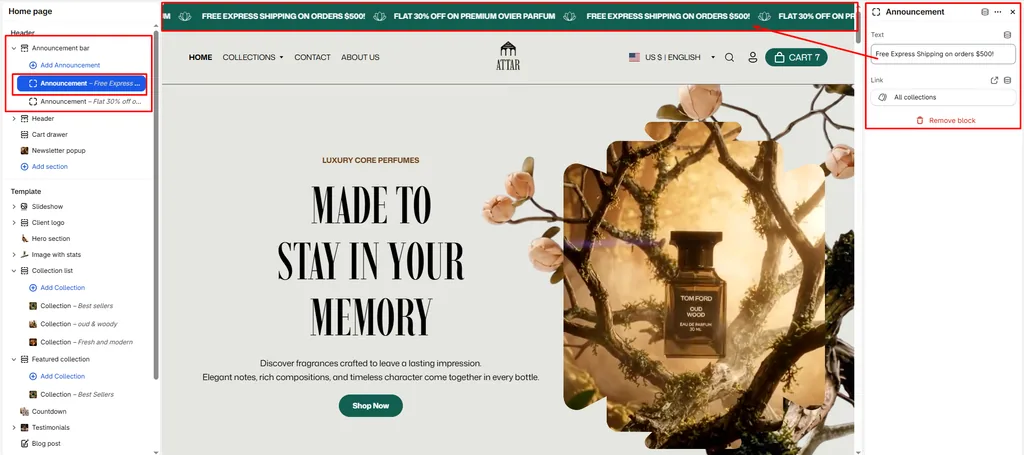
- Under Announcement bar in the left sidebar, click Add announcement.
- Configure the block settings:
- Text: Enter your promotional message (e.g., “Complimentary 2ml Sample with Every Order”, “New Batch: Pure Royal Oud Now Live”, or “Free Worldwide Shipping on Orders Over $150”).
- Link: (Optional) Add a destination link (such as linking directly to your New Arrivals, Best Sellers, or Shipping Policy page). If a link is added, that announcement becomes clickable.
- Add as many announcement blocks as you need to build your scrolling ticker.
Key Built-In Features in Attar
- Pause on Hover: When a visitor hovers their cursor over any part of the scrolling announcement bar, the animation automatically pauses. This allows shoppers to easily read longer messages or click links without chasing moving text.
- Decorative Star Separator: Attar automatically renders an embedded star emblem between each announcement block, creating a refined and balanced visual rhythm.
- Smooth Hardware Acceleration: The ticker uses lightweight CSS transforms to ensure fluid, smooth scrolling across desktop and mobile screens without draining battery life or impacting site speed.
Pro Tips for Attar Stores
- High-Contrast Bar: Use a contrasting color scheme (such as deep noir with warm amber or gold text) for your announcement bar so special offers catch the eye immediately before visitors scroll down to the hero banner.
- Optimal Speed: A Marquee speed setting between
25and35provides a comfortable, natural reading pace for customers.
Was this article helpful?
Thanks for the feedback.
Still need help?
Can't find what you're looking for? Send us a message and we'll help you out.