

Main Collection List
On this page
The Main Collection List section powers your store’s primary collection directory (the /collections catalog index page).
This page serves as a master visual roadmap for fragrance shoppers, allowing customers to browse through your complete range of scent families (such as Oud & Woody, Pure Attars, Floral Scents, Fresh Citrus, Discovery Sets, and Perfume Flacons).
Attar equips this directory with responsive column grids, live fragrance count badges, editorial staggered card shifts, and in-grid promotional campaign banners.
How to Access Main Collection List Settings
- From your Shopify Admin, navigate to Online Store > Themes.
- Click Customize on the Attar theme.
- In the top template selector, navigate to Collections list > Default collections list.
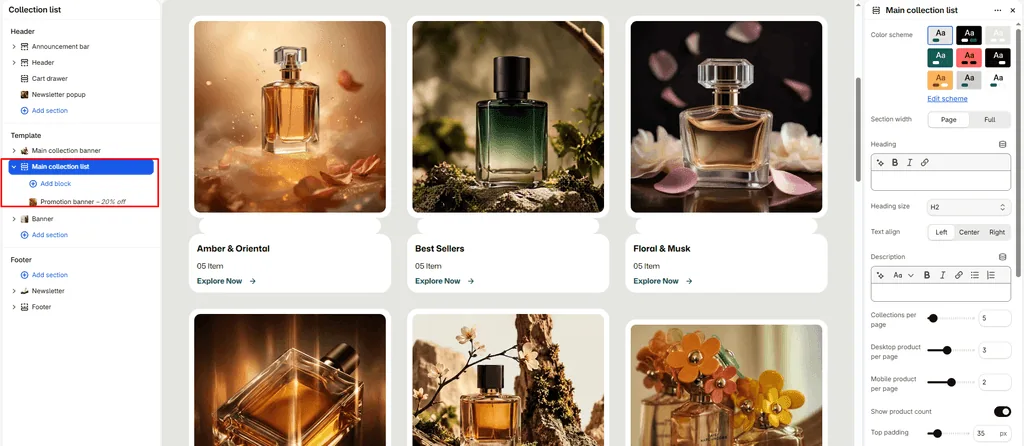
- In the left sidebar, click the Main collection list section.
- Configure your grid density, typography, and card options.
- Click Save.
Layout & Appearance Settings
| Setting Name | Type | Options / Range | Default | Description |
|---|---|---|---|---|
| Color scheme | Color Scheme Picker | Any configured color scheme | Scheme 1 | Sets the background and text color scheme for the entire collections index. |
| Section width | Dropdown | Page width, Full width | Full width | Controls whether the collection grid stays within standard margins or spans full width. |
| Heading | Inline Rich Text | Text | Collections | Main page title displayed above the directory (e.g., “Explore Fragrance Collections”). |
| Heading size | Dropdown | H1 – H6 | H2 | Sets the typography size scale for the main page headline. |
| Text align | Dropdown | Left, Center, Right | Left | Sets horizontal alignment for the page title. |
| Description | Rich Text | Formatted text | None | Optional introductory paragraph welcoming shoppers to your fragrance catalog. |
| Top padding | Slider / Range | 0px – 200px (Step: 5px) | 35px | Vertical whitespace above the collection grid. |
| Bottom padding | Slider / Range | 0px – 100px (Step: 1px) | 35px | Vertical whitespace below the collection grid. |
Grid Density & Pagination
| Setting Name | Type | Options / Range | Default | Description |
|---|---|---|---|---|
| Collections per page | Slider / Range | 1 – 100 (Step: 1) | 9 | Number of collection tiles displayed on a single page before pagination links appear. |
| Desktop columns | Slider / Range | 1 – 6 (Step: 1) | 4 | Number of collection cards displayed per row on desktop monitors and laptops. |
| Mobile columns | Slider / Range | 1 – 3 (Step: 1) | 2 | Number of collection cards displayed per row on smartphones and tablets. |
Collection Card Merchandising & Animations
| Setting Name | Type | Default | Description |
|---|---|---|---|
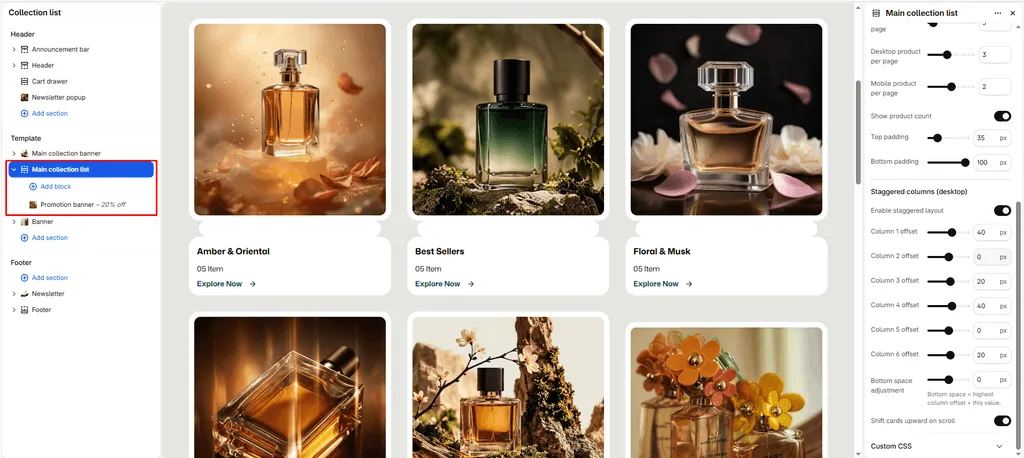
| Show product count | Checkbox | Enabled | Displays a live numerical badge showing the total number of perfumes inside each collection (e.g., “12 Scents”). |
| Enable stagger | Checkbox | Enabled | Creates an editorial, asymmetric vertical offset across columns for a high-fashion lookbook aesthetic. |
| Enable scroll shift | Checkbox | Enabled | Activates a smooth parallax vertical shift on collection cards as the customer scrolls down the page. |
In-Grid Promotional Banners
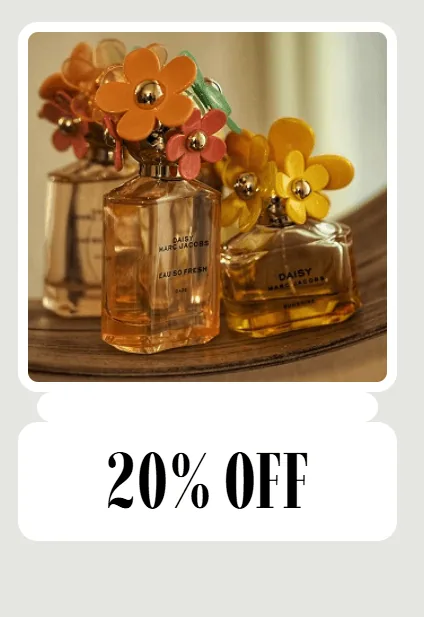
Just like the product grid, Attar allows you to break up the collection directory by injecting promotional visual banners:
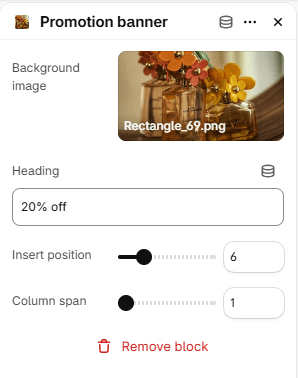
- Under the Main collection list section in the Theme Editor, click Add Promotion banner.
- Configure the block settings:
- Background image: Upload a high-impact fragrance campaign photo or seasonal launch teaser.
- Title: Banner headline (default: “GRAB IT BEFORE ENDS!”).
- Insert position (1 to 24): Controls where the promo card appears (e.g., setting to 3 places it right after the 3rd collection card).
- Column span (1 to 6): Controls how many grid columns wide the banner stretches on desktop screens (automatically expands to full width on mobile).
Pro Tips for Attar Stores
- High-Resolution Cover Photography: Make sure every collection in your Shopify Admin (under Products > Collections) has a clean, high-resolution featured image. Attar automatically pulls this photo as the collection cover tile.
- Highlight Scent Discovery: Place a 2-column Promotion banner at position 3 linking to your Fragrance Discovery Set or Scent Consultation page to engage shoppers exploring your general categories.
Was this article helpful?
Thanks for the feedback.
Still need help?
Can't find what you're looking for? Send us a message and we'll help you out.