

Countdown
On this page
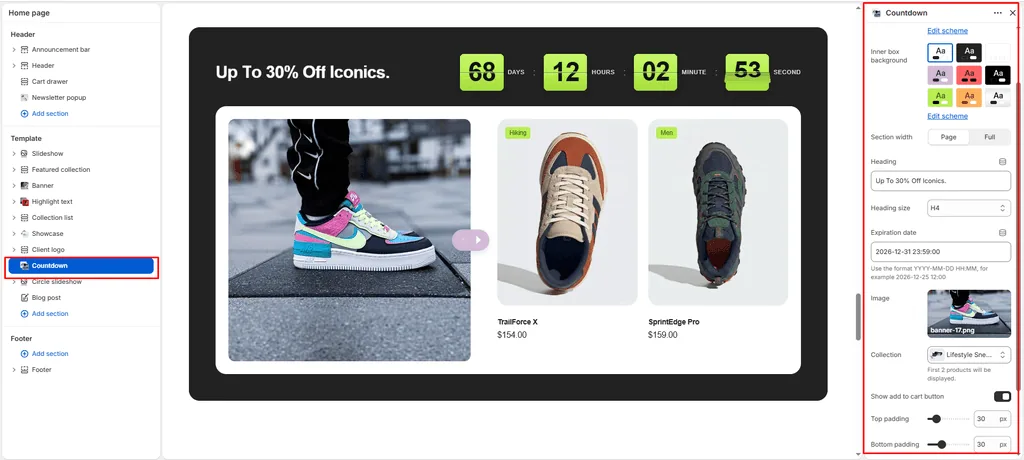
The Countdown section in Attar is a purpose-built urgency and flash-drop merchandising powerhouse. Tailored specifically for limited-edition sneaker raffles, holiday flash sales, and deadstock releases, this section pairs an attention-grabbing 3D Mechanical Flip-Card Clock directly with a curated product carousel.
The section features a split architecture: the header displays your sale announcement headline alongside real-time flipping countdown digits (Days, Hours, Minutes, Seconds).
Accessing the Countdown Section Settings
- From your Shopify Admin, navigate to Online Store > Themes.
- Click Customize next to your active Attar theme.
- In the top dropdown template selector, select Home page (or any custom landing page).
- In the left-hand sidebar, click (+) Add section and select Countdown (or click on Countdown if already added).
- Configure the timer expiration date, attach your drop campaign photo, and select the featured collection.
1. Section Header & 3D Flip Timer Settings
Configure container width, multi-layered color schemes, headline text, and target expiration timestamps:
| Setting | Type | Default | Options / Range | Description |
|---|---|---|---|---|
| Color scheme | Color Scheme | scheme-2 | Theme Schemes | Controls the outer section background canvas and header text contrast. |
| Inner background color | Color Scheme | scheme-3 | Theme Schemes | Sets the surface background color for the inner media and product carousel container. |
| Section width | Select | page-width | page-width, full-width | Choose between a centered bounded container (page-width) or an edge-to-edge canvas (full-width). |
| Heading | Text | Up to 36% OFF on shoes. | Text string | Prominent sale announcement or drop title (e.g., “MIDNIGHT HEAT DROP”, “FLASH SALE ENDS IN:”). |
| Heading size | Select | h4 | h1 to h6 | Sets the visual typography scale and font hierarchy of the section heading. |
| Expiration date | Text | 2026-12-31 23:59:00 | Format: YYYY-MM-DD HH:MM:SS | Target expiration timestamp. The clock automatically computes remaining days, hours, minutes, and seconds and animates downward in real time. |
2. Campaign Media & Swiper Product Showcase
Set up the promotional editorial photo and link your footwear collection feed:
| Setting | Type | Default | Options / Range | Description |
|---|---|---|---|---|
| Image | Image Picker | Blank | Image upload | Hero campaign photograph anchored on the left side of the inner container. Includes floating previous/next pill buttons that navigate the adjacent product carousel. |
| Collection | Collection Picker | Blank | Store product catalog | Select the footwear or sale collection to display in the swipeable carousel track. |
| Show add to cart button | Checkbox | true | Checked / Unchecked | Displays a fast-action quick-add button directly on each footwear card in the carousel. |
3. Section Spacing & Mobile Optimization
Manage vertical layout breathing room:
| Setting | Type | Default | Options / Range | Description |
|---|---|---|---|---|
| Top padding | Range | 80px | 0px to 200px (step: 5px) | Vertical padding above the countdown section on desktop monitors. |
| Bottom padding | Range | 80px | 0px to 100px (step: 1px) | Vertical padding below the countdown section on desktop monitors. |
Responsive Behavior: On screens narrower than 767px, top and bottom padding values are automatically scaled down by 50%. The split media and product carousel stack into a vertical flow, and the 3D flip timer automatically resizes its font and flap dimensions to fit smartphone displays without horizontal scrolling.
Sneaker Store Best Practices
- Format the Expiration Date Accurately: Always enter the target time in strict
YYYY-MM-DD HH:MM:SSformat (e.g.,2026-11-28 00:00:00for a Black Friday drop). - Feature High-Heat Drop Imagery on the Left: Use the Image slot for an artistic, on-foot action shot or campaign lookbook graphic of the sneaker silhouettes featured in the sale. The floating arrow pill anchored on the image encourages shoppers to swipe through the collection.
- Keep “Show Add to Cart” Enabled: In flash sales and sneaker drops, seconds count. Keeping Show add to cart button enabled allows buyers to bypass product detail pages and snap up their size instantly.
Was this article helpful?
Thanks for the feedback.
Still need help?
Can't find what you're looking for? Send us a message and we'll help you out.