

Main Blog
On this page
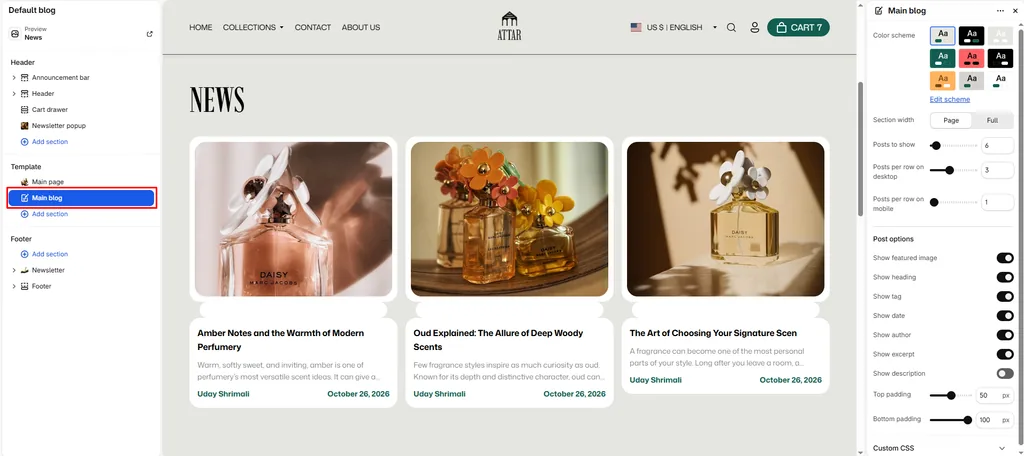
The Main Blog section powers your store’s primary editorial journal page (/blogs/[blog-name]).
For a luxury perfume and attar brand, a dedicated fragrance journal builds brand authority, educates shoppers on olfactory notes, and drives organic search traffic with scent layering guides, perfumer interviews, fragrance care advice, and new collection stories.
Attar presents your articles in an adaptive, high-performance grid with smooth card entrance animations, customizable metadata toggles, and automatic pagination.
How to Access Main Blog Settings
- From your Shopify Admin, navigate to Online Store > Themes.
- Click Customize on the Attar theme.
- In the top template dropdown, select Blogs > Default blog.
- In the left sidebar, click the Main blog section.
- Configure your grid layout and article card options.
- Click Save.
Layout & Grid Settings
| Setting Name | Type | Options / Range | Default | Description |
|---|---|---|---|---|
| Color scheme | Color Scheme Picker | Any configured color scheme | Scheme 1 | Sets the background, text, and card color scheme for the blog index page. |
| Section width | Dropdown | Page width, Full width | Page width | Determines whether the blog grid stays within the page container or spans edge-to-edge. |
| Posts per page | Slider / Range | 1 – 100 (Step: 1) | 9 | Maximum number of articles displayed before pagination links appear. |
| Desktop posts per row | Slider / Range | 1 – 6 (Step: 1) | 4 | Controls how many article cards appear side-by-side on desktop monitors and laptops. |
| Mobile posts per row | Slider / Range | 1 – 3 (Step: 1) | 2 | Controls column count on mobile screens (automatically collapses to 1 column on smaller phones). |
| Top padding | Slider / Range | 0px – 100px (Step: 1px) | 100px | Top vertical spacing above the grid (automatically scaled on mobile phones). |
| Bottom padding | Slider / Range | 0px – 100px (Step: 1px) | 100px | Bottom vertical spacing below the grid (automatically scaled on mobile phones). |
Article Card Content Toggles
Customize exactly which details appear on each article card:
| Setting Name | Type | Default | Description |
|---|---|---|---|
| Show image | Checkbox | Enabled | Displays the article’s featured hero image with responsive loading. |
| Show title | Checkbox | Enabled | Displays the article headline. |
| Show tag | Checkbox | Disabled | Displays the article’s primary tag as a category badge (e.g., Scent Guide, Oud & Amber, Perfumery). |
| Show date | Checkbox | Enabled | Shows the publication date. |
| Show author | Checkbox | Enabled | Displays the author or editor byline. |
| Show excerpt | Checkbox | Enabled | Renders the short, custom summary excerpt written in the Shopify article editor. |
| Show description | Checkbox | Disabled | Outputs the full body copy preview if you prefer longer text cards without excerpts. |
Pro Tips for Attar Stores
- Use Tags for Scent Categorization: Turn on Show tag and tag your articles consistently (such as SCENT GUIDES, OUD CULTURE, BOTANICALS, or NEW RELEASES). Shoppers can immediately identify topics of interest while browsing your journal.
- Balanced Magazine Grid: Setting Desktop posts per row to
3or4with Posts per page set to9or12creates a clean, balanced editorial magazine layout.
Was this article helpful?
Thanks for the feedback.
Still need help?
Can't find what you're looking for? Send us a message and we'll help you out.