

Breadcrumbs
On this page
The Breadcrumbs component provides clear, step-by-step navigation for your fragrance and perfume store. It shows customers their exact path on your site (for example: Home > Woody & Amber > Royal Oud Attar).
Breadcrumbs improve store usability, make it easy for shoppers to navigate back to parent collections, and help improve your store’s SEO with structured internal links.
How Breadcrumbs Work in Attar
Breadcrumbs in the Attar theme work via a 2-tier system:
- Master Global Switch: Turns breadcrumbs on or off across your entire store.
- Template Integration & Dedicated Section/Block: Auto-displays on key pages, and can also be placed anywhere using the standalone Breadcrumbs Section or Block.
Step 1: Enable the Master Global Setting
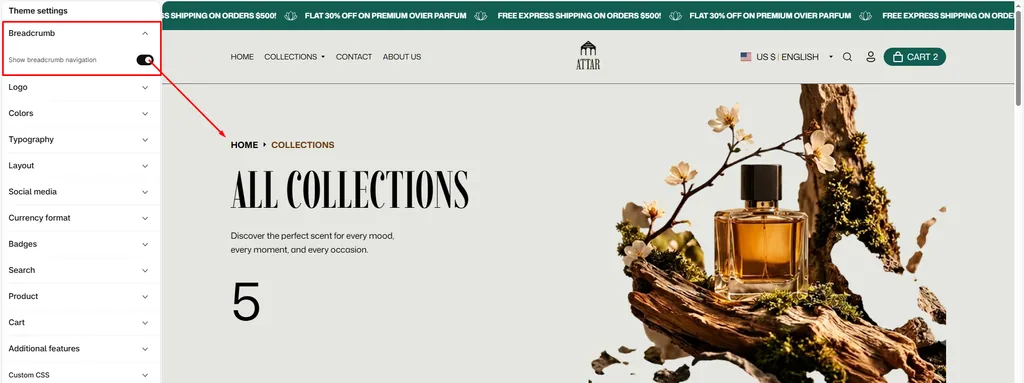
Before breadcrumbs can appear on any page or section, the global setting must be enabled:
- From your Shopify Admin, go to Online Store > Themes.
- Click Customize on the Attar theme.
- Click the Theme settings (⚙️ gear icon) in the left sidebar.
- Expand the Breadcrumbs tab.
- Check the box for Show breadcrumb navigation.
- Click Save.
(Note: If this option is unchecked, breadcrumbs will remain hidden across all pages and sections).
Where Breadcrumbs Appear Automatically
When the master setting is enabled, Attar automatically renders breadcrumbs on:
- Product Pages: Displays
Home > [Collection Name] > [Product Title]. Customers viewing a fragrance can quickly jump back to its collection. - Collection Pages: Displays
Home > [Collection Title]inside the collection header. - Blog & Article Pages: Displays
Home > [Blog Name] > [Article Title]or tagged article filters. - Standard Pages: Displays
Home > [Page Title](e.g., About Us, Contact Us, FAQs).
Step 2: Breadcrumbs Section & Block
Attar also includes a standalone Breadcrumbs Section and Theme Block that you can place anywhere on your pages.
Breadcrumbs Section Settings
To add this section, open the Theme Editor, click Add section, and select Breadcrumbs.
| Setting Name | Type | Options / Range | Default | Description |
|---|---|---|---|---|
| Color scheme | Color Scheme Picker | Any configured color scheme | scheme-1 | Sets the background and text color scheme for the breadcrumbs bar. |
| Section width | Dropdown | Page width, Full width | Page width | Choose whether breadcrumbs stay within the container or stretch full width. |
| Padding top | Slider / Range | 0px to 100px (Step: 1px) | 0px | Controls spacing above the breadcrumb trail. |
| Padding bottom | Slider / Range | 0px to 100px (Step: 1px) | 0px | Controls spacing below the breadcrumb trail. |
Breadcrumbs Theme Block
When building custom product page layouts or modular sections, click Add block and choose Breadcrumbs. It inherits the master toggle and outputs clean, accessible breadcrumb links.
Navigation Paths Supported by Attar
| Page Type | Breadcrumb Hierarchy Example |
|---|---|
| Perfume Product | Home › Woody & Amber › Royal Oud Attar |
| Fragrance Collection | Home › Concentrated Perfume Oils |
| Blog Journal | Home › Fragrance Journal |
| Tagged Blog Feed | Home › Fragrance Journal › Scent Guides |
| Journal Article | Home › Fragrance Journal › How to Apply Concentrated Attar |
| Custom Page | Home › Scent Care & FAQs |
Pro Tips for Attar Stores
- Link Collections to Products: In Shopify, when a customer opens a product from a collection page, Attar automatically includes that collection in the breadcrumb path. Make sure your navigation links lead through collections so shoppers can easily backtrack.
- Great for Info & Policy Pages: Adding breadcrumbs to informational pages (like “Fragrance Application Guide” or “Shipping Policies”) makes it easy for visitors to return to your catalog with a single click.
Was this article helpful?
Thanks for the feedback.
Still need help?
Can't find what you're looking for? Send us a message and we'll help you out.