

Main Collection
On this page
The Main Collection section powers the core product browsing and catalog experience of your collection pages (such as Oud & Amber, Pure Attars, Floral Fragrances, Discovery Sets, or Bestsellers).
Attar equips your catalog with advanced faceted filtering, multiple pagination modes (Infinite Scroll, Load More button, or Standard Numbered pages), interactive perfume card previews, and In-Grid Promotional Banners with live countdown timers.
How to Access Main Collection Settings
- From your Shopify Admin, navigate to Online Store > Themes.
- Click Customize on the Attar theme.
- In the top template selector, navigate to Collections > Default collection.
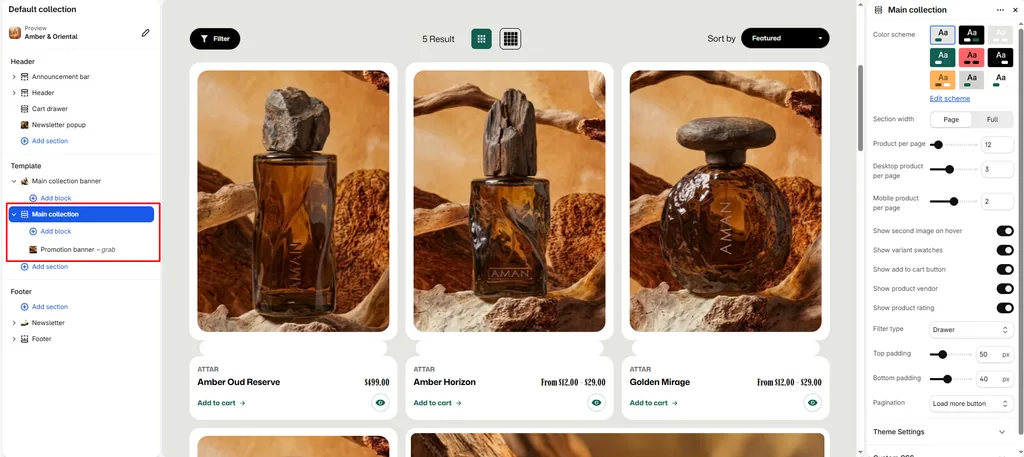
- In the left sidebar under the Template group, click the Product grid section.
- Configure your grid density, filtering style, and product card options.
- Click Save.
Layout & Grid Density Settings
| Setting Name | Type | Options / Range | Default | Description |
|---|---|---|---|---|
| Color scheme | Color Scheme Picker | Any configured color scheme | Scheme 8 | Controls the background, typography, and card container styling for the entire collection grid. |
| Section width | Dropdown | Page width, Full width | Page width | Determines whether the collection grid aligns within the page container or stretches edge-to-edge. |
| Products per page | Slider / Range | 1 – 100 (Step: 1) | 14 | Total number of perfume products loaded initially on the page. |
| Desktop columns | Slider / Range | 1 – 6 (Step: 1) | 4 | Number of perfume cards displayed per row on desktop monitors and laptops. |
| Mobile columns | Slider / Range | 1 – 3 (Step: 1) | 2 | Number of perfume cards displayed per row on mobile phones and tablets. |
| Top padding | Slider / Range | 0px – 200px (Step: 5px) | 50px | Top vertical whitespace spacing above the filter bar and grid. |
| Bottom padding | Slider / Range | 0px – 100px (Step: 1px) | 40px | Bottom vertical whitespace spacing below the pagination. |
Faceted Filtering & Sorting
Attar lets you present Shopify Search & Discovery filters (such as Scent Family, Bottle Size, Price, Brand, or Notes) in three distinct layouts:
- Horizontal (Default): Displays clean dropdown filter pills across the top bar directly above the product grid.
- Vertical: Displays a traditional sidebar on the left side of your collection grid.
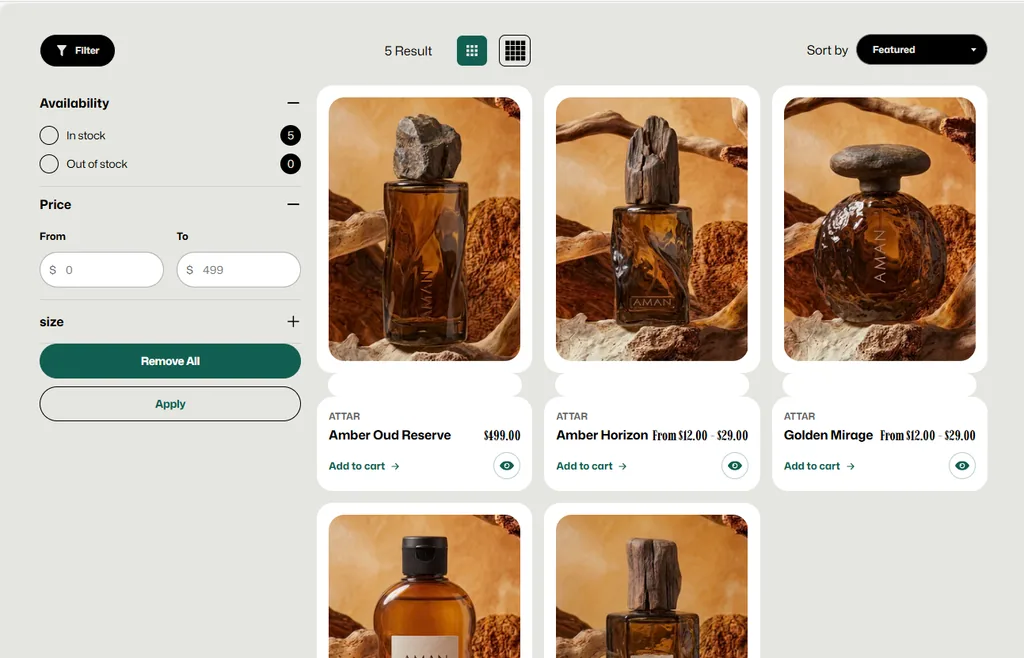
- Drawer: Keeps the grid completely clean. Shoppers click an animated “Filter” button to slide open a dedicated filter drawer from the side.
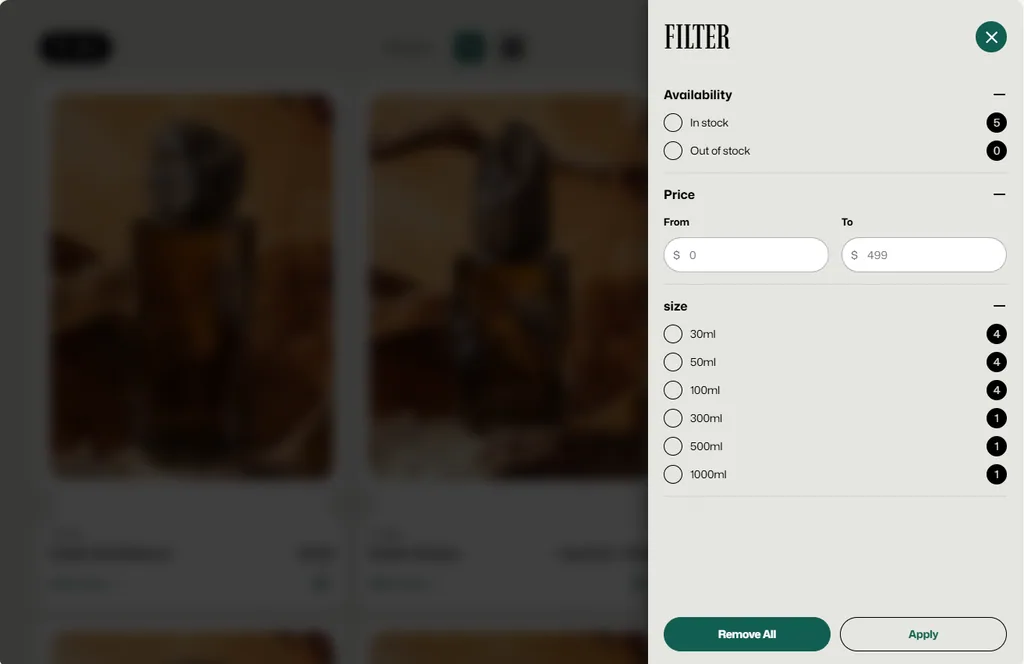
Pagination Engine
Choose how shoppers navigate through large fragrance catalogs:
- Numbered Pagination: Traditional numbered page links (1, 2, 3… Next) for structured multi-page browsing.
- Load More Button: Displays an AJAX button at the bottom of the grid. Clicking it immediately appends the next batch of perfumes without page reloads.
- Infinite Scroll: As customers scroll down, new perfume cards load automatically and seamlessly into the grid.
Perfume Card Merchandising Toggles
Customize which interactive elements appear on individual product cards:
| Setting Name | Type | Default | Description |
|---|---|---|---|
| Show secondary image on hover | Checkbox | Enabled | Hovering over a card instantly reveals a second photo (ideal for showing the perfume packaging, flacon detail, or lifestyle setup). |
| Show variant swatches | Checkbox | Enabled | Displays interactive bottle size or scent swatches directly on the card so shoppers can preview options without leaving the grid. |
| Show Add to cart | Checkbox | Enabled | Embeds a quick action button on the card, enabling fast bottle size selection and direct cart addition. |
| Show vendor | Checkbox | Enabled | Displays the perfume house or designer name above the product title. |
| Show rating | Checkbox | Enabled | Displays star ratings and review counts from your installed Shopify review app. |
In-Grid Promotional Banners
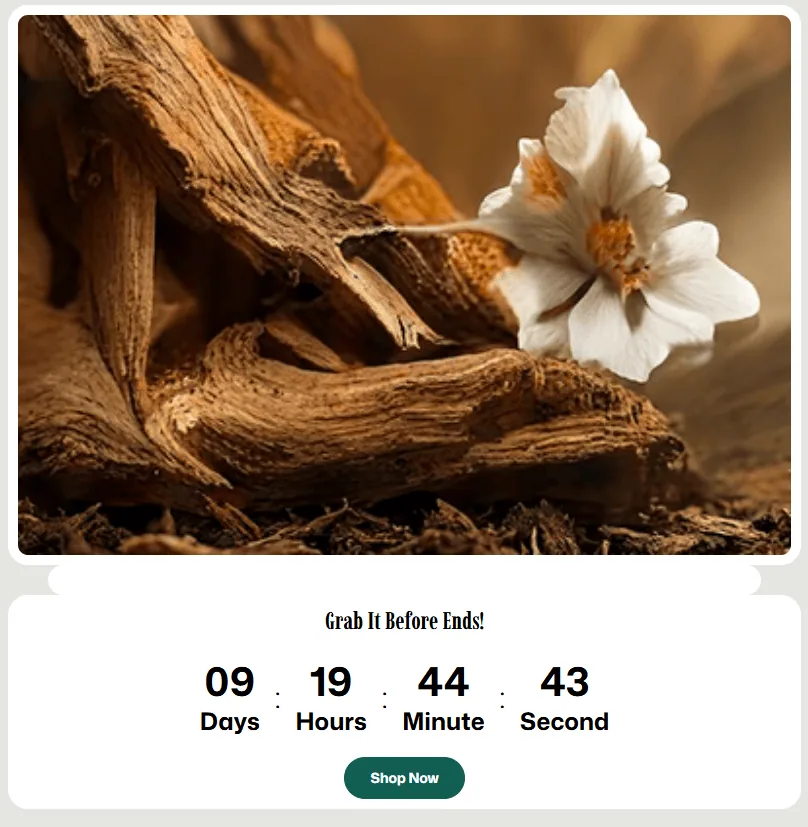
Attar lets you inject high-impact promotional banners directly into the flow of your perfume catalog:
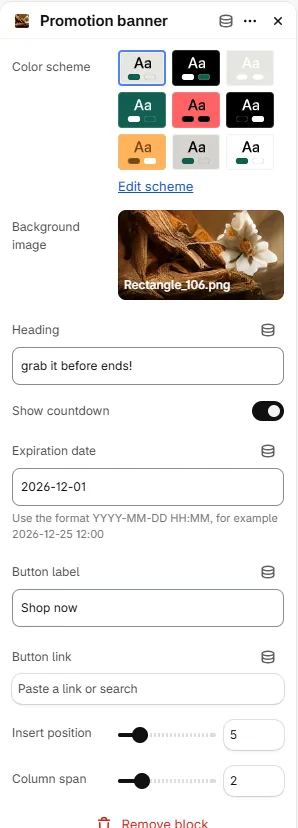
- In the Theme Editor under the Product grid section, click Add Promotion banner.
- Configure the block settings:
- Background image: Upload a promotional campaign photo for the card.
- Title: Bold headline (default: “GRAB IT BEFORE ENDS!”).
- Show countdown & Expiration date: Toggle on a live countdown timer and set your target date (format:
YYYY-MM-DD HH:MM:SS) to create urgency for limited batch releases. - Button label & Link: Custom button (e.g., “Shop Exclusive Batch”).
- Insert position (1 to 24): Controls after which product the banner appears (e.g., setting to 4 places it right after the 4th perfume card).
- Column span (1 to 6): Controls how many columns wide the banner stretches across the grid (e.g., 2 columns wide).
Pro Tips for Attar Stores
- Balanced Grid Density: Setting Desktop columns to
4with a 2-column Promotion banner injected at position4creates an editorial magazine look where perfume cards and campaign banners balance each other naturally. - Infinite Scroll for Large Catalogs: If your fragrance house features extensive scent archives or sample collections, enabling Infinite scroll provides an effortless, mobile-friendly browsing experience.
Was this article helpful?
Thanks for the feedback.
Still need help?
Can't find what you're looking for? Send us a message and we'll help you out.