

Product
On this page
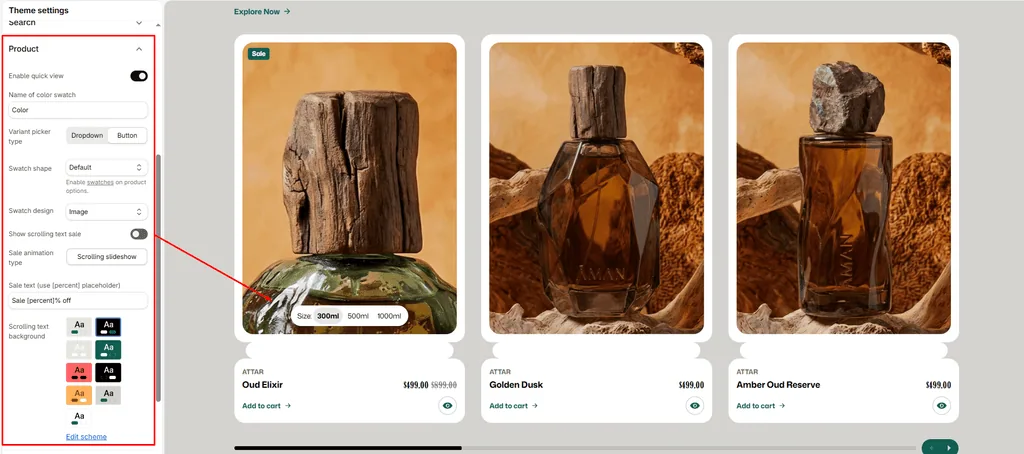
Configure how perfume cards, variant selectors, bottle swatches, and sale animations behave globally across your store.
For fragrance boutiques and attar houses, clear bottle size selection (e.g., 6ml, 12ml, 50ml, 100ml), visual variant swatches, and instant quick-views directly from the collection grid help streamline shopping and increase conversions.
How to Access Product Settings
- From your Shopify Admin, navigate to Online Store > Themes.
- Click Customize on the Attar theme.
- Click the Theme settings (⚙️ gear icon) in the left sidebar.
- Select the Product tab.
- Configure your settings and click Save.
Available Settings & Configuration
| Setting Name | Type | Options / Range | Default | Description |
|---|---|---|---|---|
| Enable quick view | Checkbox | Enabled / Disabled | Enabled | Adds a quick-view button to product cards so shoppers can preview notes and choose bottle sizes in a popup without leaving the catalog. |
| Name of color swatch | Text | e.g., Color, Bottle, Scent | Color | Specifies which product option in Shopify should be recognized and displayed as visual swatches. |
| Variant picker type | Dropdown | Button, Dropdown | Button | Determines whether variant options (such as bottle sizes or application types) display as pill buttons or traditional dropdown menus. |
| Swatch shape | Dropdown | Circle, Square, Default | Default | Sets the shape of visual swatches on product cards and product detail pages. |
| Swatch design | Dropdown | Default, Color, Image | Color | Sets how swatches render: solid color fills, variant bottle image thumbnails, or standard text pills. |
| Show card scrolling text | Checkbox | Enabled / Disabled | Enabled | Displays an animated scrolling sale ticker across product cards that have an active discount. |
| Sale animation type | Dropdown | Slider | Slider | Animation style for the discount ribbon on product cards. |
| Slider text | Text | Text with [percent] tag | Hot Sale [percent]% off | Custom text for the sale banner. The percent tag automatically calculates and inserts the exact discount percentage. |
| Sale slider color scheme | Color Scheme Picker | Any configured color scheme | Scheme 4 | Sets the background and text color scheme for the animated sale ribbon. |
Detailed Settings Breakdown
1. Quick View
When enabled, a quick-view icon appears over perfume cards on collection pages and search results. Clicking it opens a fast popup modal with the full product image gallery, bottle size picker, price, and “Add to Cart” button without reloading the page.
2. Variant Pickers & Bottle Sizes
- Button (Recommended): Displays sizes (e.g., 6ml Oil, 12ml Flacon, 50ml Spray, 100ml EDP) as clickable pill buttons. Shoppers can immediately see which sizes are in stock or sold out at a single glance.
- Dropdown: Displays variant options inside a compact dropdown select menu.
3. Swatches
- Name of color swatch: Must match your Shopify product option title exactly. If you list your variants under Bottle, Volume, or Scent, enter that exact word here.
- Swatch Design:
- Image: Automatically shows a miniature thumbnail of the actual bottle variant.
- Color: Displays a clean solid color circle or square.
- Default: Displays clean typography text pills.
- Swatch Shape: Choose between Circle, Square, or theme Default.
4. Animated Sale Marquee
Attar includes an animated sale ribbon across discounted product cards:
- Automatically calculates the discount percentage between Compare-at price and active Price.
- Replaces the [percent] placeholder in your custom text (e.g., if a perfume is discounted from $100 to $70, it automatically displays “Hot Sale 30% off”).
- Smoothly scrolls across the bottom of the perfume image to catch customer attention.
Pro Tips for Attar Stores
- Use “Button” for Sizes: On mobile devices, selecting perfume bottle sizes or concentrations via one-tap pill buttons is much faster and easier than navigating dropdown menus.
- Image Swatches for Bottle Variants: If your fragrances come in different flacon styles (e.g., Crystal Bottle vs. Travel Spray), setting Swatch design to Image lets customers immediately see the bottle design before clicking into the product page.
Was this article helpful?
Thanks for the feedback.
Still need help?
Can't find what you're looking for? Send us a message and we'll help you out.