

Main Cart
On this page
- Accessing the Main Cart Settings
- 1. Layout & Styling Settings
- 2. In-Cart Promotion Banner (Block)
- Promotion Banner Settings:
- 3. Built-in Conversion Features
- Free Shipping Progress Bar
- In-Cart Discount Code Entry
- Order Notes & Delivery Instructions
- Automated Cart Summary & Tax Notes
- 4. Footwear Cart Table & Line Items
- 5. App Blocks (@app)
- 6. Empty Cart Experience
- Pro Tips for Sneaker Retailers
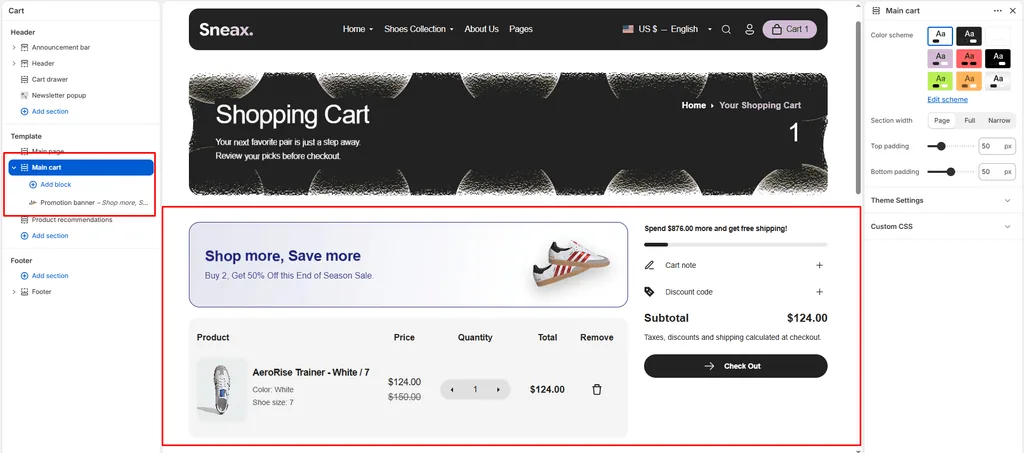
The Main Cart section controls the dedicated Cart Page (/cart) of your sneaker store. It provides customers with a transparent, friction-free breakdown of their selected footwear, sizing details, colorways, subtotal savings, and express checkout options.
Equipped with conversion-focused tools–such as real-time stock cap validation, an in-cart promo code applier, a free shipping progress bar, and an in-cart promotional banner–this section helps reduce cart abandonment and turns tentative shoppers into confirmed buyers.
Accessing the Main Cart Settings
- From your Shopify Admin, go to Online Store > Themes.
- Click Customize next to Attar.
- In the top template selector dropdown, select Cart (or navigate to
/cartin the live preview). - In the left-hand sidebar, click on Main cart to configure section settings, or click (+) Add block to add a promotion banner or third-party app block.
1. Layout & Styling Settings
Customize the section’s background contrast, layout width, and responsive vertical spacing:
| Setting | Type | Default | Options / Range | Description |
|---|---|---|---|---|
| Color scheme | Color Scheme | scheme-1 | Theme Schemes | Controls the overall background and typography color palette across the entire cart page. |
| Section width | Select | Narrow-width | Narrow-width, Page-width, Full-width | Controls the horizontal span of the cart table and summary sidebar. |
| Top padding | Range Slider | 0px | 0px – 200px (step 5px) | Sets top spacing above the cart container. |
| Bottom padding | Range Slider | 0px | 0px – 100px (step 1px) | Sets bottom spacing below the checkout area. |
Narrow-Width Recommendation:
Setting the section width to Narrow-width keeps the cart centered with tight margins, creating a sleek, high-end boutique look that makes the checkout button and order summary instantly prominent on wide desktop screens.
Mobile Padding Scale:
On mobile devices (< 767px), Attar automatically reduces the top and bottom padding values by 50% to keep content compact and readable.
2. In-Cart Promotion Banner (Block)
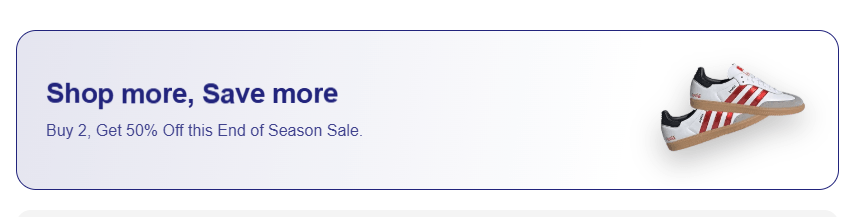
Attar includes a built-in Promotion Banner block that can be placed directly above the cart table. This is an exceptional conversion booster for high-demand sneaker drops, limited-time coupon announcements, or threshold incentives.
- Limit: Maximum
1promotion banner per cart page. - Dynamic Styling: The banner automatically generates a translucent gradient matching your chosen text color:
background: linear-gradient(100deg, color-mix(in srgb, [text_color] 12%, transparent), transparent 75%).
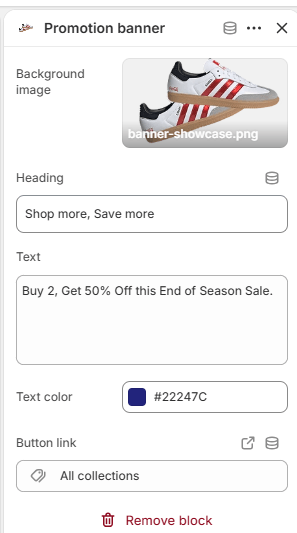
Promotion Banner Settings:
- Background Image (
image): Upload an editorial lifestyle banner or product visual (e.g., shoe care accessories, special box packaging). If left empty, a placeholder visual will display. - Title (
title): Main promo title (e.g., "Weekend Sneaker Drop" or "Free Crease Protectors"). Default:Special Offer. - Text (
text): Subheading or promotional details (e.g., "Order 2 pairs and get free standard express delivery across the nation."). - Text Color (
text_color): Custom color picker (Default:#000000). Directly controls both text and border accents. - Banner Link (
banner_link): Make the entire banner clickable to direct shoppers to a sale collection, special release, or accessories page.
3. Built-in Conversion Features
The cart page integrates seamless conversion features that dynamically sync with your global Theme Settings > Cart:
Free Shipping Progress Bar
- Displays a visual tier bar tracking how close the customer is to unlocking free shipping (e.g., "Add $35.00 more to unlock Free Express Shipping!").
- Once the threshold is crossed, the progress bar turns green and displays a celebratory unlock message.
- Configured globally in Theme Settings > Cart > Free Shipping Bar.
In-Cart Discount Code Entry
- Shoppers can apply promotional coupons and drop codes directly on the cart page without waiting for the final Shopify checkout screen.
- Features real-time validation with instant success messages, error feedback, and immediate cart total recalculation.
Order Notes & Delivery Instructions
- A clean, collapsible accordion with a pencil icon that allows buyers to leave special instructions for fulfillment (e.g., "Please deliver in discreet packaging", "Hold for Saturday delivery").
Automated Cart Summary & Tax Notes
- Clearly itemizes:
- Subtotal & Original Total Price
- Applied Line-Item & Order-Level Discounts (showing exact dollar savings)
- Dynamic Tax & Duties Statements (automatically links to your store's legal shipping policy if configured in Shopify Admin).
- Checkout Button: High-contrast primary CTA button with hover micro-animations and a directional arrow.
- Additional Checkout Buttons: Automatically shows accelerated express checkout buttons (Shop Pay, Apple Pay, Google Pay, PayPal) when available.
4. Footwear Cart Table & Line Items
The cart table displays all critical footwear data so shoppers can confirm their orders before committing:
- Sneaker Imagery: High-resolution thumbnail linked directly back to the product page.
- Product Title & Silhouettes: Clear product naming with brand vendor display.
- Variant Options: Clearly lists individual attributes such as Colorway, US/UK/EU Shoe Size, and Width.
- Line-Level Savings: Shows regular vs. discounted pricing tags and highlighted savings when coupons or automatic volume pricing are active.
- Real-Time Inventory Cap: The
+and-quantity steppers respect live inventory quantities (item.variant.inventory_quantity). If a customer reaches the maximum stock available for a rare sneaker size, the+button automatically disables to prevent overselling. - One-Click Item Removal: Clean, accessible remove button to delete an item and update the cart totals via AJAX.
5. App Blocks (@app)
Attar fully supports Shopify's Theme App Extensions. You can easily integrate third-party apps directly into your Cart Page layout without modifying code:
- Delivery Date & Time Pickers: Let customers select preferred delivery dates for gift releases.
- Package Protection & Insurance: One-click insurance checkboxes (e.g., Route, Navidium).
- Custom Gift Wrapping: Add custom shoe box wrap or personalized gift notes.
- Terms & Conditions Checkboxes: Require agreement before moving to checkout.
To add an app block, click (+) Add block under the Main cart section in the Theme Editor sidebar and choose your installed app extension.
6. Empty Cart Experience
If a visitor arrives at /cart with no items, Attar displays an uncluttered, modern empty state:
- Displays a clean "Your cart is empty" message.
- Provides a prominent Continue Shopping button with a hover arrow animation that directs shoppers straight to your primary footwear catalog (
/collections/all).
Pro Tips for Sneaker Retailers
- Leverage the Promotion Banner for Accessory Cross-Sells:
- Use the in-cart Promotion Banner to promote shoe cleaners, crease protectors, or extra lace packs with a CTA like "Grab a Sneaker Care Kit before checkout".
- Set Section Width to "Narrow-width":
- Wide cart tables can make line items look distant and scattered on ultra-wide desktop monitors. Narrow-width keeps the product photo, size, quantity, and checkout summary within a focused reading eye-line.
- Keep Free Shipping Realistic:
- Set your free shipping threshold slightly above your average order value (AOV) so customers buying a single pair of sneakers are motivated to add socks or sneaker cleaner to hit the free shipping goal.
Was this article helpful?
Thanks for the feedback.
Still need help?
Can't find what you're looking for? Send us a message and we'll help you out.