

Badges
On this page
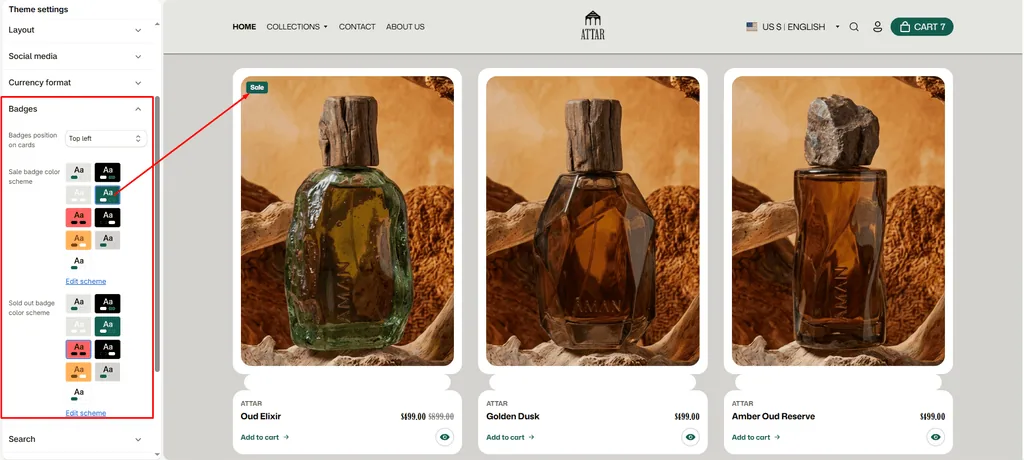
Badges are high-visibility labels placed directly over product images on collection grids, search results, and featured product sections.
For a perfume and attar store, badges help customers make quick purchasing decisions by highlighting special offers, limited batch releases, new fragrance arrivals, and sold-out items at a glance.
How to Access Badge Settings
- From your Shopify Admin, navigate to Online Store > Themes.
- Click Customize on the Attar theme.
- Click the Theme settings (⚙️ gear icon) in the left sidebar.
- Select the Badges tab.
- Configure your badge position and color schemes.
- Click Save.
Available Settings & Configuration
| Setting Name | Type | Options / Range | Default | Description |
|---|---|---|---|---|
| Badges position on cards | Dropdown | Top left, Top right, Bottom left, Bottom right | Top left | Anchors the badge to your chosen corner over the perfume bottle image. |
| Sale badge color scheme | Color Scheme Picker | Any configured color scheme | Scheme 4 | Controls the background, text, and border colors for “Sale” badges and custom product tag badges. |
| Sold out badge color scheme | Color Scheme Picker | Any configured color scheme | Scheme 4 | Controls the colors of the “Sold Out” badge when a fragrance is out of stock. |
Types of Badges Supported in Attar
Attar automatically displays three badge types based on inventory, pricing, and product tags:
1. Sold Out Badge
- Trigger: Automatically displayed when all bottle sizes/variants of a fragrance are out of stock and not set to continue selling.
- Styling: Uses the Sold out badge color scheme to clearly indicate the item is currently unavailable.
2. Sale Badge
- Trigger: Automatically displayed whenever a fragrance has a Compare-at price higher than its active price.
- Styling: Uses the Sale badge color scheme to highlight discounted scents or seasonal promotions.
3. Custom Product Tag Badges
- Trigger: If a product is in stock and not on sale, but has tags added in your Shopify Admin (for example:
NEW,LIMITED BATCH,PURE OIL,BESTSELLER, orORGANIC), Attar automatically displays the first tag as a stylish badge on the card! - (Note: Internal Shopify tags starting with an underscore, such as
_filter, are automatically ignored). - Styling: Inherits the Sale badge color scheme.
Pro Tips for Attar Stores
- Unobstructed Bottle Imagery: Depending on how your perfume flacons are framed in photos, place badges in the corner with the most empty space (such as
Top leftorTop right) so bottle details remain fully visible. - Use Custom Tags for Urgency: Add tags like
LIMITED BATCHorEXCLUSIVEto your products in Shopify Admin. Attar automatically turns them into elegant product badges without needing third-party apps. - Contrast Your Schemes: Choose an eye-catching accent scheme for Sale & Tag badges, and a subtle or dark scheme for Sold Out badges so stock status is instantly clear to browsing customers.
Was this article helpful?
Thanks for the feedback.
Still need help?
Can't find what you're looking for? Send us a message and we'll help you out.