

Main Password
On this page
- Accessing the Password Page Settings
- 1. Layout & Styling Settings
- 2. Logo & Branding Customization
- 3. Storefront Password Login Modal
- 4. Content Customization with Theme Blocks (@theme)
- Heading Block (title)
- Text Block (text)
- Additional Blocks (Drop Countdown, Image, App)
- 5. Built-in Email Capture (Newsletter Form)
- 6. Shopify Admin Password Message
- Sneaker Store Best Practices
The Main Password section controls the layout and visitor experience on your store’s Password Protection Page (/password). In the sneaker and streetwear industry, this page is an essential tool for building massive drop hype, hosting private VIP pre-sales, teasing upcoming releases, and collecting customer emails prior to an official store launch.
Attar equips the password page with a dedicated brand header, a discreet password login popup modal, Shopify Theme Blocks support (including headings, text, and countdowns), and a built-in email newsletter capture form.
Accessing the Password Page Settings
- From your Shopify Admin, go to Online Store > Themes.
- Click Customize next to Attar.
- In the top template selector, switch to Others > Password.
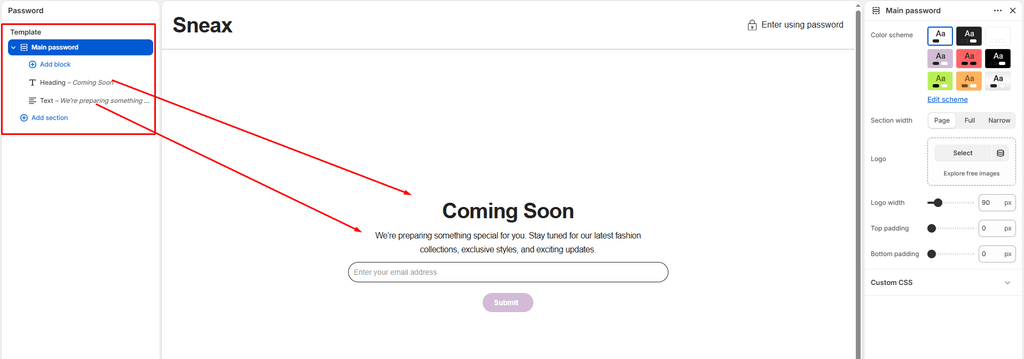
- In the left sidebar, click on Main password to configure layout, branding, and spacing, or click (+) Add block to add custom content blocks.
Note on Enabling the Password Page:
You can toggle password protection on or off at any time in your Shopify Admin > Online Store > Preferences > Restrict store access.
1. Layout & Styling Settings
Customize the container boundaries, color scheme, and responsive vertical spacing:
| Setting | Type | Default | Options / Range | Description |
|---|---|---|---|---|
| Color scheme | Color Scheme | scheme-1 | Theme Schemes | Sets the background and typography color contrast across the entire password page. |
| Section width | Select | Page-width | Page-width, Full-width, Narrow-width | Controls the horizontal span of the content container. |
| Top padding | Range Slider | 0px | 0px – 200px (step 5px) | Vertical spacing above the password content. |
| Bottom padding | Range Slider | 0px | 0px – 100px (step 1px) | Vertical spacing below the newsletter form. |
Narrow-Width Recommendation:
Selecting Narrow-width centers your drop announcement, countdown, and email input into a tight, editorial column–ideal for high-converting “Coming Soon” splash pages on desktop displays.
Responsive Mobile Optimization:
On mobile screens (< 767px), Attar automatically reduces the top and bottom padding values by 50% to keep the logo and email capture field immediately visible above the fold.
2. Logo & Branding Customization
Ensure your footwear brand or boutique emblem is prominently displayed:
- Logo (
logo):- Upload a dedicated logo image for your password page.
- If left blank, Attar displays your store name in your brand's primary typography.
- Logo max width (
logo_max_width):- Default:
140px(Range:50pxto300pxin5pxincrements) - Precisely scale your logo size to maintain crispness and visual balance across desktop and mobile devices.
- Default:
3. Storefront Password Login Modal
In the top header bar, Attar includes an Enter using password button featuring a lock icon (icon-password):
- Popup Modal: Clicking the button opens a clean modal overlay where staff, collaborators, or VIP members can enter the storefront password.
- Frictionless Login: Features a secure password input field and submit button with error validation.
- Admin Access: Includes direct convenience links to your Shopify Admin login for staff members.
4. Content Customization with Theme Blocks (@theme)
Between your logo and the email capture form, you can arrange modular content blocks to communicate launch dates or drop details:
Heading Block (title)
- Heading: Multiline announcement text (e.g., "The Next Drop Is Almost Here", "Attar Vault Opening 11.11", or "Coming Soon").
- Heading size: Choose from
H1down toH6(Template Preset:H2). - Text align: Align text to
Left,Center, orRight(Template Preset:Center). - Cascade Animation: Features subtle scroll text cascade animations (
data-scroll-text-cascade).
Text Block (text)
- Text: Subheading or teaser copy (e.g., "We're prepping the rarest footwear silhouettes and limited-edition colorways. Sign up below to get early access before general release.").
- Text size: Choose from
H1down toH6(Template Preset:H4). - Text align: Align text to
Left,Center, orRight(Template Preset:Center). - Text opacity: Adjust opacity from
0%to100%for a sleek editorial aesthetic.
Additional Blocks (Drop Countdown, Image, App)
- Countdown Block: Add a live countdown clock ticking down to the exact second your shoe drop or store launch goes live.
- App Blocks (
@app): Seamlessly connect third-party SMS marketing apps (e.g., Klaviyo SMS, Attentive) or early-bird giveaway widgets.
5. Built-in Email Capture (Newsletter Form)
Directly below your content blocks, Attar automatically renders a responsive Newsletter Signup Form:
- Lead Generation: Captures customer email addresses directly into your Shopify Customers database under the
accepts_marketingfilter. - Drop Notifications: Allows sneaker enthusiasts to subscribe and be notified the exact moment your store unlocks.
- Success & Error States: Automatically displays clean confirmation feedback upon successful subscription.
6. Shopify Admin Password Message
If you enter a custom message in your Shopify Admin > Preferences > Password protection > Message to your visitors, Attar automatically renders it inside a formatted container above your content blocks.
Sneaker Store Best Practices
- Pair with a Drop Countdown Block:
- Add a
countdownblock right below your headline. An active ticking timer creates urgency and signals to collectors that high-heat silhouettes are dropping soon.
- Add a
- Offer VIP Early Access for Email Subscriptions:
- Use copy that promises tangible perks: "Subscribe for 15-minute early access to our limited sneaker drop before public release". This dramatically increases email opt-in conversion rates.
- Use "Narrow-width" with Centered Alignment:
- For minimalist streetwear branding, configure the section to Narrow-width with Center text alignment to keep eyes focused directly on the logo and subscription box.
Was this article helpful?
Thanks for the feedback.
Still need help?
Can't find what you're looking for? Send us a message and we'll help you out.